Turn on suggestions
Auto-suggest helps you quickly narrow down your search results by suggesting possible matches as you type.
Cancel
- Home
- :
- All Communities
- :
- Products
- :
- Data Management
- :
- Data Management Questions
- :
- Raster to Polygon problem
Options
- Subscribe to RSS Feed
- Mark Topic as New
- Mark Topic as Read
- Float this Topic for Current User
- Bookmark
- Printer Friendly Page
Raster to Polygon problem
17923
17
01-28-2013 05:50 AM

01-28-2013
05:50 AM
- Mark as New
- Bookmark
- Subscribe to RSS Feed
- Permalink
Thanks in advanced.
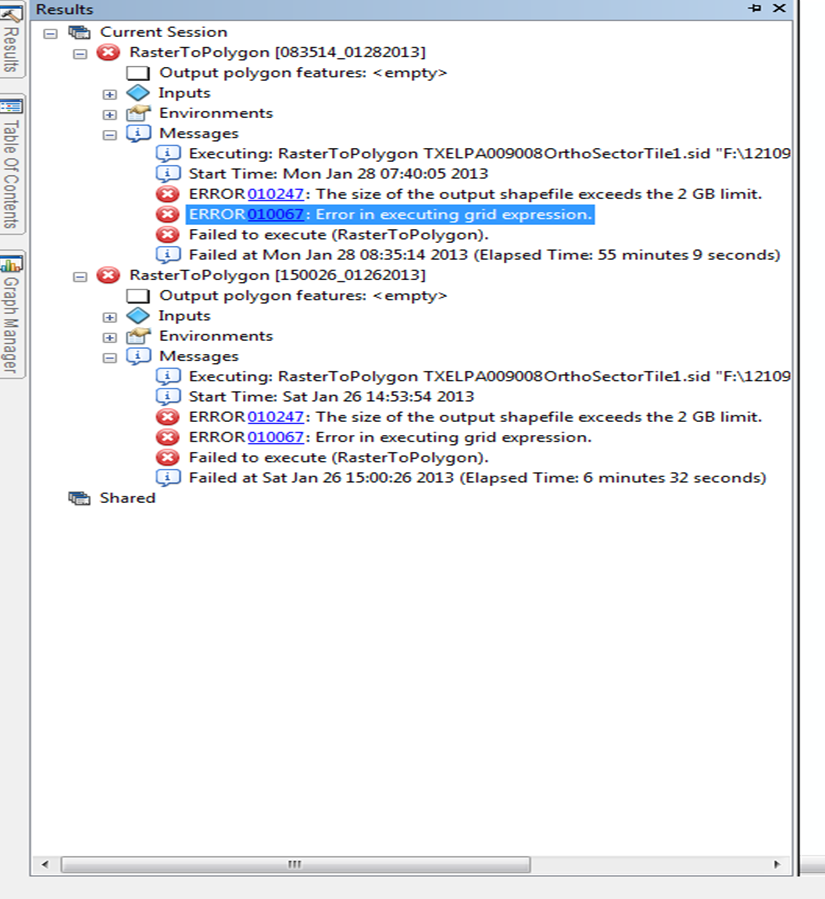
I have over 100 aerials images that I want to convert to polygons using the raster to polygon tool, but I get an error for this tool [ATTACH=CONFIG]21130[/ATTACH].
All I want to do is to create a base map so that I know which aerial refers to specific area and be able to find it easily.
NOTE: Only have basic license, unfortunately.
I have over 100 aerials images that I want to convert to polygons using the raster to polygon tool, but I get an error for this tool [ATTACH=CONFIG]21130[/ATTACH].
All I want to do is to create a base map so that I know which aerial refers to specific area and be able to find it easily.
NOTE: Only have basic license, unfortunately.
17 Replies
02-01-2013
09:07 AM
- Mark as New
- Bookmark
- Subscribe to RSS Feed
- Permalink
Hello everyone and thanks again for the feed back....
I have been trying both recommendations without success.
For the phyton script I get errors, I think that I have been setting my file path wrong.....
I have a drive F:\12109\2011 aerials which I callout "<F:\12109\2011 aerials>" and does not work with another error...
[ATTACH=CONFIG]21331[/ATTACH]
For the second suggestion I tried the tool From Raster to ASCII and then send it to a geodatabase so that I could observe the raster but I did not quite get this step. So I tried converting the table into x and y's but the fields that where created from the ASCII confuse me a lot.
Appreciate all the help..!
I have been trying both recommendations without success.
For the phyton script I get errors, I think that I have been setting my file path wrong.....
I have a drive F:\12109\2011 aerials which I callout "<F:\12109\2011 aerials>" and does not work with another error...
[ATTACH=CONFIG]21331[/ATTACH]
For the second suggestion I tried the tool From Raster to ASCII and then send it to a geodatabase so that I could observe the raster but I did not quite get this step. So I tried converting the table into x and y's but the fields that where created from the ASCII confuse me a lot.
Appreciate all the help..!

02-01-2013
09:11 AM
- Mark as New
- Bookmark
- Subscribe to RSS Feed
- Permalink
Sorry, you have to take out the '<' and '>' characters...use full pathnames, etc., and raw strings if possible, as in:
r'<your full pathname string>'
...so, something like:
r'C:\temp'
Hope that helps...
Wayne
r'<your full pathname string>'
...so, something like:
r'C:\temp'
Hope that helps...
Wayne
02-04-2013
09:20 AM
- Mark as New
- Bookmark
- Subscribe to RSS Feed
- Permalink
Reviewed this again today, and it appears you are also mixing hard-coded pathnames with pathname variables, so let the following code serve as an example, where the 'variable section' should be the only section you need to adjust (see the attached py as well):
A note of interest here -- as an 'extra' attribute table feature, attributes are set up so that if using within ArcMap, you have the option of exporting the attribute table to a separate dbf or gdb table (save to a different name than the shapefile/fc) and when adding to ArcMap, it serves as a 'legacy' image catalog...you have to add it after completing the table export process, i.e., so that it's read as an 'image catalog', not just as a table. Images will be auto-loaded --- adjust display properties accordingly from the table properties window.
# import the needed modules
import arcpy, os
arcpy.env.overwriteOutput = True

##########################################
## VARIABLE SECTION - MODIFY THIS SECTION ONLY
# here's where you need to define some variables

# The following variable is for setting the workspace to a directory of rasters:
arcpy.env.workspace = r'F:\12109\2011 aerials'

# ...variable for the polygon shapefile or feature class for the raster outline (grid) output pathname, for example:
GridName = r'C:\temp\test.shp'

# ...variable, a numeric value, specifying the text field length needed to hold the pathname...
# If it is a long pathname, then a longer field length will be required:
IMAGEfldLen = 200

## END VARIABLE SECTION - DO NOT MODIFY BELOW THIS LINE
#########################################

outPath, outName = GridName.rsplit(os.sep, 1)
arcpy.CreateFeatureclass_management(outPath, outName, 'POLYGON')

fields = ['IMAGE', 'XMIN', 'XMAX', 'YMIN', 'YMAX']

arcpy.AddField_management(GridName, fields[0], 'TEXT', '', '', IMAGEfldLen)

for i in range(1, 5):
         arcpy.AddField_management(GridName, fields, 'DOUBLE', 18, 17)

rasters = arcpy.ListRasters()
arrayObj = arcpy.CreateObject('Array')

outRows = arcpy.InsertCursor(GridName)

for raster in rasters:
         extent = arcpy.Describe(raster).extent
         arrayObj.add(extent.lowerleft)
         arrayObj.add(extent.lowerright)
         arrayObj.add(extent.upperright)
         arrayObj.add(extent.upperleft)
         arrayObj.add(extent.lowerleft)
         feat = outRows.newRow()
         feat.Shape = arrayObj
         image = os.path.join(arcpy.env.workspace, raster)
         feat.setValue('IMAGE', image)
         feat.setValue('XMIN', extent.xmin)
         feat.setValue('YMIN', extent.ymin)
         feat.setValue('XMAX', extent.xmax)
         feat.setValue('YMAX', extent.ymax)
         outRows.insertRow(feat)
         arrayObj.removeAll()

del outRows
A note of interest here -- as an 'extra' attribute table feature, attributes are set up so that if using within ArcMap, you have the option of exporting the attribute table to a separate dbf or gdb table (save to a different name than the shapefile/fc) and when adding to ArcMap, it serves as a 'legacy' image catalog...you have to add it after completing the table export process, i.e., so that it's read as an 'image catalog', not just as a table. Images will be auto-loaded --- adjust display properties accordingly from the table properties window.


01-21-2014
10:29 AM
- Mark as New
- Bookmark
- Subscribe to RSS Feed
- Permalink
Wayne,
I am needing to create an image catalog. I have downloaded your python script, but I am getting this error? Suggestions?
Runtime error
Traceback (most recent call last):
File "<string>", line 39, in <module>
AttributeError: 'Extent' object has no attribute 'lowerleft'
I am needing to create an image catalog. I have downloaded your python script, but I am getting this error? Suggestions?
Runtime error
Traceback (most recent call last):
File "<string>", line 39, in <module>
AttributeError: 'Extent' object has no attribute 'lowerleft'
01-21-2014
11:34 AM
- Mark as New
- Bookmark
- Subscribe to RSS Feed
- Permalink
With 10.2.x, apparently the case has changed for the Extent property get...it's camel-case now i.e., lowerLeft, lowerRight, etc...
See this:
http://resources.arcgis.com/en/help/main/10.2/index.html#//018z00000072000000
So you'd need to fix that for every corner point -- note these returns are point objects loaded into the array object which in turn is used to create the index grid polygon or footprint for the raster...
Probably you'll want to look into the raster catalog support provided for rasters - this image catalog legacy support may now no longer be supported with 10.2.x versions, but if you like you can still use it for the footprints I guess if you need. I haven't checked the rest of the script to see if the other props/methods are still supported so use at your own risk -- my guess is if you got this far, you are good to go, just fix the case on your corner property commands (fix all refs to lowerLeft, lowerRight, upperLeft, upperRight).
Wayne
PS - I just checked and this legacy image catalog format is still supported at 10.2.1.
Good luck! Make sure you export the fc output to a table to use as an image catalog - do not load the table as a gp output automatically or if it does remove it...then load it as a completely separate process to your map so that it is 'recognized' as an image catalog...I think the default is to show a wireframe for over 9 images....change this as you wish and save to a layer file if you want to save your own user-defined settings. For example, I made mine scale-dependent.
See this:
http://resources.arcgis.com/en/help/main/10.2/index.html#//018z00000072000000
So you'd need to fix that for every corner point -- note these returns are point objects loaded into the array object which in turn is used to create the index grid polygon or footprint for the raster...
Probably you'll want to look into the raster catalog support provided for rasters - this image catalog legacy support may now no longer be supported with 10.2.x versions, but if you like you can still use it for the footprints I guess if you need. I haven't checked the rest of the script to see if the other props/methods are still supported so use at your own risk -- my guess is if you got this far, you are good to go, just fix the case on your corner property commands (fix all refs to lowerLeft, lowerRight, upperLeft, upperRight).
Wayne
PS - I just checked and this legacy image catalog format is still supported at 10.2.1.
Good luck! Make sure you export the fc output to a table to use as an image catalog - do not load the table as a gp output automatically or if it does remove it...then load it as a completely separate process to your map so that it is 'recognized' as an image catalog...I think the default is to show a wireframe for over 9 images....change this as you wish and save to a layer file if you want to save your own user-defined settings. For example, I made mine scale-dependent.
01-21-2014
11:54 AM
- Mark as New
- Bookmark
- Subscribe to RSS Feed
- Permalink
Thanks for the help. However, I am still confused. This is due to my lack of knowledge on this subject. Could you please provide an example? I appreciate it.
for raster in rasters:
extent = arcpy.Describe(raster).extent
arrayObj.add(extent.lowerleft)
arrayObj.add(extent.lowerright)
arrayObj.add(extent.upperright)
arrayObj.add(extent.upperleft)
arrayObj.add(extent.lowerleft)
for raster in rasters:
extent = arcpy.Describe(raster).extent
arrayObj.add(extent.lowerleft)
arrayObj.add(extent.lowerright)
arrayObj.add(extent.upperright)
arrayObj.add(extent.upperleft)
arrayObj.add(extent.lowerleft)
01-21-2014
12:15 PM
- Mark as New
- Bookmark
- Subscribe to RSS Feed
- Permalink
The image I attached should be self-explanatory...see the change needed?
You can edit the py file in a text editor, use IDLE, or whatever editor you wish - change 'lowerleft' to 'lowerLeft', etc.
Okay? Sorry, I meant to load the jpg earlier but forgot.
Wayne
PS - If you happen to miss fixing a line, then you'll get a similar error which will give you a line number the error is on - so go to the corresponding line and fix the error and run again...this is the msg that gave you the line number in the script the 1st time you ran it (line 39):
File "<string>", line 39, in <module>
You can edit the py file in a text editor, use IDLE, or whatever editor you wish - change 'lowerleft' to 'lowerLeft', etc.
Okay? Sorry, I meant to load the jpg earlier but forgot.
Wayne
PS - If you happen to miss fixing a line, then you'll get a similar error which will give you a line number the error is on - so go to the corresponding line and fix the error and run again...this is the msg that gave you the line number in the script the 1st time you ran it (line 39):
File "<string>", line 39, in <module>

01-22-2014
03:11 AM
- Mark as New
- Bookmark
- Subscribe to RSS Feed
- Permalink
I also had to change xmin to XMin etc. That worked I appreciate the help! This will save me alot of time. Thanks.

- « Previous
-
- 1
- 2
- Next »
- « Previous
-
- 1
- 2
- Next »