- Home
- :
- All Communities
- :
- Products
- :
- Data Management
- :
- Data Management Questions
- :
- Locator won't match close street number in single ...
- Subscribe to RSS Feed
- Mark Topic as New
- Mark Topic as Read
- Float this Topic for Current User
- Bookmark
- Subscribe
- Mute
- Printer Friendly Page
Locator won't match close street number in single address locator

- Mark as New
- Bookmark
- Subscribe
- Mute
- Subscribe to RSS Feed
- Permalink
We have been able to tweak most other settings but are still having issues with street number scoring.
Basically, we would like the locator to rank similar house numbers on the same street/town with a high score.
The default action (from my testing and based on one other forum thread) seems to indicate that the locator is VERY strict about the house number matching - to the point that it will give a high ranking to an address that matches the house number and street in a town hundreds of miles away, but fail to even score the address 100' away.
We have tried playing with the scoring of the FullNormalAddress, NormalAddress and House components but nothing seems to allow addresses with close house numbers in the desired city to be ranked higher than exact house number matches in a different city.
For example:
Search for 100 Main Street, Mytown
Geocoder responds with:
Score: 90, Address: 100 Main Street, Yourtown (could be large distance away from Mytown and therefore totally wrong location).
Yet 98 Main Street, Mytown is only two house numbers away from the desired address. I would like the locator to return something like:
Score: 98, Address: 98 Main Street, MyTown
Score: 50, Address: 100 Main Street, Yourtown
Has anyone found a solution for this? Any workarounds? Apparently this worked as desired in 9.3.1 but was "improved" in 10.0?

- Mark as New
- Bookmark
- Subscribe
- Mute
- Subscribe to RSS Feed
- Permalink
Sorry, I like I said I am new to this. Do I have to do that in ArcMap or in my code?


- Mark as New
- Bookmark
- Subscribe
- Mute
- Subscribe to RSS Feed
- Permalink
Elizabeth,
Look at it in the locator property dialog or in the locator .loc file.
UseMultithreading
Brad
- Mark as New
- Bookmark
- Subscribe
- Mute
- Subscribe to RSS Feed
- Permalink
I do not see that property in the Locator Properties. I do see 'Number of Threads' and that is set to '1'. Should I try to recreate the the Locator file?
- Mark as New
- Bookmark
- Subscribe
- Mute
- Subscribe to RSS Feed
- Permalink
Elizabeth,
Set that property to 1 or set it in the .loc file.
Brad
- Mark as New
- Bookmark
- Subscribe
- Mute
- Subscribe to RSS Feed
- Permalink
Yeah it is. I am not sure what is throwing the error and why it can't access it. I am loading from an MXD file, but it has already loaded at this point. So don't think that is it. We can discuss more tomorrow, if possible. I probably have a lot of code that is way more work than it needs to be. And I am sure we will be upgrading to Pro at some point, which is different as well.
- Mark as New
- Bookmark
- Subscribe
- Mute
- Subscribe to RSS Feed
- Permalink
Brad Niemand This is the full message I am getting when the GP.Execute fails:
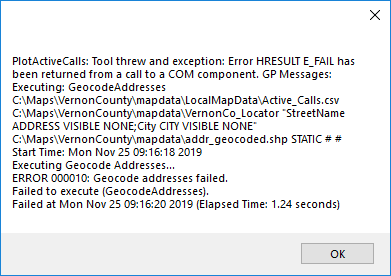
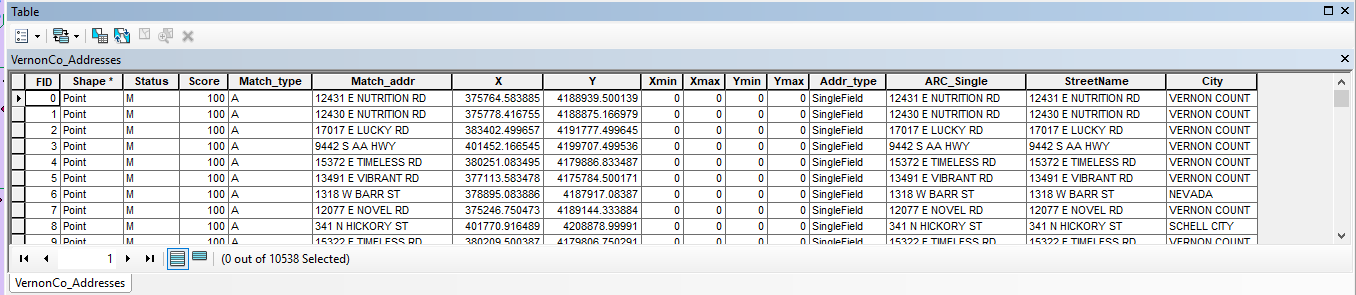
I have attached my csv file I am trying to work with. I am wondering if there might be something wrong in the formatting? Since things have changed.


- Mark as New
- Bookmark
- Subscribe
- Mute
- Subscribe to RSS Feed
- Permalink
Elizabeth- just curious as to what CAD/Moblie app you are using....
- Mark as New
- Bookmark
- Subscribe
- Mute
- Subscribe to RSS Feed
- Permalink
Well right now, this is just a testing app. But we have our own CAD/Mobile solutions in house.
- Mark as New
- Bookmark
- Subscribe
- Mute
- Subscribe to RSS Feed
- Permalink
Elizabeth,
Are your locator fields StreetName and City? StreetName doesn't sound like an out of the box locator field name. You can run the table through the GeocodeAddresses GP tool in ArcMap and then look at the GP result to see what the field mapping was to confirm. You may have done this already because you have the "VISIBLE NONE" as part of the string that isn't really needed but it part of the output from the tool.
Is your locator just one USAddress - Single House locator or is it part of a composite or anything else that can give me some additional clues? Just to confirm, were you able to geocode the CSV with the GeocodeAddresses GP tool in ArcMap with no issue?
Brad
- Mark as New
- Bookmark
- Subscribe
- Mute
- Subscribe to RSS Feed
- Permalink
Actually I am using Single Field because my address is all in one field (611 N CLAY ST). I have tried one address too, but wasn't getting anywhere with that either.
StreetName is what came in the VernonCountyMO_Addresses.shp file I was given.
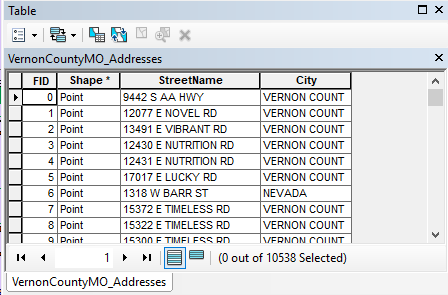
Do I need to run GeoCode against this, because I have. And I was going to use it on the map, but my points were no longer showing up.
UPDATE: I did run Geocoding against the shapefile and did get my points to show up. So I must have fixed something. LOL. But still getting an error either trying to open the csv file or using the GP.Execute. Seems to be the same error. I was able to GeoCode that csv file as well. I am using windows 10, which I hope doesn't make a difference.