- Home
- :
- All Communities
- :
- Products
- :
- ArcGIS StoryMaps
- :
- Classic Esri Story Maps Questions
- :
- Customize facebook share message
- Subscribe to RSS Feed
- Mark Topic as New
- Mark Topic as Read
- Float this Topic for Current User
- Bookmark
- Printer Friendly Page

- Mark as New
- Bookmark
- Subscribe to RSS Feed
- Permalink
We have done a map tour and we would like to customize the facebook message after sharing.
How can I accomplished it? I really don't figure out how.
Thanks
Solved! Go to Solution.
Accepted Solutions

- Mark as New
- Bookmark
- Subscribe to RSS Feed
- Permalink
Thanks, Owen. After some back and forth with our social media people we discovered that they have a bit more control over our organisational Facebook page than we do over our individual ones. So they were able to edit the title and text to suit them.
Your technique will be useful for when others in the office want to share via their personal accounts, so thanks!

- Mark as New
- Bookmark
- Subscribe to RSS Feed
- Permalink
Unfortunately, Facebook recently abandoned the API we were using to dynamically set the title, description and thumbnail. That's something that we should get fixed soon but from now your workaround is to use the downloadable version of the template and edit index.html to include your title, description and a link to the thumbnail you wants to be used (there is documentation in that file).
- Mark as New
- Bookmark
- Subscribe to RSS Feed
- Permalink
This doesn't appear to have been fixed yet. I am in a situation where I cannot host the application (Story Map Journal) on our organisation's servers due to IT restrictions, so hosting with Esri is our only option. I assume that this means I cannot make any changes to the OG tags in the HTML?
Our marketing people are reluctant (with good reason) to share a link on our Facebook pages that looks like this:
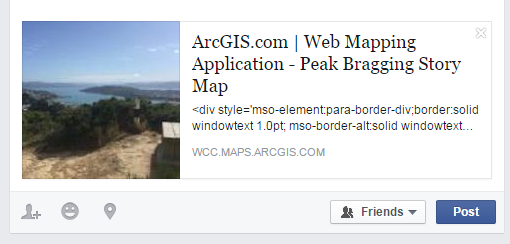
So I am left in a situation where some hard work from our team will likely not get the exposure that we need it to.
Is there any indication as to when this might be addressed?
Regards
James.
- Mark as New
- Bookmark
- Subscribe to RSS Feed
- Permalink
Hi James,
The three elements that are used to populate the Facebook dialog are: the item thumbnail, title and the summary. You can edit those information from the application item page or using My Stories | Story Maps .
If you clean up your summary to not include any HTML markup I think you will be in a pretty good state.
The only part that is not under your control is the start of the title, please let me know if you would like that removed and I can submit an enhancement request for it.
Note that after you edit your item, you may have to use the following Facebook tool to see the change immediately https://developers.facebook.com/tools/debug/og/object


- Mark as New
- Bookmark
- Subscribe to RSS Feed
- Permalink
Hi James,
Regarding sharing your story maps on social media...even when what is generated via the Facebook and Twitter buttons is better, it's still just a small thumbnail and a short description. While it's still good to make sure your thumbnail and metadata are updated as Greg described (so when others use these buttons they don't create a post with generic/confusing information), there's a better alternative that you can suggest to your marketing department...
Send them a nice screenshot of your story map and have them share that and the short URL to your story in a Facebook post or tweet. Crafting your own post in this way makes your work stand out much better on social media feeds.
If you check out the Esri Facebook page and Story Maps Twitter feed you can see some examples of this, like the ones below.
Hope this is helpful!
Owen


Lead Product Engineer | StoryMaps
- Mark as New
- Bookmark
- Subscribe to RSS Feed
- Permalink
Thanks, Owen. After some back and forth with our social media people we discovered that they have a bit more control over our organisational Facebook page than we do over our individual ones. So they were able to edit the title and text to suit them.
Your technique will be useful for when others in the office want to share via their personal accounts, so thanks!
- Mark as New
- Bookmark
- Subscribe to RSS Feed
- Permalink
Great to hear, James! Due in part to your feedback we are now working on some additional changes to sharing story maps on social networks that should be released at the end of February, so stay tuned!
Owen
Lead Product Engineer | StoryMaps

- Mark as New
- Bookmark
- Subscribe to RSS Feed
- Permalink
Be sure you add the meta "property" tag in the Facebook Sharing section of the head tag, or your content may not work or refresh when you change it:
<!-- Facebook sharing -->
<meta property="og:type" content="article"/>
You should also plug your URL into Facebook's Object Debugger. It will tell you if anything is wrong with OG tags:
