- Home
- :
- All Communities
- :
- Industries
- :
- Education
- :
- Campus Operations Blog
- :
- Transforming Campus Facilities Operations at CSULB...
Transforming Campus Facilities Operations at CSULB Through ArcGIS Online

- Subscribe to RSS Feed
- Mark as New
- Mark as Read
- Bookmark
- Printer Friendly Page
California State University, Long Beach (CSULB) occupies a sprawling 322-acre urban campus that has grown continuously since its founding in 1949. Today it educates more than 40,000 students per semester and lists 110 permanent buildings just a few miles south of downtown Los Angeles.
In recent years, CSULB has embraced Geographic Information Systems (GIS) as a foundational technology to modernize campus operations, improve safety, and enhance data-driven decision‑making.
By creating a unified geospatial platform, the university has:
- Mapped its underground utility infrastructure and integrated this data with digital and hard copy as-built documentation
- Tracked ADA accessibility corrections
- Created dashboards displaying ecological and sustainability benefits analyses from tree data
- Mapped fire and safety equipment
- Provided time critical spatial data for construction management teams
- Mapped facilities managed assets
- Created an integrated repository of building floor plans
- Active operational chargeback work orders
This digital revolution has transformed how Physical Planning, Energy, Construction & Facilities Management operates every single day.
Mapping the Invisible: Underground Utilities
One of the earliest and most transformative uses of GIS at CSULB has been the comprehensive mapping of all underground utilities. Prior to GIS adoption, utility locations were tracked mainly by means of paper records and decades-old, faded construction drawings. This understandably created challenges for construction, maintenance, planning and emergency response teams.
A university campus is threaded with a dense web of infrastructure: water mains, sanitary and storm sewer lines, natural gas distribution, electrical conduits, telecommunications fiber, chilled water and meter vaults. Using centimeter-accuracy GPS equipment (in this case an EOS Arrow Gold RTK GNSS receiver) in combination with contemporary mobile GIS applications, we were able to record such attributes as pipe material, diameter, years of installation along with photo attachments of fiend conditions such as open trenches and equipment mobilization.
This data can help capital planning staff assess the age and condition of buried infrastructure when prioritizing deferred maintenance investments. Further, recognizing that striking any one of these utilities during excavation can halt a construction project, cause significant property damage, and in the case of gas or electrical systems, endanger lives.
Having an accurate and reliable record of underground utility locations, and the ability to quickly visualize them in mobile mapping applications, empowers field crews with spatial awareness that has fundamentally changed how they approach excavation planning.

Image displaying all active underground utilities map layers turned ON

Image displaying prepopulated utilities PDF provide as an attachment for each building on a map
This digital mapping provides:
- Faster, safer excavation and construction planning
- Reduced occurrence of accidental utility strikes
- Accurate reference for engineering projects
- Centralized utility visibility for planners and contractors
Digitizing Floor Plans, using As‑Builts Documents and Photos
ArcGIS has become a repository for building information at CSULB, thus connecting each facility’s spatial footprint with digital documentation, including:
- CAD/PDF floor plans
- As‑built drawings
- Construction documents
- Equipment photos
With this system users can click on a building and instantly load its associated documentation. We’ve even created PDFs of each building loaded with all utilities surrounding that building. Such quick-access PDFs are crucial in that they enable non-GIS users working on a project to quickly identify underground infrastructure in the field.

Image displaying campus map with building selected and popup displaying a PDF attachment of each floor’s detailed operational floor drawings

Image displaying campus map Telecom Nodes and popup showing node detail plus a PDF attachment of the as-built construction record
Campuswide Management of ADA Compliance Through Mapping and Tracking
Ensuring accessibility for all students, staff, and visitors is a core priority at CSULB. For example, GIS has allowed the university to generate (provide detailed aerial maps with GPS locations of barriers that allow contractors to quickly repair), track, and assess over 12,600 ADA‑related barriers to scale, including:
- Accessible paths of travel
- Curb ramps and slopes
- Accessible building entrances and handrails
- Restriping lanes, parking spaces and signs
By using GIS CSULB can now:
- Quickly map non-compliant or high‑risk accessibility barriers
- Use color‑coded status symbology on maps to reveal completed and in-progress repairs
- Support compliance reporting and funding requests
- Improve mobility for all campus users

Image displaying ADA barriers in ArcGIS Map.
Blue means needs repairs and red are completed repairs
Tree Inventory and Ecological Benefits Dashboard via iTree
CSULB’s urban forest is the often-overlooked asset that plays a key role in sustainability across this 322-acre campus with measurable ecological, economic and community benefits. Using GIS combined with iTree statistical modeling, the university created a dynamic dashboard displaying:
- Carbon storage and sequestration
- Energy savings
- Air pollution removal and quality improvement
- Stormwater mitigation
- Species distribution
- Canopy coverage
- Each tree is mapped in GIS as a point feature for a full inventory, complete with:
- Species and DBH (diameter at breast height)
- Condition rating
- Ecological benefit value
- Maintenance history
- This empowers the university to:
- Prioritize Arborist Work
- Demonstrate environmental leadership
- Plan for climate resilience
It should be noted that ArcGIS Online does have an embedded database link to our tree data software (ArborPro) and is great because we have a real-time trees and data, however to create the dashboard it is necessary to load the data from ArborPro and iTree manually in a separate ArcGIS Online hosted layer. The statistical data is generated by loading the ArborPro data into iTree which then processes the statical analysis values. These statistical data are then transferred to a geodatabase in ArcGIS Online from which visually compelling maps and dashboards can be created for access by both technical and non-technical end users.

Image displaying CSULB’s Urban Forest with iTree statistical eco benefits in ArcGIS Dashboard

Image displaying CSULB’s Urban Forest inventory in and ArcGIS Map
Mapping Facilities Management Assets Through an ArcGIS Experience
Facilities Management oversees thousands of physical assets, including:
- HVAC units
- Pumps and motors
- Lighting systems
- Safety equipment
- Building systems
- Exterior infrastructure, roofs
- Vehicles
Using and ArcGIS hosted layer and a map we can create a visual using the ArcGIS Experience Builder that shows where each asset is spatially located at on the campus and provides a link and linked to:
- Preventive maintenance schedules
- Warranty and manufacturer info
- Replacement lifecycle data
- Work order history
This ArcGIS Experience Builder map gets populated (manually) from data exported from our Integrated Workplace Management system Planon. What the ArcGIS Experience Builder accomplished for us is that it quickly allows us to visually locate any asset type across the campus. In simple terms, is a great reporting tool! We can search for a particular asset group (for example AHUs air handling units) and find all records pertaining to that group.
The data also has a hyperlink directly to Planon that allows users to see more details about the assets including work order history and other similar data that we track in real-time. The Experience provides a visually appealing asset reporting tool, something we never could have done without the help of GIS.
In the near future, we are looking to expand on the utility of this tool to help us do things like find clusters of aging equipment that need to be replaced and visualizing these locations in map form. The future possibilities are truly endless!
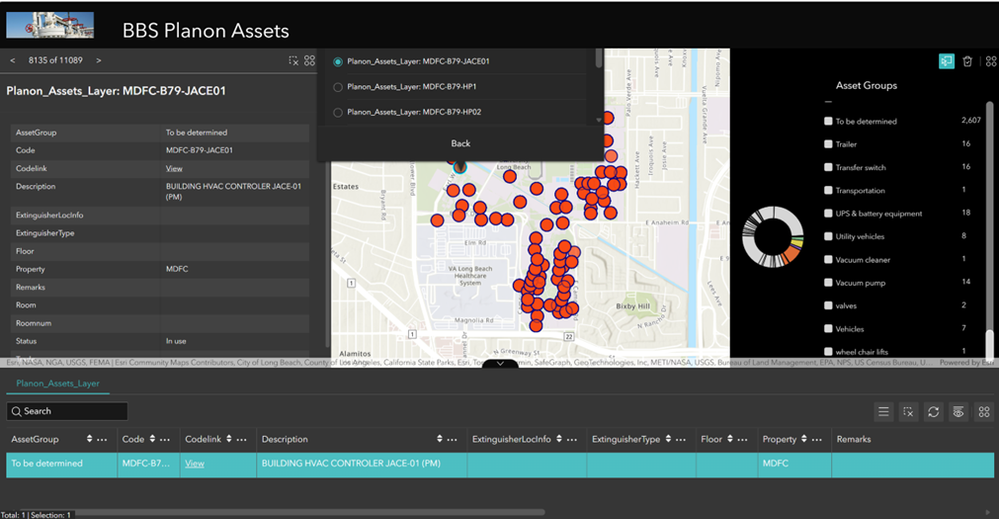
Image displaying Facilities Managed Assets in an ArcGIS Experience
Chargeback Work Orders Mapped by Customer and Location
ArcGIS Experiences Builder can also help us spatially visualize chargeback requested work orders across the entire campus. With this tool each work order is:
- Mapped to the specific building with a link to the IWMS for more details
- Categorized by customer or requesting department
- Summarized in dashboards for leadership review
This offers immediate insights into issues like workload distribution.
In the future we hope to be able to quickly locate high‑cost departments and recurring problem areas
Leadership will be able to make data‑supported decisions on staffing, budgeting, and capital planning.

Fire Extinguisher Mapping and Safety Readiness
Fire extinguishers have associated spatial data that allows them to be easily mapped. We continuously update this data as PDF attachments. These attachments contain floorplans with fire extinguisher locations and inspection records along with type of extinguisher and other data. Our safety teams have mapped every fire extinguisher on campus while simultaneously capturing critical attributes such as extinguisher type, service dates, mounting location and compliance status. This greatly enhances inspection routing efficiency, compliance documentation and emergency preparedness. However, currently these data is updated manually. To streamline the process, we are working toward having technicians use mobile GIS to update this data in real-time as they capture it in the field. We do have a few technicians doing this already but will expand.

Image displaying CSULB buildings with fire extinguishers data in an ArcGIS Map with PDF attachments of each floor and extinguisher location plus a spreadsheet of inspection records
Conclusion: A Fully Integrated Smart Campus
Through the comprehensive implementation of GIS technology, CSULB has evolved into a forward‑thinking, data‑driven campus. GIS is now an essential backbone of the university’s digital infrastructure. It is something we depend upon for day-to-day management of this large campus.
We are excited about continuing to automate processes involving data integration and convergence, possibly extending to indoors spaces using indoor GIS, building digital twins performing real-time sensor data capture, doing predictive analysis for asset condition and automated work order generation, streamlining workflows across departments as well as broadening our audience to include academic services, students and sustainability coordinators.
If you have any questions about our implementation and deployment of ArcGIS across campus you can email CSULB Physical Planning, Facilities and Construction Management: IT Manager [email protected]
