Turn on suggestions
Auto-suggest helps you quickly narrow down your search results by suggesting possible matches as you type.
Cancel
- Home
- :
- All Communities
- :
- Products
- :
- ArcPad (Retired)
- :
- ArcPad Questions
- :
- Writing multiple values to a single field using a ...
Options
- Subscribe to RSS Feed
- Mark Topic as New
- Mark Topic as Read
- Float this Topic for Current User
- Bookmark
- Subscribe
- Mute
- Printer Friendly Page
Writing multiple values to a single field using a FORM linked to an EDITFORM
Subscribe
4007
0
04-08-2014 11:35 PM

04-08-2014
11:35 PM
- Mark as New
- Bookmark
- Subscribe
- Mute
- Subscribe to RSS Feed
- Permalink
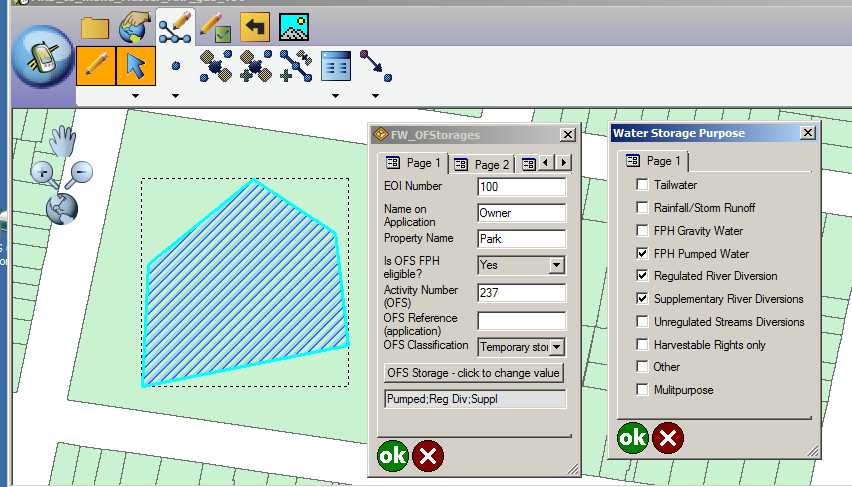
I have just completed coding up a multiple-select FORM which is called up from an EDITFORM in ArcPad. The multiple selections are "encoded" into a single attribute value. For example, you can encode short strings into one long string separated by a delimiter, or encode values into a long int, setting a specific bit for each selected value. Code is attached. Here's what the forms looks like (and there's another example at the end):
[ATTACH=CONFIG]32940[/ATTACH]
I shall describe how I have done that here, and hope the ArcPad community finds my observations useful. I am new to both VbScript and ArcPad scripting, having just started last week. My previous experience with VbScript (or equivalent) has been limited to customizing labels in ArcMap.
Comments and corrections are welcome, particularly from the ArcPad Team Blog staff. You can find my e-mail address on this GRASS posting:
http://lists.osgeo.org/pipermail/grass-dev/2013-November/066241.html
My main trouble has been understanding exactly what goes on when a feature in a Layer is created or changed. The ArcPad manual has not been of great use to me in giving an overview and understanding of what's going on, though the detailed descriptions of components in the XML reference manual are good. I have resorted to Google searches and searches of the ESRI ArcPad forums, where I have found useful (though oblique) hints as to the resolution of problems I have encountered.
In broad outline, I wanted to create and edit features for one particular Layer for which one field can "contain" multiple values. I have a Button Control on that Layer's EDITFORM and, just below it, I have an Edit Control which displays the single encoded value which comes from a designated field of the Layer. One nicety is that you can make the Edit Control read-only so the user cannot change the encoded value directly, though you can obviously set it programmatically.
When the Button is clicked, its "onclick" event calls a subroutine which "shows" a FORM as designed in ArcPad Studio; this has a CHECKBOX for each of the allowed values.
Showing the FORM fires its "onload" event, which calls a subroutine which gets the single attribute value encoding the current multiple selections from the Edit Control's value. The value is decoded, and the results are used to check or uncheck the CHECKBOXes to indicate the current selection. The "onload" subroutine then reaches its end, at which point ArcPad refreshes the FORM, so the user actually sees the current multiple selections.
The user then selects the desired items by checking the corresponding CHECKBOXes. Each check or uncheck of a CHECKBOX fires an "onclick" event which calls a subroutine which sets a global variable, from which I can tell if the FORM's values have changed. When the user is finished, the FORM's OK button is clicked, which fires the "onok" event which calls a subroutine. This checks to see if any changes have been made and, if so, it gets the values of the CHECKBOXes, and encodes them into the one value, and sets it into the value of the EDITFORM's Edit Control whence it came.
How did I arrive at this solution?
To start with, I needed to develop an operational understanding of what goes on when I create the attributes of a new feature, or edit the attributes of an existing one. I shall describe here how ArcPad appears to work operationally. Obviously, I have no access to the code, so I don't know how exactly it works but, based on my direct experience, the following provides a viable conceptual model.
1. Create a new feature. When you create a new feature, you make the geometry first, and then proceed to enter and edit attribute values via an EDITFORM. ArcPad creates (stores) the spatial feature and its attributes as one or more records in its tables stored in a SQL Server CE database, and populates the attributes with default values. ArcPad then (appears to) start an SQL transaction which wraps around all the attribute editing, and this (appears to) involve taking a lock on the feature's records or tables, preventing them from being changed whilst the editing is going on (i.e., while the EDITFORM is open).
2. As the first action of the transaction, ArcPad shows the EDITFORM. This involved creating an EDITFORM object which stores controls, events, values, etc., and it sets values by reading them from the corresponding (selected) record of the Layer's attribute table. Importantly, it appears that ALL changes to the feature's attribute values in the EDITFORM are stored as object values of the EDITFORM object. That is, no changes are made to the underlying attribute table(s) in the SQL database while the EDITFORM is open.
3. If you want to change an attribute value of the feature, you MUST change the corresponding value in the EDITFORM. That means, you need a control in the EDITFORM which is associated with the attribute (field). Whilst editing the feature, it seems you can't directly change the attribute value in the underlying database via a RecordSet Update, because the record (or table) is locked.
4. Finally, when the EDITFORM is closed with OK, the changes are committed to the database, and the transactions ends. If closed with Cancel, the changes are not committed (or the transaction is unrolled).
A lesson I learned on what not to do. Following a forum post, I got my Layer's Recordset and moved to the selected feature via the Map.SelectionBookmark. I changed my encoded value, assigned it to the Recordset and updated the Recordset with Recordset.Update. I could then close my FORM with OK, returning to the EDITFORM and then re-open it, and the changed values would be correct. But the changes were not committed when I closed the EDITFORM. I think this was because I was trying to update the Recordset outside the editing Transaction.
Code
My code is for an application in which the user can select from ten choices. I have ensured that the encoded string value does not exceed the width of the corresponding attribute of the Layer (feature class). You may prefer to check the length of your final encoded string, and truncate it if it is too long (or take some other action).
My Button Control on the Layer's EDITFORM has "Call ShowPurposeForm" as the action for its "onclick" event.
The Edit Control which contains the encoded single value of the multiple selections is just called "Edit1".
My Layer's FORM has "Call LoadPurposeForm" as the action for its "onload" event, and "Call CloseWithOK" for the "onok" event, and "Call CloseWithCancel" for the "oncancel" event.
Another example - Encoding Values Numerically by Setting Bits in a Long Integer
In the image, you'll see that the encoded value is 165. That's 1 for Tailwater plus 4 for FPH Gravity Water plus 32 for Supplementary River Diversions plus 128 for Harvestable Rights only:
1+4+32+128 = 165.
[ATTACH=CONFIG]32941[/ATTACH]
Correction on 10th April: "Map.Bookmark" corrected to "Map.SelectionBookMark"
[ATTACH=CONFIG]32940[/ATTACH]
I shall describe how I have done that here, and hope the ArcPad community finds my observations useful. I am new to both VbScript and ArcPad scripting, having just started last week. My previous experience with VbScript (or equivalent) has been limited to customizing labels in ArcMap.
Comments and corrections are welcome, particularly from the ArcPad Team Blog staff. You can find my e-mail address on this GRASS posting:
http://lists.osgeo.org/pipermail/grass-dev/2013-November/066241.html
My main trouble has been understanding exactly what goes on when a feature in a Layer is created or changed. The ArcPad manual has not been of great use to me in giving an overview and understanding of what's going on, though the detailed descriptions of components in the XML reference manual are good. I have resorted to Google searches and searches of the ESRI ArcPad forums, where I have found useful (though oblique) hints as to the resolution of problems I have encountered.
In broad outline, I wanted to create and edit features for one particular Layer for which one field can "contain" multiple values. I have a Button Control on that Layer's EDITFORM and, just below it, I have an Edit Control which displays the single encoded value which comes from a designated field of the Layer. One nicety is that you can make the Edit Control read-only so the user cannot change the encoded value directly, though you can obviously set it programmatically.
When the Button is clicked, its "onclick" event calls a subroutine which "shows" a FORM as designed in ArcPad Studio; this has a CHECKBOX for each of the allowed values.
Showing the FORM fires its "onload" event, which calls a subroutine which gets the single attribute value encoding the current multiple selections from the Edit Control's value. The value is decoded, and the results are used to check or uncheck the CHECKBOXes to indicate the current selection. The "onload" subroutine then reaches its end, at which point ArcPad refreshes the FORM, so the user actually sees the current multiple selections.
The user then selects the desired items by checking the corresponding CHECKBOXes. Each check or uncheck of a CHECKBOX fires an "onclick" event which calls a subroutine which sets a global variable, from which I can tell if the FORM's values have changed. When the user is finished, the FORM's OK button is clicked, which fires the "onok" event which calls a subroutine. This checks to see if any changes have been made and, if so, it gets the values of the CHECKBOXes, and encodes them into the one value, and sets it into the value of the EDITFORM's Edit Control whence it came.
How did I arrive at this solution?
To start with, I needed to develop an operational understanding of what goes on when I create the attributes of a new feature, or edit the attributes of an existing one. I shall describe here how ArcPad appears to work operationally. Obviously, I have no access to the code, so I don't know how exactly it works but, based on my direct experience, the following provides a viable conceptual model.
1. Create a new feature. When you create a new feature, you make the geometry first, and then proceed to enter and edit attribute values via an EDITFORM. ArcPad creates (stores) the spatial feature and its attributes as one or more records in its tables stored in a SQL Server CE database, and populates the attributes with default values. ArcPad then (appears to) start an SQL transaction which wraps around all the attribute editing, and this (appears to) involve taking a lock on the feature's records or tables, preventing them from being changed whilst the editing is going on (i.e., while the EDITFORM is open).
2. As the first action of the transaction, ArcPad shows the EDITFORM. This involved creating an EDITFORM object which stores controls, events, values, etc., and it sets values by reading them from the corresponding (selected) record of the Layer's attribute table. Importantly, it appears that ALL changes to the feature's attribute values in the EDITFORM are stored as object values of the EDITFORM object. That is, no changes are made to the underlying attribute table(s) in the SQL database while the EDITFORM is open.
3. If you want to change an attribute value of the feature, you MUST change the corresponding value in the EDITFORM. That means, you need a control in the EDITFORM which is associated with the attribute (field). Whilst editing the feature, it seems you can't directly change the attribute value in the underlying database via a RecordSet Update, because the record (or table) is locked.
4. Finally, when the EDITFORM is closed with OK, the changes are committed to the database, and the transactions ends. If closed with Cancel, the changes are not committed (or the transaction is unrolled).
A lesson I learned on what not to do. Following a forum post, I got my Layer's Recordset and moved to the selected feature via the Map.SelectionBookmark. I changed my encoded value, assigned it to the Recordset and updated the Recordset with Recordset.Update. I could then close my FORM with OK, returning to the EDITFORM and then re-open it, and the changed values would be correct. But the changes were not committed when I closed the EDITFORM. I think this was because I was trying to update the Recordset outside the editing Transaction.
Code
My code is for an application in which the user can select from ten choices. I have ensured that the encoded string value does not exceed the width of the corresponding attribute of the Layer (feature class). You may prefer to check the length of your final encoded string, and truncate it if it is too long (or take some other action).
My Button Control on the Layer's EDITFORM has "Call ShowPurposeForm" as the action for its "onclick" event.
The Edit Control which contains the encoded single value of the multiple selections is just called "Edit1".
My Layer's FORM has "Call LoadPurposeForm" as the action for its "onload" event, and "Call CloseWithOK" for the "onok" event, and "Call CloseWithCancel" for the "oncancel" event.
Another example - Encoding Values Numerically by Setting Bits in a Long Integer
In the image, you'll see that the encoded value is 165. That's 1 for Tailwater plus 4 for FPH Gravity Water plus 32 for Supplementary River Diversions plus 128 for Harvestable Rights only:
1+4+32+128 = 165.
[ATTACH=CONFIG]32941[/ATTACH]
Correction on 10th April: "Map.Bookmark" corrected to "Map.SelectionBookMark"

0 Replies
