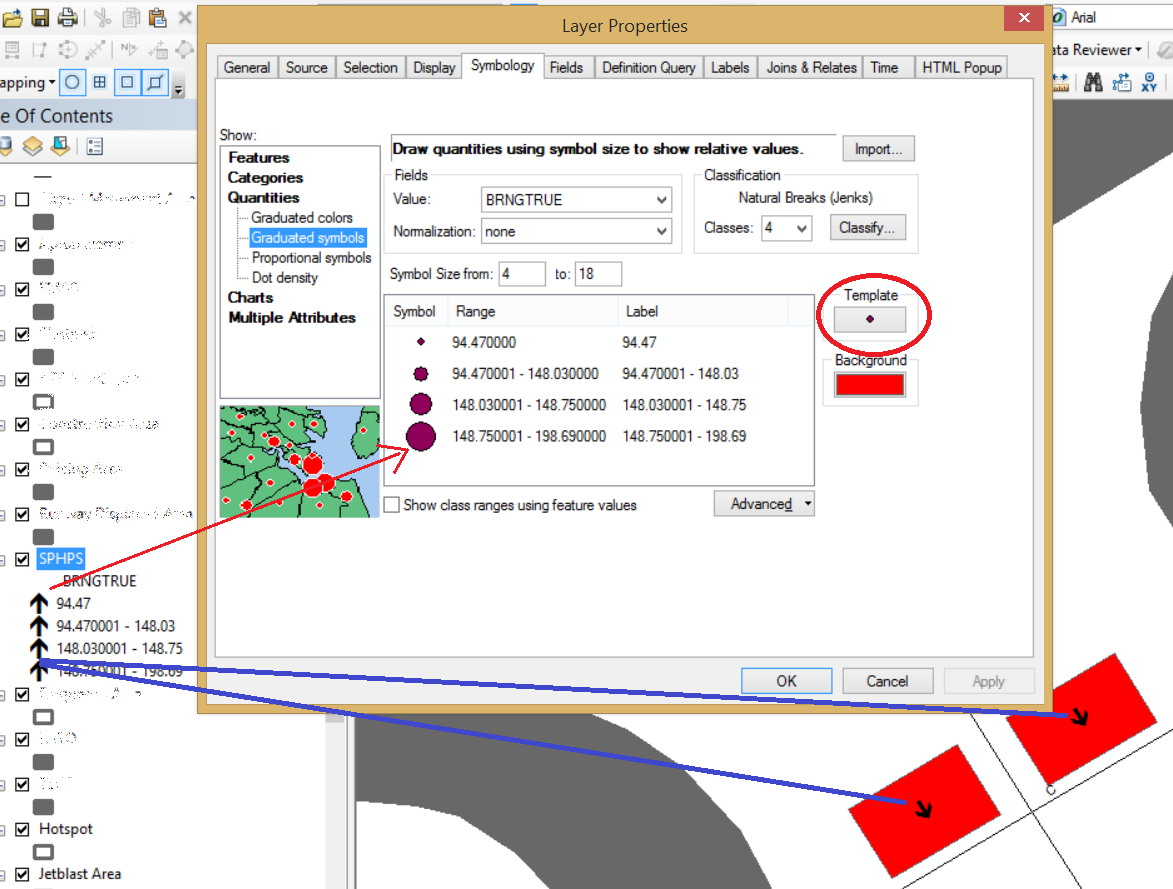
Assigning the Quantities - Graduated Symbols for one field. The TOC is showing an updated symbolize but not in the UI shown in the attached snapshot.
IClassBreaksRenderer classBreaksRenderer = new ClassBreaksRendererClass();
classBreaksRenderer.Field = "BRNGTRUE";
classBreaksRenderer.BreakCount = classCount;
classBreaksRenderer.MinimumBreak = classBreaks[0];
classBreaksRenderer.SortClassesAscending = true;

IClassBreaksUIProperties classBreaksUIProperties = classBreaksRenderer as IClassBreaksUIProperties;
classBreaksUIProperties.Method = pClassifyGEN.ClassID;


ISymbol simpleMarkerSymbol = GetMarkerSymbol();
IFillSymbol fillSymbol = GetFillSymbol() as IFillSymbol;

classBreaksRenderer.BackgroundSymbol = fillSymbol;

//Through a loop, attach rendering symbol to all rendered levels
for (int i = 0; i < classCount; i++)
{
	////Specify the symbol for hierarchical rendering (Symbol)
	classBreaksRenderer.Symbol[i] = simpleMarkerSymbol;
	classBreaksRenderer.Break[i] = classBreaks[i];

	if (i == 0)
	{
		classBreaksUIProperties.LowBreak[i] = classBreaks[i];
		classBreaksRenderer.Label[i] = string.Format("{0}", classBreaks[i]);
	}
	else
	{
		classBreaksUIProperties.LowBreak[i] = classBreaks[i - 1] + 0.000001;
		classBreaksRenderer.Label[i] = string.Format("{0} - {1}", classBreaks[i - 1] + 0.000001, classBreaks[i] + 0.000000);
	}

}