- Home
- :
- All Communities
- :
- Products
- :
- ArcGIS Utility Network
- :
- ArcGIS Utility Network Questions
- :
- Re: UN and OnPost Event Webhooks - should this wor...
- Subscribe to RSS Feed
- Mark Topic as New
- Mark Topic as Read
- Float this Topic for Current User
- Bookmark
- Subscribe
- Mute
- Printer Friendly Page

- Mark as New
- Bookmark
- Subscribe
- Mute
- Subscribe to RSS Feed
- Permalink
@MikeMillerGIS @RobertKrisher and others, I'm hoping you can help out here...
We have an Electric UN running on v11.5 and would like to trigger an external activity that runs after the OnPost Webhook is triggered.
The webhook has been setup fine and the trigger works. The recipient (FME Flow) sees the notification that the event has been triggered and then makes the second request to the 'extractChanges' url. This never results in a valid response. We can see in the ArcGIS Server logs that a geoprocessing job has been created and the job file has been written to the output folder. However, it seems to fail at writing any information to the scratch.gdb in the jobs folder.
We've enabled verbose logging just to see if we can determine where it's failing without any luck. We've enabled all capabilities across the Feature Service and the Utility Network Service and have tried different version properties (public, protected, private), also without any luck. We've even tried looking at epoch date values and they all seem to align.
So, should this onPost webhook work for UN Services, and if so, are there any specific properties that need to be defined at the version, services or sde level?
Any tips or direction would be much appreciated!
Cheers,
Solved! Go to Solution.
Accepted Solutions


- Mark as New
- Bookmark
- Subscribe
- Mute
- Subscribe to RSS Feed
- Permalink
@geovolve - Do you get the servergens parameter via the webhook URL?
I think what has tripped me up in the past is the "Server Gens" vs "Layer Server Gens"
Also I was under the impression that ServerGens is a timestamp because it looks like one.
Just did a quick test -

Results - I moved an ICP (objectID = 27234)
If you select returnIDs only = False, the job should run asynchronously meaning it will return a status URL for the job. Once completed you can access the results URL with all the changes.


As people have pointed out, it does take a sometime so you need to build this into logic
Do Until...JobStatus = Completed.

Once JobStatus = Completed, then download the JSON to get the details.


- Mark as New
- Bookmark
- Subscribe
- Mute
- Subscribe to RSS Feed
- Permalink
We don't have the UN implemented in our organization but I have done some testing with Feature Service webhooks in our Enterprise 11.3 environment in conjunction with FME Flow. I have found Enterprise and AGOL feature service webhooks to be more cumbersome to work with than virtually any other platform.
What I've found is that it appears that FME is making the HTTP calls to Enterprise before Enterprise has the data packaged and ready to respond (which is why a response is never received). I used a hacky way to get FME to "wait for a little while" before making the call to Enterprise using a Decelerator transformer, and this seems to have worked for me.
I'll post a screenshot of my workbench below. I was thinking about posting this as a custom transformer to the FME Hub if that would be helpful. I do find it quite cumbersome to have to make 3 separate HTTP calls after the initial webhook to be able to expose the data that would be available via the webhook directly in most every other application that I've worked with.
I set the Decelerator to 10 seconds to allow Enterprise to catch its breath before making each of the calls.

- Mark as New
- Bookmark
- Subscribe
- Mute
- Subscribe to RSS Feed
- Permalink
Thanks Nathan,
We also have found that Enterprise webhooks are far more difficult than they need to be.
We'll give your suggestion a try, but I suspect that the issue is more related to enterprise itself, esp as it doesn't seem to be completing the writing of data to the internal job folder before it returns a "process failed" message.
I'll keep you updated.


- Mark as New
- Bookmark
- Subscribe
- Mute
- Subscribe to RSS Feed
- Permalink
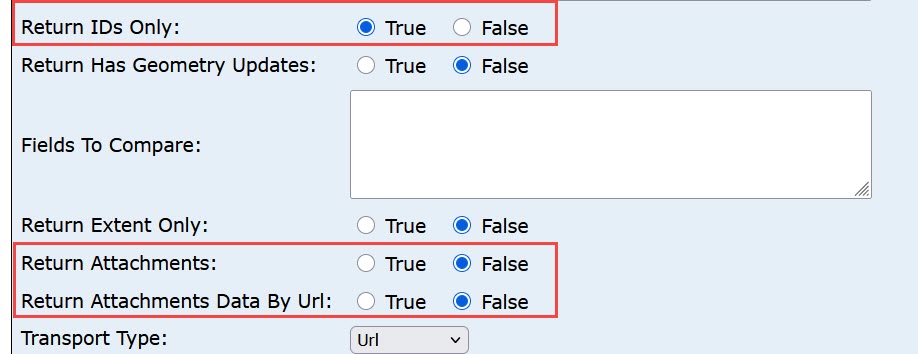
Hi - from your notes above it seems like the key issue is with the extractChanges url that is provided with the webhook and that returning an error. To help troubleshoot that, let's try the following - can you take the URL and run it from the browser in the REST services directory ? Please set the serverGens to the values provided with the webhook URL. Then set returnIdsOnly=true as well as setting returnAttachments=false and returnAttachmentsDataByUrl=false - see attached image. Then run it..
This will run it as a synchronous process vs and async process which may return easier to interpret info. Let me know if this succeed and returns the expected results. If it errors please include the server log error messages.
Thanks
- Mark as New
- Bookmark
- Subscribe
- Mute
- Subscribe to RSS Feed
- Permalink
@geovolve - Do you get the servergens parameter via the webhook URL?
I think what has tripped me up in the past is the "Server Gens" vs "Layer Server Gens"
Also I was under the impression that ServerGens is a timestamp because it looks like one.
Just did a quick test -
Results - I moved an ICP (objectID = 27234)
If you select returnIDs only = False, the job should run asynchronously meaning it will return a status URL for the job. Once completed you can access the results URL with all the changes.
As people have pointed out, it does take a sometime so you need to build this into logic
Do Until...JobStatus = Completed.
Once JobStatus = Completed, then download the JSON to get the details.
- Mark as New
- Bookmark
- Subscribe
- Mute
- Subscribe to RSS Feed
- Permalink
Thanks @gis_KIWI4 You were right. As soon as we switched to using Layer Server Gens instead of Server Gens - data was returned and all worked correctly!
The issue we do have is that the initial request to get the server Gens does not tell us which layer ids have had edits. As a result, we pass ALL relevant layer ids for the server gens to the rest call, with many of them being returned with no data of course.
Does anyone know if there is a way to identify which layer ids have had edits, as this approach seems rather inefficient. @GaryMacDougall ?
- Mark as New
- Bookmark
- Subscribe
- Mute
- Subscribe to RSS Feed
- Permalink
As an update to this, we've discovered that Server Gens (without Layer Server Gens) actually worked also, we just had to pass through all layer ids as per the image below:

- Mark as New
- Bookmark
- Subscribe
- Mute
- Subscribe to RSS Feed
- Permalink
@geovolve - The webhook payload should have the layer that triggered it. Could use that before making the the request to the get serverGens and then in the ExtractChanges call.
https://developers.arcgis.com/rest/services-reference/online/web-hooks-payloads-feature-service/?#ex...
[
{
"name": "webhookname",
"layerId": 0,
"orgId": "myorgId",
"serviceName": "myService",
"lastUpdatedTime": 1644613399009,
"changesUrl": "https://olserver/myorgId/ArcGIS/rest/services/myService/FeatureServer/extractChanges?serverGens=[251...",
"events": ["FeaturesUpdated"]
}
]
- Mark as New
- Bookmark
- Subscribe
- Mute
- Subscribe to RSS Feed
- Permalink
Yes - as you guys have discovered, you can get the layerId form the payload. If you take the changeUrl from the payload and add the "layers" parameter does it give you the expected result?
Thanks
Gary
