- Home
- :
- All Communities
- :
- Products
- :
- ArcGIS Utility Network
- :
- ArcGIS Utility Network Questions
- :
- Re: Downstream Trace - Sewer Utility Network
- Subscribe to RSS Feed
- Mark Topic as New
- Mark Topic as Read
- Float this Topic for Current User
- Bookmark
- Subscribe
- Mute
- Printer Friendly Page

- Mark as New
- Bookmark
- Subscribe
- Mute
- Subscribe to RSS Feed
- Permalink
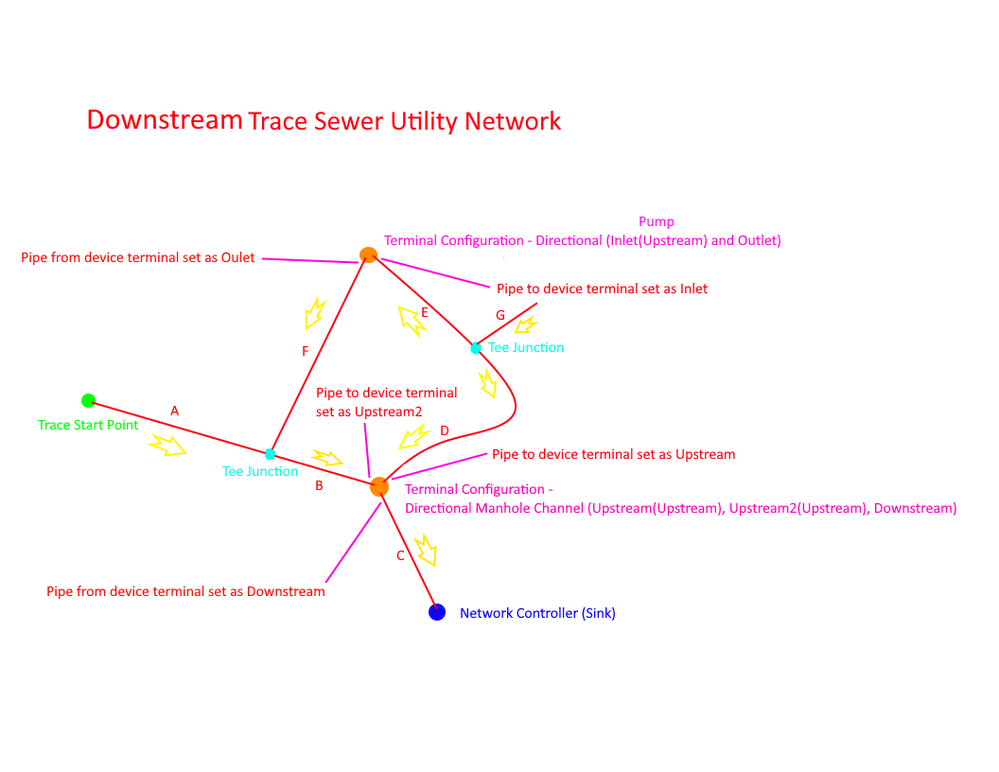
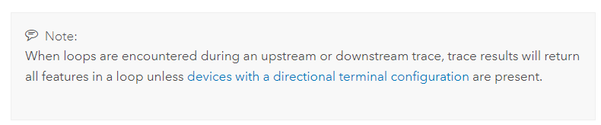
I am trying to determine if this is a bug or the expected result of a downstream trace I am performing on my Sewer Utility Network. The trace in question involves a loop, however according to the documentation if terminal configurations are established features in the loop shouldn't be returned. I have my terminals setup as shown in the diagram below. However I am still getting the features in the loop section returned in my trace selection results. Based on my terminals set on segments F and D and terminal devices I would expect to only have segments A, B, and C returned, but I am getting segments A, B, C, D, E, and F returned in my downstream trace. Am I missing something here?
Current Versions:
UN 6
ArcGIS Pro 3.2.1
Enterprise Portal 11.1
Solved! Go to Solution.
Accepted Solutions


- Mark as New
- Bookmark
- Subscribe
- Mute
- Subscribe to RSS Feed
- Permalink
@rlyding If you are using the current sewer utility network foundation this is the expected behavior, however in the upcoming model, this terminal has been enhanced to include more path options that allow for more control between the upstream and downstream paths. That is because the paths of the default terminal configuration of a directional manhole is "all". This means that there is a two-way path from upstream to upstream 2 as well as a two-way path from downstream to downstream 2. The following diagram represents the 'internal connectivity' of the paths for the directional manhole terminal configuration:
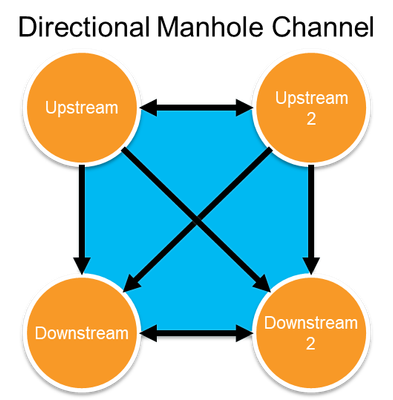
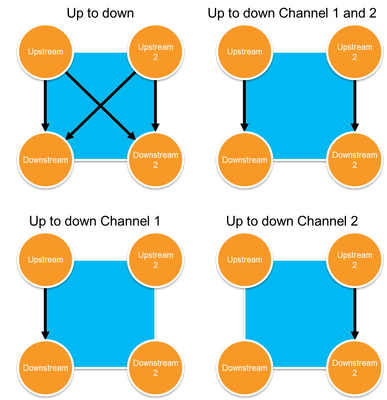
If you wish to separate the upstream and downstream terminals into mutually exclusive paths, you will need to create a terminal configuration with a specific set of paths that don' allow for that. If you're still in the implementation phase of your utility network, you can adjust the existing terminal configuration in your asset package. If you're already in production, the process will be more involved.
For reference, this is what the terminal configurations in the newer data model are expected to look like:
- Mark as New
- Bookmark
- Subscribe
- Mute
- Subscribe to RSS Feed
- Permalink
@rlyding If you are using the current sewer utility network foundation this is the expected behavior, however in the upcoming model, this terminal has been enhanced to include more path options that allow for more control between the upstream and downstream paths. That is because the paths of the default terminal configuration of a directional manhole is "all". This means that there is a two-way path from upstream to upstream 2 as well as a two-way path from downstream to downstream 2. The following diagram represents the 'internal connectivity' of the paths for the directional manhole terminal configuration:
If you wish to separate the upstream and downstream terminals into mutually exclusive paths, you will need to create a terminal configuration with a specific set of paths that don' allow for that. If you're still in the implementation phase of your utility network, you can adjust the existing terminal configuration in your asset package. If you're already in production, the process will be more involved.
For reference, this is what the terminal configurations in the newer data model are expected to look like:

- Mark as New
- Bookmark
- Subscribe
- Mute
- Subscribe to RSS Feed
- Permalink
Hey Robert,
Stumbled upon this thread when troubleshooting a similar issue. I assume updating terminal configuration for a UN that has been deployed would involve exporting it back to an asset package, modifying the valid paths/default, and then re-deploying? Unfortunately I do not see a geoprocessing tool that allows the modification of a terminal configuration.
- Mark as New
- Bookmark
- Subscribe
- Mute
- Subscribe to RSS Feed
- Permalink
Correct, a terminal configuration cannot be modified once created. You can set a terminal configuration of an asset type, but it cannot be modified.
While these restrictions might be loosened in the future (with additional checks, safeguards, and specific restrictions) this currently requires going back to an asset package.
