- Home
- :
- All Communities
- :
- Products
- :
- ArcGIS Survey123
- :
- ArcGIS Survey123 Questions
- :
- Nested repeat creating blank records
- Subscribe to RSS Feed
- Mark Topic as New
- Mark Topic as Read
- Float this Topic for Current User
- Bookmark
- Subscribe
- Mute
- Printer Friendly Page
Nested repeat creating blank records

- Mark as New
- Bookmark
- Subscribe
- Mute
- Subscribe to RSS Feed
- Permalink
| type | name | label | required | relevant |
|---|---|---|---|---|
| begin repeat | freq_plot | Freq Plots | ||
| integer | quad_id | Quad ID | yes | |
| begin repeat | freq_plot_species | Species List | string-length(string(${quad_id}))>0 | |
| select_one species | species_name | Sci Name | yes | |
| select_one livedead | live_dead | Live or Dead | yes | |
| end repeat | ||||
| end repeat |
Basic nested repeat as shown above.
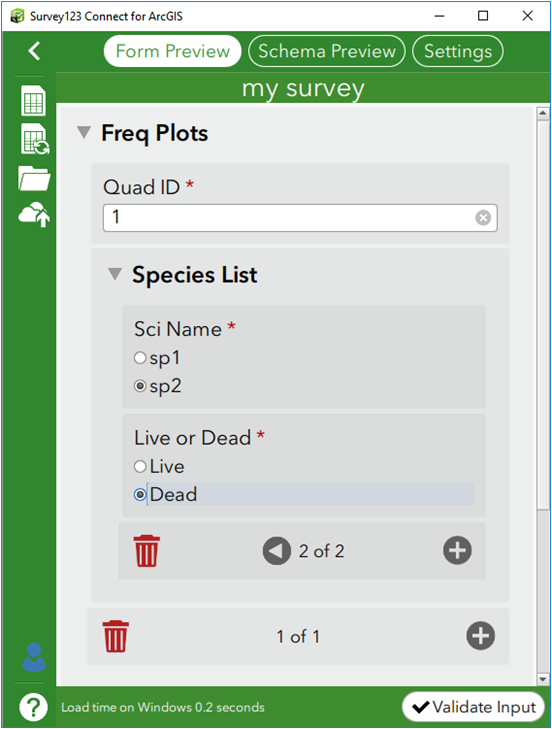
Here's the survey form. The first record, Quad ID 1, has 2 inner repeat records, sp1-live and sp2-dead hence why you see the 2 of 2 count on the inner-repeat. This is the behavior one would expect.
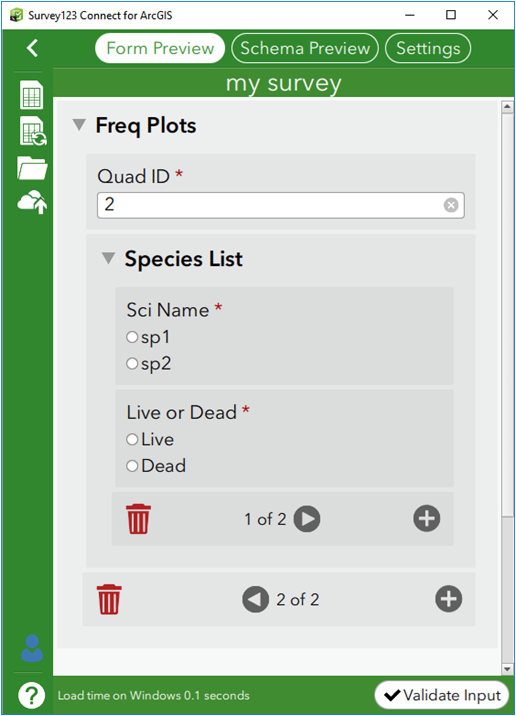
This is Quad ID: 2, the 2nd record. Here's a screenshot immediately after entering the Quad ID value. Notice how the inner-repeat is already pre-populated with 2 blank records. If the previous record, (Quad ID: 1) would of had 3 inner-repeat records, then this record would of also had 3 blank inner-repeat records and so forth. The biggest issue is when you arrow < to previous outer repeat records then try to navigate through the inner repeat records. You get validation errors because the blanks are not meeting the field required.
After more testing, turns out that these blank records are ONLY created when you have a formula in the relevant column, as shown in the table at the top of this post. If that relevant formula is removed, then the blank records are not created.
This is the same behavior in S123 Connect, S123 Windows, Android and iOS, all the latest versions.
ESRI, is this expected or is this a bug?
thanks.

- Mark as New
- Bookmark
- Subscribe
- Mute
- Subscribe to RSS Feed
- Permalink
I have a similar problem. I have nested repeats with a relevant statement on the inner repeat, and when there are two or more records in the inner repeat (X records) and I advance to the next record in the outer repeat, the inner repeat initializes at record "X of X" instead of "1 of 1." The "ghost records" disappear if I page back through them, but I'm using position(..) for a critical calculation in the inner repeat, so when it initializes in the wrong place it throws off the calculation. Looks like ESRI was aware of this back in 2018 and planning to fix it, but I guess it's still not fixed? I have tried various workarounds, but haven't been able to come up with a solution that works within the requirements of my survey.

- « Previous
-
- 1
- 2
- Next »
- « Previous
-
- 1
- 2
- Next »