- Home
- :
- All Communities
- :
- Products
- :
- ArcGIS Survey123
- :
- ArcGIS Survey123 Questions
- :
- Re: Hidden field
- Subscribe to RSS Feed
- Mark Topic as New
- Mark Topic as Read
- Float this Topic for Current User
- Bookmark
- Printer Friendly Page

- Mark as New
- Bookmark
- Subscribe to RSS Feed
- Permalink
Could someone please share an example of a hidden field. I can not seem to get the syntax correct. THANK YOU!
Solved! Go to Solution.
Accepted Solutions

- Mark as New
- Bookmark
- Subscribe to RSS Feed
- Permalink
There are two main ways of hiding fields.
1. Specifying hidden as the field type (as in rows 3 and 4 in the attached Excel document). You use the bind::esri:fieldType column to specify what you want the field type to be:
| type | name | label | bind::esri:fieldType |
| hidden | HiddenString | Hidden String | esriFieldTypeString |
| hidden | HiddenInteger | Hidden Integer | esriFieldTypeInteger |
2. Using the relevant column to hide a question (as in rows 5 and 6 in the attached Excel document):
| type | name | label | relevant |
| select_one ListYesNo | ShowNextQuestion | Show Next Question | |
| geopoint | Location | Selection Location | ${ShowNextQuestion}='Yes' |
Hidden fields will never be displayed in Survey123, whereas fields with relevancy set on them will be displayed if the specific condition is met.
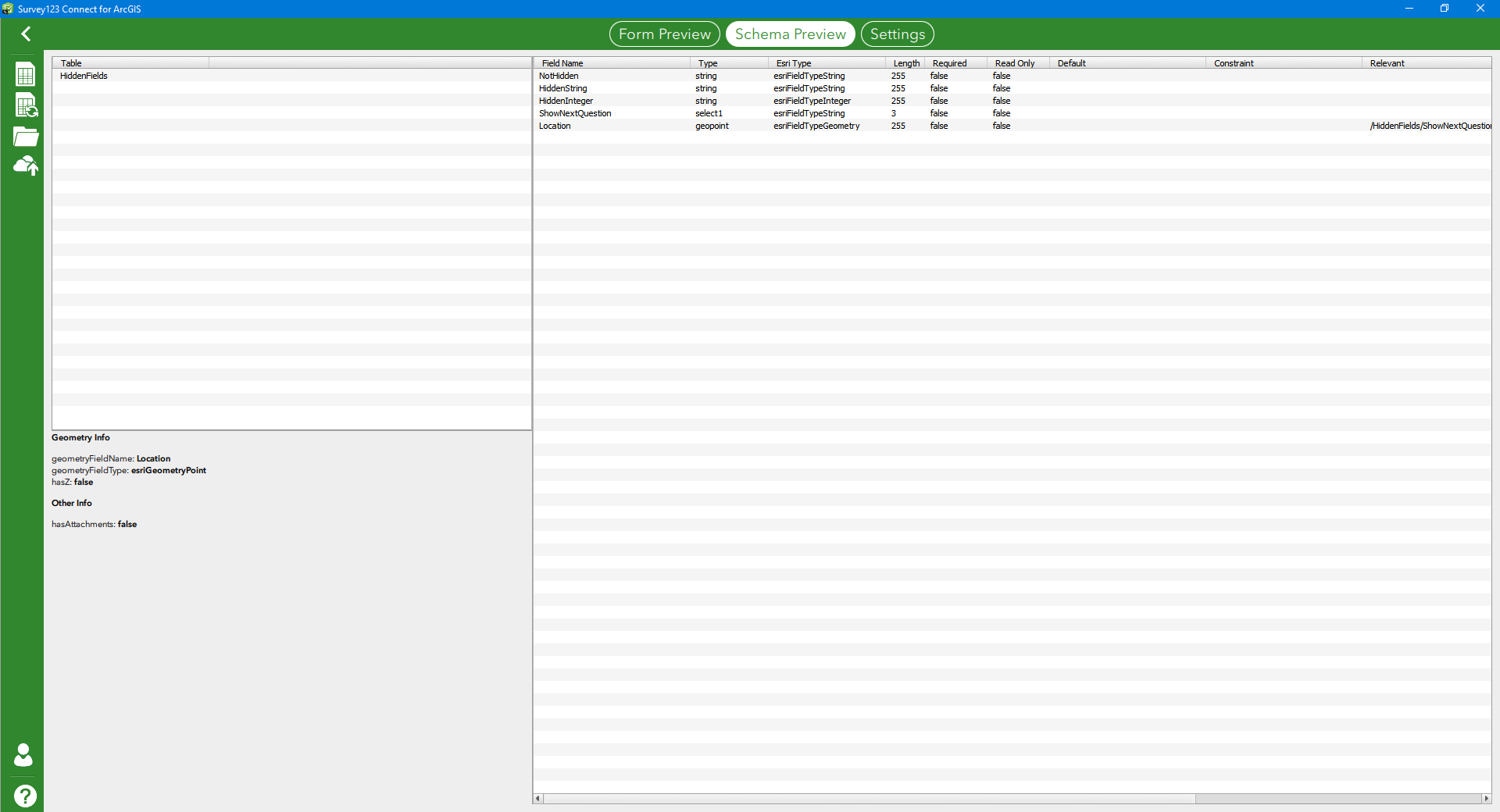
You can check exactly what will be published in the Schema Preview within Survey123 Connect:
- Mark as New
- Bookmark
- Subscribe to RSS Feed
- Permalink
There are two main ways of hiding fields.
1. Specifying hidden as the field type (as in rows 3 and 4 in the attached Excel document). You use the bind::esri:fieldType column to specify what you want the field type to be:
| type | name | label | bind::esri:fieldType |
| hidden | HiddenString | Hidden String | esriFieldTypeString |
| hidden | HiddenInteger | Hidden Integer | esriFieldTypeInteger |
2. Using the relevant column to hide a question (as in rows 5 and 6 in the attached Excel document):
| type | name | label | relevant |
| select_one ListYesNo | ShowNextQuestion | Show Next Question | |
| geopoint | Location | Selection Location | ${ShowNextQuestion}='Yes' |
Hidden fields will never be displayed in Survey123, whereas fields with relevancy set on them will be displayed if the specific condition is met.
You can check exactly what will be published in the Schema Preview within Survey123 Connect:

- Mark as New
- Bookmark
- Subscribe to RSS Feed
- Permalink
When using hidden questions in Survey123 forms, I notice that these fields are by default invisible in ArcGIS Pro, but visible in Survey123 Web page. Of course I could set these fields to invisible in the table section but I need to set this every time i open the feature layer in Survey123 Web page. Is it possible to have it by default to invisible?


- Mark as New
- Bookmark
- Subscribe to RSS Feed
- Permalink
Hi Rene,
I'm not sure what you are referring to by hidden questions being hidden by default in ArcGIS Pro - that should not be the case (and is not the case in my testing).
- Mark as New
- Bookmark
- Subscribe to RSS Feed
- Permalink
HI James, the added image shows the fields visibility upon adding my Survey123 Feature Layer in Pro. My hidden type questions are not visible as I want it to be. When viewing the same feature Layer in the data tab of survey123, all these hidden fields are visible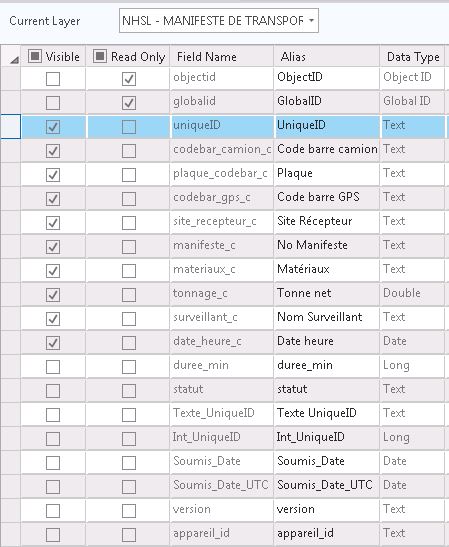
- Mark as New
- Bookmark
- Subscribe to RSS Feed
- Permalink
Hi Rene,
Again, I would not expect hidden fields to be hidden automatically if published by Survey123. Could you share the JSON of the feature layer info? I'm not sure why Pro would be hiding fields unless it was specified there.
- Mark as New
- Bookmark
- Subscribe to RSS Feed
- Permalink
Hi Rene,
I was asking for the JSON version of the 'Service URL' you can get to via the Item Details page of the feature service.
- Mark as New
- Bookmark
- Subscribe to RSS Feed
- Permalink
Hi Rene,
The service is secured; that is why I was asking for the JSON. Perhaps opening an Esri Technical Support ticket would make this a bit quicker to diagnose than relying on the GeoNet forum.
