- Home
- :
- All Communities
- :
- Products
- :
- ArcGIS Survey123
- :
- ArcGIS Survey123 Questions
- :
- Filter option missing from Data tab on Survey123 w...
- Subscribe to RSS Feed
- Mark Topic as New
- Mark Topic as Read
- Float this Topic for Current User
- Bookmark
- Subscribe
- Mute
- Printer Friendly Page
Filter option missing from Data tab on Survey123 web portal.

- Mark as New
- Bookmark
- Subscribe
- Mute
- Subscribe to RSS Feed
- Permalink
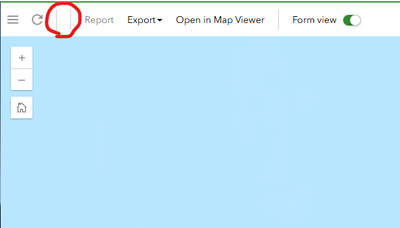
I'm running into this issue where I cannot filter/query my Survey123 dataset within the Data tab on the web portal. See screenshot below.
If I log in as the survey owner, the filter options are available, but under another account they are not. I've double checked my share/collaborate settings and everything looks right, so I'm not sure what's causing this.
I have a feeling it's something simple I'm missing.

- Mark as New
- Bookmark
- Subscribe
- Mute
- Subscribe to RSS Feed
- Permalink
Did you have a resolution to this issue?. I'm seeing the same behavior in some of my surveys. I can't see any difference between the configuration of the survey (apart from the time they were created). Thanks
- Mark as New
- Bookmark
- Subscribe
- Mute
- Subscribe to RSS Feed
- Permalink
Fixing a different issue, got this issue resolved. Below solution for the other issue (not getting Analyze and Data tabs): Post here
In my case, deleting the Hosted View that gets created when sharing the results fixed the issue. When the results of a S123 are shared with organization or a group, a new hosted view layer is created (SurveyName_results with an URL derived from form item ID).
This view will pick the service name of the survey (you will see something like this when the view layer is created): https://services3.arcgis.com/ABCovkCPMyTRnuA7/arcgis/rest/services/survey123_abcd78e7d2b54065656625r...
The service name is derived from the survey form itemID, in the example 'abcd78e7d2b54065656625rtfc01b120', it just adds "survey123" prefix and "_results" suffix to the URL. So, when you unshare the results in S123 web page and delete the hosted view layer, when sharing again, it will create the same URL, as it's derived from the survey form itemID.
The Analyze and Data tabs use this view layer to render the pages. My problem was also that the Survey was using submission_URL from an existing hosted feature layer. This seems to generate some extra issues, like not having the Filter in the data tab (see post here ). But recreating the view also fixed the filter issue.
