We are excited to announce that the September 2024 update for ArcGIS Survey123 is now available. This release brings essential fixes for the Survey123 website and web app, as well as enhancements to survey management and Survey123 reports. Key updates include:
- Recycle Bin Support: Added to the Survey123 website.
- Enhanced Reporting Features: Ability to print web maps and filter operational layers when generating Survey123 reports.
- Additional Improvements: Various enhancements and bug fixes have been implemented.
Recycle bin support on the Survey123 website
The new recycle bin feature enables deleted surveys to be retained for a predefined period, typically 14 days, before they are permanently removed. Initially introduced in Survey123 Connect with the June 2024 update, this functionality is now accessible on the Survey123 website as well..
Once the recycle bin is activated in your ArcGIS Organization, you will see the option to “Send to the recycle bin in your ArcGIS account” in the delete survey dialog. This allows for easy recovery of surveys in the event of accidental deletion.
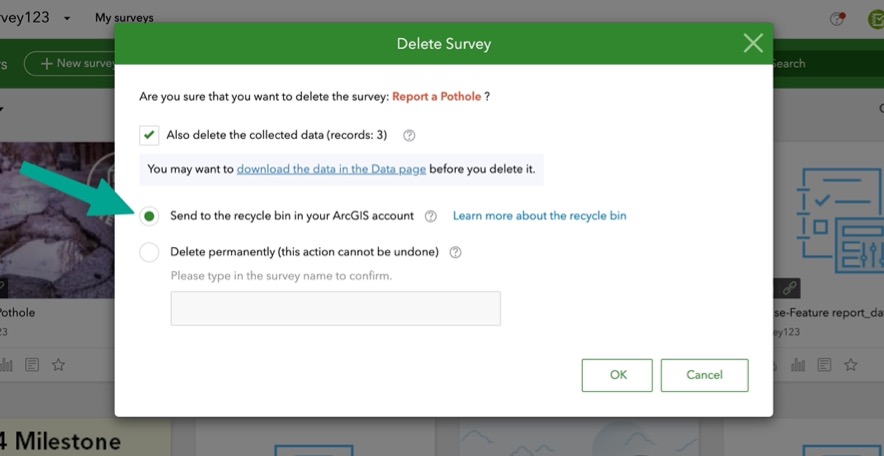
Survey123 Web Recycle Bin
Survey123 report enhancements
Printing web maps
This version of Survey123 offers enhanced flexibility and customization for incorporating maps into Survey123 reports. Previously, printing a web map in a Survey123 report required referencing a geopoint question in the syntax. For Example:
${geopoint1 | map:”dc0722c1c56c47268da4c1e046516b21″ | size:400:300}
This will display the collected point as a blue pin on the designated web map. However, there are situations where you may prefer to hide the blue pin, particularly if the web map already provides all the required information. In these instances, the new $map keyword in the report template syntax enables you to print the web map directly, eliminating the need to reference a survey question:
${$map | map:” 85b4c863faac44548cd96ca21a70e236″ | size:600:300}
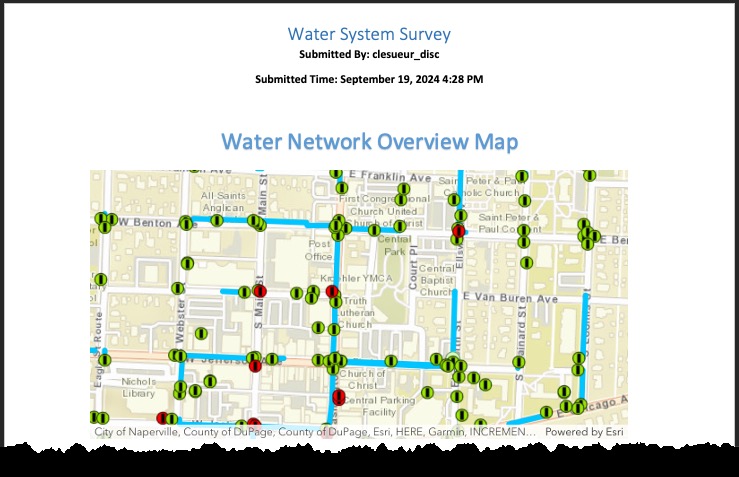
Web map in report without Geopoint
New map filters for Survey123 reports
If you want to print only a subset of features from an operational layer in the web map, the new mapFilters:”<parametersForQueryOperation>” method is designed for this purpose. For example, if there’s a feature layer containing parcel inspections:
- ${$map | map:”7f2ef03be73a4b51b9e0480df46de7b1″ | mapFilters:”where=parcelID=’123-456-7890′”} –This prints only inspections for parcel 123-456-7890.
- ${$map | map:”7f2ef03be73a4b51b9e0480df46de7b1″ | mapFilters:”where=parcelID='”+parcelID+”‘”} – If you are printing an individual report for a parcel, this filters inspections to the current parcel. Here, the first “parcelID” is the field name, and the second “parcelID” represents the current parcel in the report.
For more information, refer to Survey123 Tricks of the Trade: Print web map and filter features in operational layers in reports.
Other enhancements and bug fixes
Website, web app and report service
- DE-000007576 BUG-000134099 ArcGIS Survey123 website does not load the survey when the user owns more than a certain number of Access and update capability groups
- BUG-000165788 The background image and thumbnail of a survey are removed when the survey is republished by the ArcGIS Survey123 web designer after the February 2024 release
- BUG-000163949 Mobile browsers do not use the same format for image names as PC for the ArcGIS Survey123 web survey
- ENH-000137567 Provide the functionality to apply a dynamic filter to the features displayed on a web map in a Survey123 feature report
- BUG-000164918 Check marks don’t appear in ArcGIS Survey123 reports when the single select question responses contain a comm
- BUG-000170665 Creating and uploading report templates and generating reports in Survey123 website in some versions of ArcGIS Enterprise fails
Field app
- On Android 14, a new location permission request has been added to ensure features continue to work when the app is in background.
- On Android 13 and later, a bug was fixed in which an error message appeared when you measure objects using Spike.
What’s coming next
Our next update is scheduled for November 2024 and will include important fixes for Survey123 Connect and the field app, as well as several key enhancements based on your feedback for the Survey123 web app and website. Highlights of this update include:
- Automatic translation: expanding support to more languages beyond those currently supported by ArcGIS Online
- Grid layout support in the web app
 Example of Grid Layouts in the Survey123 Web AppExamples of Grid Layouts in the Survey123 Web App
Please stay tuned to our Survey123 Early Adopter Community and release blogs for more updates.
