- Home
- :
- All Communities
- :
- Products
- :
- ArcGIS Spatial Analyst
- :
- ArcGIS Spatial Analyst Questions
- :
- Topo to raster
- Subscribe to RSS Feed
- Mark Topic as New
- Mark Topic as Read
- Float this Topic for Current User
- Bookmark
- Subscribe
- Mute
- Printer Friendly Page
Topo to raster

- Mark as New
- Bookmark
- Subscribe
- Mute
- Subscribe to RSS Feed
- Permalink
Hello. I am trying to create contour lines in arcmap but when I created raster, it was only showing one colour and of course no contour lines when I created contour lines.
The hydraulic head numbers I used to create raster are quite small, around 16, 17. I wonder if that is the reason. Trying to figured out what could be the reason.
Would be great if you guys could help.
Thank you.


- Mark as New
- Bookmark
- Subscribe
- Mute
- Subscribe to RSS Feed
- Permalink
something seems off with your interpolation, if that what the Capture.JPG is. The range of values in that field would suggest a different result.
If you used
Topo to Raster (Spatial Analyst)—ArcGIS Pro | Documentation
could you elaborate on the options used
... sort of retired...


- Mark as New
- Bookmark
- Subscribe
- Mute
- Subscribe to RSS Feed
- Permalink
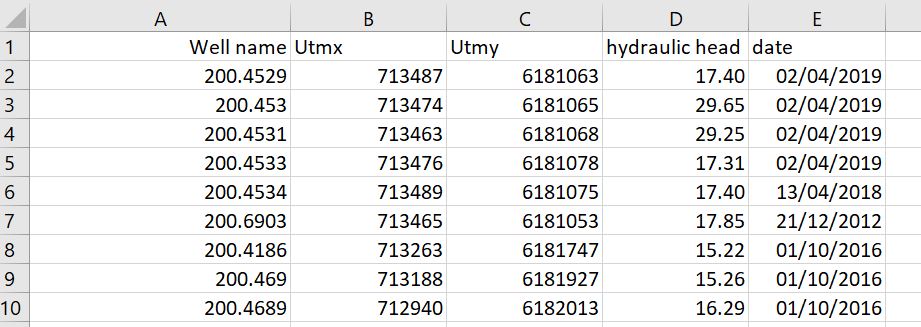
1.JPG is the screenshot of an excel/csv file. Do you also have the same attributes reflecting in the attribute table of the point layer. If you have created an XY event layer, you should export the layer as a shapefile or FGDB Feature Class.
Using the above point shapefile, run Topo to Raster > (Field:Hydraulic_Head) > (Type: PointElevation) > (Primary Type of Input Data: Spot)
You could then run Contour, to generate contour lines from the above Raster Surface.
Think Location
- Mark as New
- Bookmark
- Subscribe
- Mute
- Subscribe to RSS Feed
- Permalink
something seems off with your interpolation, if that what the Capture.JPG is. The range of values in that field would suggest a different result
... sort of retired...
- Mark as New
- Bookmark
- Subscribe
- Mute
- Subscribe to RSS Feed
- Permalink
Hello. I am trying to create contour lines in arcmap but when I create raster, it was only showing one colour and of course no contour lines when I create it.
The hydraulic head numbers I used to create raster are quite small, around 16, 17. I wonder if that is the reason. Trying to figured out what could be the reason.
Would be great if you guys could help.
Thank you.


