- Home
- :
- All Communities
- :
- Developers
- :
- ArcGIS Pro SDK
- :
- ArcGIS Pro SDK Questions
- :
- Re: Graphic layer: How to rotate a graphic Element
- Subscribe to RSS Feed
- Mark Topic as New
- Mark Topic as Read
- Float this Topic for Current User
- Bookmark
- Printer Friendly Page
Graphic layer: How to rotate a graphic Element

- Mark as New
- Bookmark
- Subscribe to RSS Feed
- Permalink
I would like to rotate/ flip a graphic element using the Pro SDK but could not find any references for doing this.
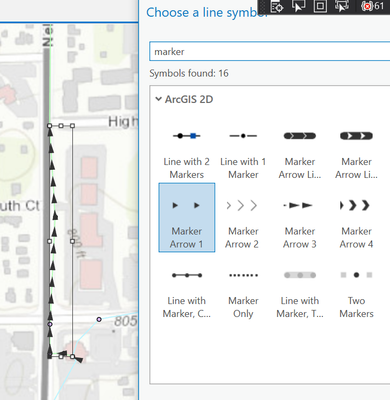
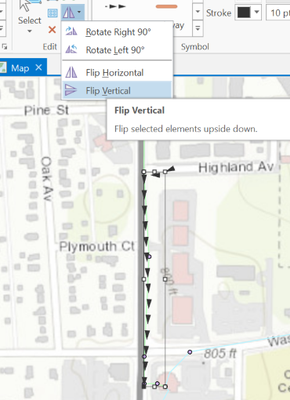
See below images for reference.
Line element with marker arrow symbol
Marker arrow symbol after vertical flip
Below is the code snippet of how I'm creating an element. How can I rotate or flip it while creating it?
CIMSymbolReference symbolReference = SymbologyHelper.GetLineSymbolReference("Marker Arrow 1");
CIMLineGraphic cimGraphicElement = new CIMLineGraphic
{
Line = geometry as Polyline,
Symbol = symbolReference
};
graphicsLayer.AddElement(cimGraphicElement);


- Mark as New
- Bookmark
- Subscribe to RSS Feed
- Permalink
Hi,
I think you need to rotate geometry first (before creating cimGraphicElement). It could be done by using GeometryEngine Rotate method. More info here:
https://pro.arcgis.com/en/pro-app/latest/sdk/api-reference/#topic8281.html
- Mark as New
- Bookmark
- Subscribe to RSS Feed
- Permalink
Thank you. will try this out
