- Home
- :
- All Communities
- :
- Developers
- :
- ArcGIS Pro SDK
- :
- ArcGIS Pro SDK Questions
- :
- Re: Attributes Pane editing context menu id
- Subscribe to RSS Feed
- Mark Topic as New
- Mark Topic as Read
- Float this Topic for Current User
- Bookmark
- Printer Friendly Page

- Mark as New
- Bookmark
- Subscribe to RSS Feed
- Permalink
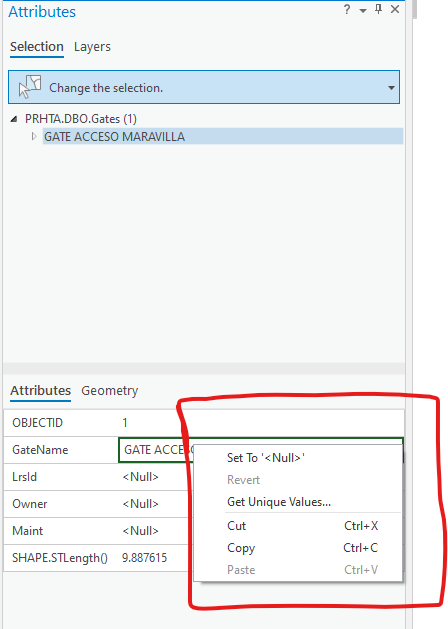
I am attempting to insert a custom button in the right click context menu highlighted in red in the attached image. I am unable however, to determine the refid of this specific context menu. I have scoured https://github.com/esri/arcgis-pro-sdk/wiki/DAML-ID-Reference-Editing.daml#menus to no avail. Because I turned on the capability, when I hover over any button, I am able to see its id but in this case, none of the commands in this context menu shows any id on hovering. Any idea how I can retrieve the id of this context menu for update purposes? @CharlesMcLeod @Wolf @UmaHarano
Solved! Go to Solution.
Accepted Solutions


- Mark as New
- Bookmark
- Subscribe to RSS Feed
- Permalink
it appears that that menu is off the user control itself and not from daml so it cannot be customized
- Mark as New
- Bookmark
- Subscribe to RSS Feed
- Permalink
it appears that that menu is off the user control itself and not from daml so it cannot be customized

- Mark as New
- Bookmark
- Subscribe to RSS Feed
- Permalink
@MarvisKisakye1 Did you get any solution of this? I am also looking for same solution
I have tried many ways in config.daml but no success, below are sample entries in file i tried.
<!-- 1. esri_editing_Attributes_RelatedNonFeatureRowContextMenu: Drill down from the spatial feature to the Non Spatial object for the Context Menu Item to appear
	 e.g. Right-clicking a Related record (child record) in the top selection tree. -->
<updateMenu refID="esri_editing_Attributes_RelatedNonFeatureRowContextMenu">
	<insertButton refID="POC_Addins_CustomContext_Views_CatalogHelpBtn" separator="true" placeWith="esri_editing_Attributes_StandaloneTablePropertiesContextMenuItem" />
</updateMenu>

<!-- 2. esri_editing_Attributes_NonFeatureRowContextMenu: is used for standalone table records that are open in the Attributes Pane but are not currently being viewed as a "related child" of a map feature.
     e.g. In ArcGIS Pro, when you open a standalone table (one without geometry) and select a row, that row appears in the Attributes Pane. This specific refID controls the right-click menu for that record's entry in the selection tree.-->
<updateMenu refID="esri_editing_Attributes_NonFeatureRowContextMenu">
	<insertButton refID="POC_Addins_CustomContext_Views_CatalogHelpBtn" separator="true" placeWith="esri_editing_Attributes_StandaloneTablePropertiesContextMenuItem" />
</updateMenu>

<updateMenu refID="esri_editing_Attributes_FeatureContextMenu">
	<insertButton refID="POC_Addins_CustomContext_Views_CatalogHelpBtn" separator="true" placeWith="esri_editing_Attributes_LayerPropertiesContextMenuItem" />
</updateMenu>

<!-- esri_editing_Attributes_FeatureRowContextMenu: Right-clicking a Map Feature (Point, Line, Poly) in the top selection tree. -->
<updateMenu refID="esri_editing_Attributes_FeatureRowContextMenu">
	<insertButton refID="POC_Addins_CustomContext_Views_CatalogHelpBtn" separator="true" />
</updateMenu>


<!-- esri_editing_AttributesPaneAttributesContextMenu: Right-clicking the actual field values/cells in the bottom grid. -->
<updateMenu refID="esri_editing_AttributesPaneAttributesContextMenu">
	<insertButton refID="POC_Addins_CustomContext_Views_CatalogHelpBtn" separator="true" />
</updateMenu>

<updateMenu refID="esri_editing_AttributesPane_GridContextMenu">
	<insertButton refID="POC_Addins_CustomContext_Views_CatalogHelpBtn" separator="true" />
</updateMenu>
Please refer screenshot: