Select to view content in your preferred language

Arcgis pro sdk : File/folder dialog

4687
2
04-21-2020 11:48 PM
by Anonymous User
Not applicable
3 2 4,687

Have noticed that there is arcgis pro sdk OpenItemDialog object which allow developers to use for consistent look and feel like arcgis pro.


Below is the ArcPro github guide.

ProGuide Custom Browse Dialog Filters · Esri/arcgis-pro-sdk Wiki · GitHub 


However if we run into the scenario to get the file types which are not natively support by the sdk.

Actually we can use two other libraries which are provided by microsoft.


For getting folder path - 

using (FolderBrowserDialog tmpDestination = new FolderBrowserDialog())
                {

                    if (tmpDestination.ShowDialog() == DialogResult.OK)
                    {
                        this.InputModel.SourceFolderPath = tmpDestination.SelectedPath;
                        
                                            
                    }
                }‍‍‍‍‍‍‍‍‍‍‍‍‍‍‍‍‍‍‍‍

Help doco of that class : FolderBrowserDialog Class (System.Windows.Forms) | Microsoft Docs 


That will look like this.


For getting file for specific extension - like excel files. 

OpenFileDialog openFileDialog = new OpenFileDialog();
                openFileDialog.Filter = "Excel Files|*.xls;*.xlsx;*.xlsm";
                if (openFileDialog.ShowDialog() == DialogResult.OK)
                {              

                   //lets move on with 
string filePath = openFileDialog.FileName;
                }‍‍‍‍‍‍‍‍‍‍‍‍‍‍‍‍

Help doco of that class :OpenFileDialog Class (System.Windows.Forms) | Microsoft Docs 


That will look like this.
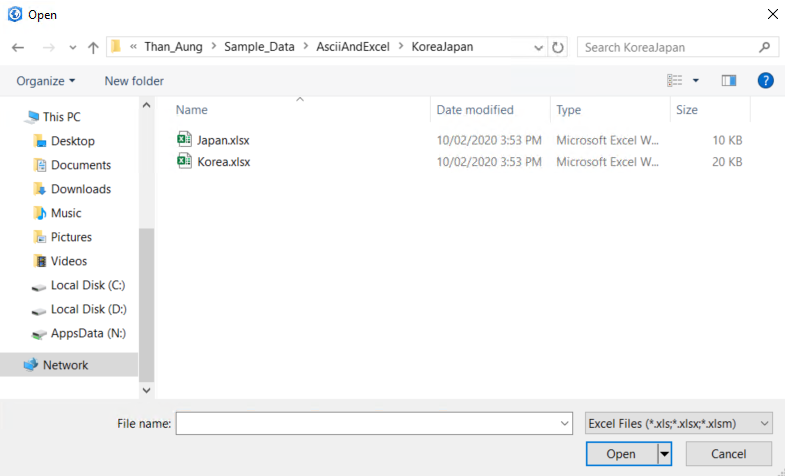
 

All in all the point is that ArcGIS pro sdk is based on the wpf c#, so sometime if sdk don't have build in functionality, we can always go back to foundation to base libraries of wpf and sample out there may be in stackoverflow especially UI customization and, thread management. 


Feel free to comment, it is just my first blog because noticed that could give some ideas to the developer who does not know much about wpf development or .net framework area.

2 Comments
GKmieliauskas
Esri Regular Contributor

Hi Than,

I had experience today with excel files and I found solution using ArcGIS Pro filters:

                var xlsxFilter = BrowseProjectFilter.GetFilter("esri_browseDialogFilters_browseFiles");
                xlsxFilter.FileExtension = "*.xlsx;*.xls";//restrict to specific extensions as needed
                xlsxFilter.BrowsingFilesMode = true;
                //Specify a name to show in the filter dropdown combo box - otherwise the name will show as "Default"
                xlsxFilter.Name = "Excel Files (*.xlsx;*.xls)";
                //Use the filter with the OpenItemDialog
                var dlg = new OpenItemDialog()
                {
                    BrowseFilter = xlsxFilter, //or use defaultFilter or contentFilter...
                    Title = "Select Satellites Table"
                };
                //show the dialog and retrieve the selection if there was one
                if (!dlg.ShowDialog().Value)
                    return;
                var item = dlg.Items.First();
                txtXLSFile = item.Path;
Another one solution is to use composite filters. To composite filter you can add one filter for xls, another one for xlsx or csv files.
For folder browsing there is ArcGIS Pro filter:
                OpenItemDialog dlg = new OpenItemDialog
                {
                    Title = sTitle,
                    InitialLocation = initialLocation,
                    AlwaysUseInitialLocation = true,
                    MultiSelect = false,
                    Filter = ItemFilters.folders
                };
                if (!dlg.ShowDialog().Value)
                    return;
                var item = dlg.Items.First();
               txtFolderPath = item.Path;
by Anonymous User
Not applicable

Hi Gintautas Kmieliauskas‌,

Thank for the pointer. Bad example for filter, I should have explore more and choose one which is not in the ArcGIS pro sdk.

Contributors