- Home
- :
- All Communities
- :
- Products
- :
- ArcGIS Pro
- :
- ArcGIS Pro Questions
- :
- Summarize Within Summary Fields not working
- Subscribe to RSS Feed
- Mark Topic as New
- Mark Topic as Read
- Float this Topic for Current User
- Bookmark
- Subscribe
- Mute
- Printer Friendly Page
Summarize Within Summary Fields not working

- Mark as New
- Bookmark
- Subscribe
- Mute
- Subscribe to RSS Feed
- Permalink
I've been using the Summarize Within feature for a while to get the count of points and the process works fine. However, I am now adding the Summary Fields function to get the mean of a particular field.
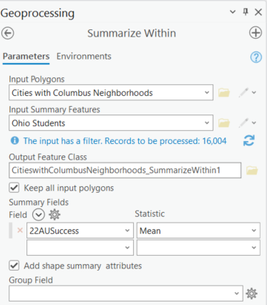
The field is numeric and there are no null values (the filter has not prevented me from running Summarize Within previously, though this is the first time I'm trying to use the Summary Field). The tool runs, but fails and here are the details:
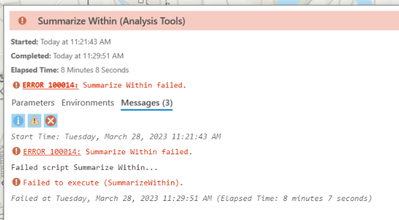
When I remove the Summary Field, the tool runs fine. I'm using ArcGIS Pro, 3.1.0 and it is up to date.


- Mark as New
- Bookmark
- Subscribe
- Mute
- Subscribe to RSS Feed
- Permalink
From looking at the screenshots it would appear that the output feature class name is too long. This may result in a long file name, and thus, the error is returned.
To attempt to resolve the issue, you could try to specify a shorter name in the Output Feature Class parameter when running the tool. Esri recommends using a short name. Error: 100014: Summarize within failed (esri.com)
I hope this helps!
Thank you,
Corey
- Mark as New
- Bookmark
- Subscribe
- Mute
- Subscribe to RSS Feed
- Permalink
Thank you, @Corey_M , but that did not work.

- Mark as New
- Bookmark
- Subscribe
- Mute
- Subscribe to RSS Feed
- Permalink
Were there joins on the summary layers by chance? I had a similar issue with summarize within failing when I was simply summarizing the total population of blocks into block group polygons. I ended up finding that when there was a join on the summarized layer (blocks) it would fail. However, when I exported blocks as a feature and tried again, it worked. Not sure if that was the issue with the original post but maybe an idea for other folks having this problem in the future
