- Home
- :
- All Communities
- :
- Products
- :
- ArcGIS Pro
- :
- ArcGIS Pro Questions
- :
- Parquet & Pro
- Subscribe to RSS Feed
- Mark Topic as New
- Mark Topic as Read
- Float this Topic for Current User
- Bookmark
- Subscribe
- Mute
- Printer Friendly Page

- Mark as New
- Bookmark
- Subscribe
- Mute
- Subscribe to RSS Feed
- Permalink
Hey All,
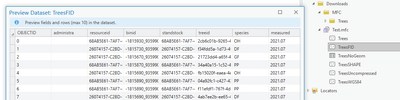
Ive created a multi-file connection (mfc) to a directory with some parquet files in Pro 3.1.3
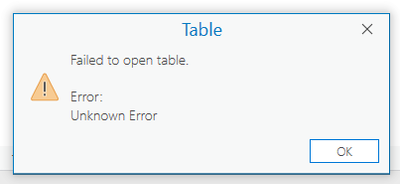
The mfc creates fine and I can preview the layer (see below) but when I add the layer to a map I get no geometries and if I open the attribute table I get an unknown error.
Pro recognizes the geometry column fine according to the layer properties.
Ive tried;
- Different projections (original data is not in wgs84)
- Adding an objectid
- Removing the geometry column
- Removing the compression
But I will get the same error and no geometries.
Solved! Go to Solution.


- Mark as New
- Bookmark
- Subscribe
- Mute
- Subscribe to RSS Feed
- Permalink
I was able to work with Trevor to figure out what was going on. Pro 3.2 (and it's patches) were unable to recognize the parquet files that he shared with us. We only see this happen with some parquet files, since Pro 3.2 can recognize other parquet files just fine. As a workaround, we wrote Trevor's parquet files out using Pandas and Pro 3.2 was able to recognize them. This will be fixed in the next release of Pro (3.3 and above). Thank you for reporting this issue Trevor!
Thanks,
Derek Gourley
GeoAnalytics Product Engineer

- « Previous
-
- 1
- 2
- Next »
- « Previous
-
- 1
- 2
- Next »