- Home
- :
- All Communities
- :
- Products
- :
- ArcGIS Pro
- :
- ArcGIS Pro Questions
- :
- Locate Function Fail?
- Subscribe to RSS Feed
- Mark Topic as New
- Mark Topic as Read
- Float this Topic for Current User
- Bookmark
- Subscribe
- Mute
- Printer Friendly Page
Locate Function Fail?

- Mark as New
- Bookmark
- Subscribe
- Mute
- Subscribe to RSS Feed
- Permalink
As much as I try to like, work, and slowly adopt ArcGIS Pro - it continues to disappoint. In ArcMap, I can click on a binocular icon and search all visible layers with no configuration on my part. I'm able to quickly find a street in a local layer or a REST service that exists in my map and simply zoom to that location.
It took 15 minutes to use the binocular icon in ArcGIS Pro just to get to a list that I had to pick through to find the correct location. Someone check my work flow here - but I'm now required to add the layer to the Locate tool that I want to search, configure each attribute to an equals or contains, then check and uncheck each layer I want to use for the search, and finally zoom to a number of results just to get close to where I want to be???
In this instance, I wanted to find a street called Joyce using a REST service from our P&Z. In ArcMap I can type "Joyce" and see a results list of Joyce Drive, Joyce Court, Joyce Circle, etc. In Pro, I get 12 results with just "Joyce", requiring me to click through 5 just to get to Joyce Circle. Sure - I could type Joyce Circle. But I DIDN'T have too before - and I liked it!
Change is not a problem with me. I was excited about Pro. However, when users have to continually cry out for simple tools we are used to using - the product is a no-go.


- Mark as New
- Bookmark
- Subscribe
- Mute
- Subscribe to RSS Feed
- Permalink
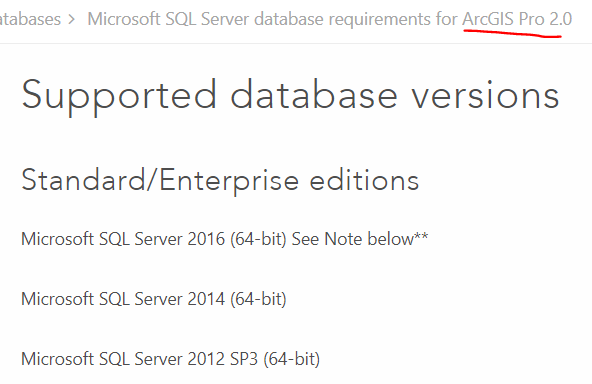
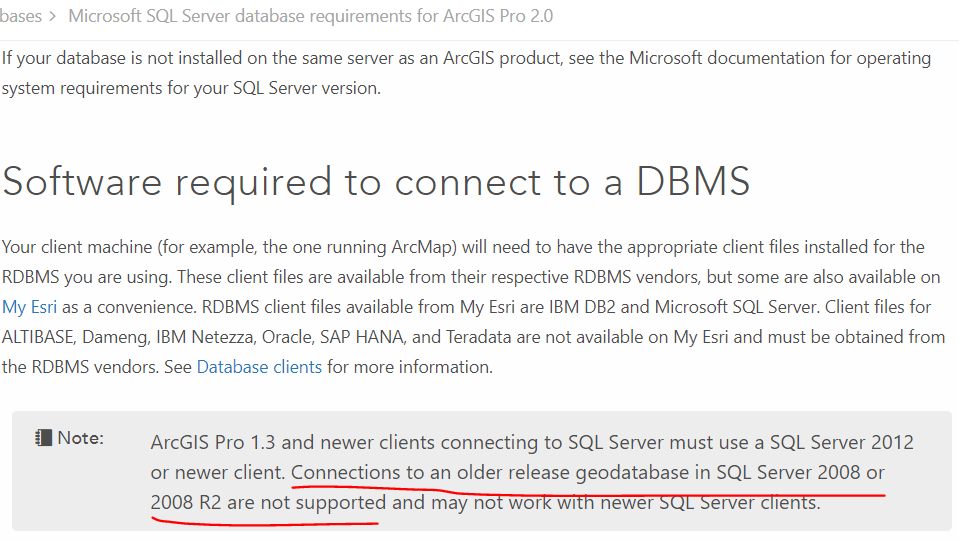
As a test, copy your data to a local file geodatabase and follow the same steps. I think you're just running an incompatible version...
Microsoft SQL Server database requirements for ArcGIS Pro 2.0—Help | ArcGIS Desktop

- Mark as New
- Bookmark
- Subscribe
- Mute
- Subscribe to RSS Feed
- Permalink
Thanks Kory. Exporting the dataset to a file geodatabase performed much faster within ArcPro- which is great!
Could be the RDBMS compatibility factor that is causing problems with the search on the production dataset. Will be upgrading to SQL Server 2014 soon, so will hold off on any further ArcPro explorations until then. To be continued...
Thanks for your help!

- « Previous
-
- 1
- 2
- Next »
- « Previous
-
- 1
- 2
- Next »