- Home
- :
- All Communities
- :
- Products
- :
- ArcGIS Pro
- :
- ArcGIS Pro Questions
- :
- Labels overlap features with 1000 weight
- Subscribe to RSS Feed
- Mark Topic as New
- Mark Topic as Read
- Float this Topic for Current User
- Bookmark
- Subscribe
- Mute
- Printer Friendly Page
Labels overlap features with 1000 weight

- Mark as New
- Bookmark
- Subscribe
- Mute
- Subscribe to RSS Feed
- Permalink
Arcgis Pro 3.2.2
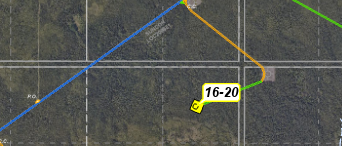
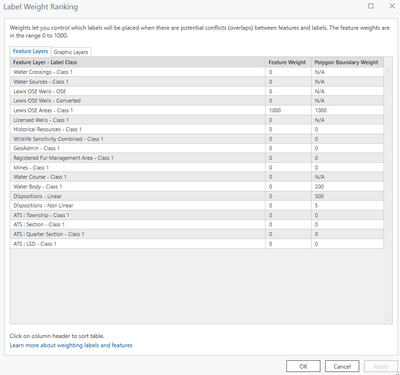
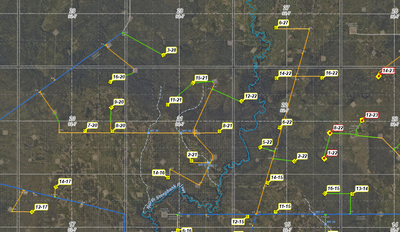
I have the feature weight of the green lines below wet to 1000 for interior and exterior.
The label ( separate feature) is set to best position and top left zone as 2 rank. maximum offset is 1000 map units (trying to let it move)
Maplex label engine is on.
Thought it may be the balloon that is not considered in the label placement but the text is overlapping the feature with a weight of 1000.
Would anticipate for the "16-20" label it would move to the top left zone and cant figure out why it so not.


- Mark as New
- Bookmark
- Subscribe
- Mute
- Subscribe to RSS Feed
- Permalink
Interesting. So a couple things I tried with similar data is to change the callout type from balloon to background and changed the color to white and changed the outline color to black to see if that made any difference. Kind of. Second thing I did was go into the zones area of placement and change the 2 value to the 6 o'clock position vs the 10 o'clock position to see if that helped with placements and overlaps. Kind of. Try changing your zones up a bit and see if you get a desired outcome.

- Mark as New
- Bookmark
- Subscribe
- Mute
- Subscribe to RSS Feed
- Permalink
Beyond annoying. I have the same issue. Road polylines set to zero weight, property polygon areas and outlines set to max 1000 and STILL the road names overlap the polygons, even though there is a large open length of road to label. Would love to hear from a developer, as I read someone else had this issue back in the '1' version of Arc Pro.

- Mark as New
- Bookmark
- Subscribe
- Mute
- Subscribe to RSS Feed
- Permalink
I run into this issue all the time, except in my case the callouts are overlapping the very features they are labeling. I routinely make map series depicting road networks, sometimes comprised of hundreds of maps. Converting to annotation is not an option and changing the values on the position wheel isn't really helpful across so many scale levels and situations.
Here is my workaround: I create a second label class for my line feature and give it an arbitrary label text of "0000000000". I set the position to "street placement" and enable "spread labels". I configure my label to be spread across the entire length of my line. I set the weight of this label class to 1000, and set the text color to clear. This method is not perfect, but almost always has better results than not using it. Hopefully ESRI fixes this issue in a future update.

- Mark as New
- Bookmark
- Subscribe
- Mute
- Subscribe to RSS Feed
- Permalink
EDIT: I am apparently a Liar... because I can't get this to work again. Sorry everybody.
The only solution that has worked for me is to create a polygon layer using Buffer. Set the weight on the polygon layer. Make it transparent.
I've used it in the past, but I'm having a hard time confirming how effective it is because my computer was already struggling with this map (lots of map frames) and with the buffer layers it has stopped even trying to update.
