- Home
- :
- All Communities
- :
- Products
- :
- ArcGIS Pro
- :
- ArcGIS Pro Questions
- :
- Import connections from ArcMap/Catalog
- Subscribe to RSS Feed
- Mark Topic as New
- Mark Topic as Read
- Float this Topic for Current User
- Bookmark
- Subscribe
- Mute
- Printer Friendly Page
Import connections from ArcMap/Catalog

- Mark as New
- Bookmark
- Subscribe
- Mute
- Subscribe to RSS Feed
- Permalink
Is there any way to import database and server connections into ArcGIS Pro from ArcCatalog or ArcMap?
- Mark as New
- Bookmark
- Subscribe
- Mute
- Subscribe to RSS Feed
- Permalink
That just shows some defaults - Global Scene & MyProject.

- Mark as New
- Bookmark
- Subscribe
- Mute
- Subscribe to RSS Feed
- Permalink
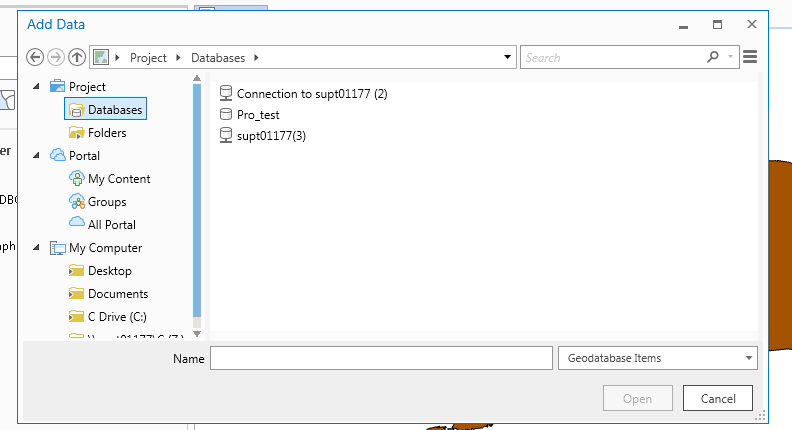
Not sure then why you are not seeing the connections. This is how it should look:
- Mark as New
- Bookmark
- Subscribe
- Mute
- Subscribe to RSS Feed
- Permalink
I sure wish it did!
- Mark as New
- Bookmark
- Subscribe
- Mute
- Subscribe to RSS Feed
- Permalink
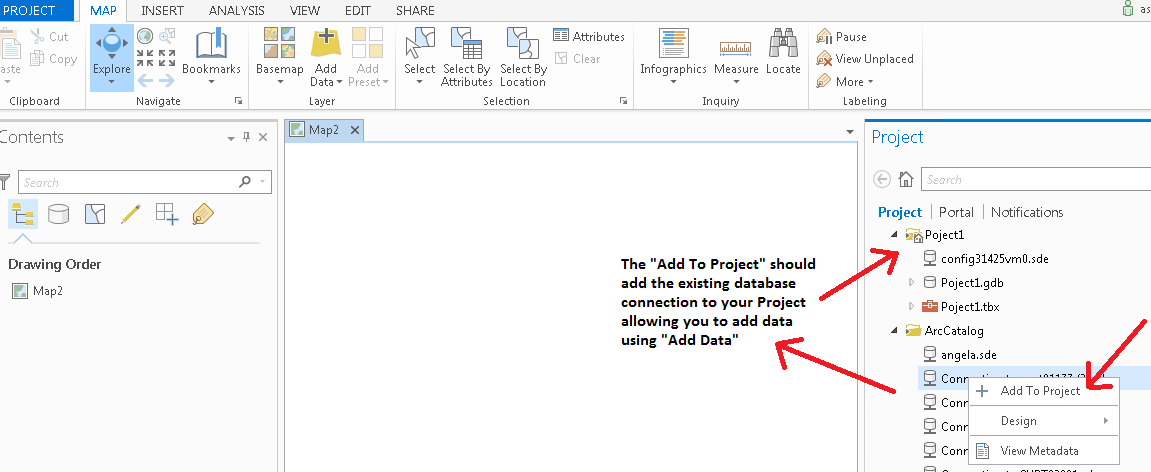
Last try. I think you did this, just confirming:
- Mark as New
- Bookmark
- Subscribe
- Mute
- Subscribe to RSS Feed
- Permalink
Thank you for your response. This connection shows up once I add the folder connection, but does not persist between projects. Nor does it persist when I close and re-open the same project. So as it is now, I have to re-add my database connections and my folder connections every time I open a PRO project, unless I'm missing some fundamental step here.
However I think the problem may be bigger than this. I'm finding now that one of my past projects does not hold any data! I did a PRO project a couple weeks ago, published it to AGOL, and now that same PRO project file has literally zero data in it, including the .gdb that got created with the project and is located in the project folder. No map and no data in the GDB. What am I missing here? Do we need to do more than "Save Project" to when saving in PRO?
- Mark as New
- Bookmark
- Subscribe
- Mute
- Subscribe to RSS Feed
- Permalink
I'll suggest discussing this with Esri Tech Support. Maybe they can take a look at your configuration and all, and then figure out the issue.
- Mark as New
- Bookmark
- Subscribe
- Mute
- Subscribe to RSS Feed
- Permalink
Alrighty. Thanks for your help.

- « Previous
-
- 1
- 2
- Next »
- « Previous
-
- 1
- 2
- Next »