- Home
- :
- All Communities
- :
- Products
- :
- ArcGIS Pro
- :
- ArcGIS Pro Questions
- :
- Re: How to do a batch conversion of point feature ...
- Subscribe to RSS Feed
- Mark Topic as New
- Mark Topic as Read
- Float this Topic for Current User
- Bookmark
- Printer Friendly Page
How to do a batch conversion of point feature data columns to single band rasters?

- Mark as New
- Bookmark
- Subscribe to RSS Feed
- Permalink
Hello,
I have a point feature class that contains over 100 columns (variables) of data (ArcMap 10.8.1) . I would like to convert each column to a single band raster. The reason for doing this is to create a multiband raster that can be subject to Principal Components analysis in ArcGIS Pro (2.7).
Thanks


- Mark as New
- Bookmark
- Subscribe to RSS Feed
- Permalink
You could run the desired Interpolation tool in batch.
e.g. Run Kriging as a batch tool.
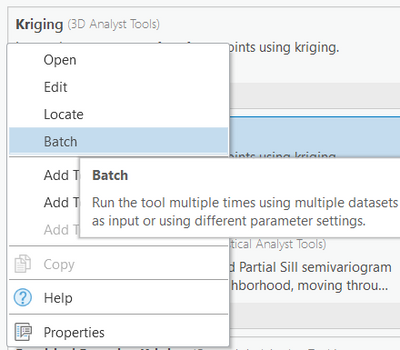
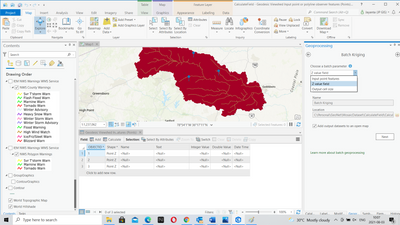
Choose "Z value Field" as your batch parameter. You could save the batch tool as well.
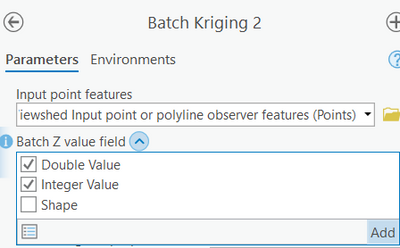
After choosing the input point feature, you can select multiple fields from the drop-down of "Batch Z value fields".
You may note that the output comes with an inline variable substitution, "%Name%", which helps in creating multiple output raster files in a given workspace.
Think Location
- Mark as New
- Bookmark
- Subscribe to RSS Feed
- Permalink
Thanks Jayanta. I also found another solution in Pro by using the batch option in the feature to raster conversion tool.
