- Home
- :
- All Communities
- :
- Products
- :
- ArcGIS Pro
- :
- ArcGIS Pro Questions
- :
- Datum Transformation cannot be found
- Subscribe to RSS Feed
- Mark Topic as New
- Mark Topic as Read
- Float this Topic for Current User
- Bookmark
- Subscribe
- Mute
- Printer Friendly Page

- Mark as New
- Bookmark
- Subscribe
- Mute
- Subscribe to RSS Feed
- Permalink
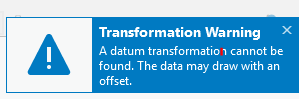
I upgraded ArcGIS Pro from 10.8 to 10.8.1. When opening existing layout created from ArcGIS Pro 10.8, the message below pop up every time I open up any layout created from older version.
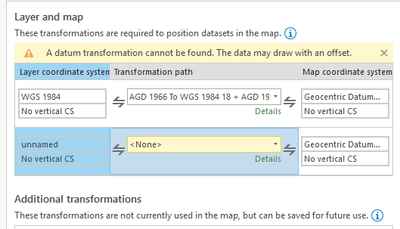
I tried to fix the issue but the second transformation shown below cannot be edited.
Any suggestion to fix the issue would be greatly appreciated.
Solved! Go to Solution.

- Mark as New
- Bookmark
- Subscribe
- Mute
- Subscribe to RSS Feed
- Permalink
This issue appears to have disappeared with version 3.x (not sure which version exactly). It is not present in version 3.3 (for me), and was not present in version 3.2. I can't remember for sure about 3.0 or 3.1.

- Mark as New
- Bookmark
- Subscribe
- Mute
- Subscribe to RSS Feed
- Permalink
Here is a fun twist. When an Imagery Layer in Portal is added directly to a map in Pro, it does not trigger the transformation warning. When the same Imagery Layer is added to a Web Map in Portal and the Web Map is opened in Pro, this triggers the transformation warning. The Imagery Layer references a mosaic.
- Mark as New
- Bookmark
- Subscribe
- Mute
- Subscribe to RSS Feed
- Permalink
Found the issue for our case. Our source raster was in UTM. Then referenced in a mosaic projected to Web Mercator. Then the mosaic was published and added to a Web Map in Portal. Changing the mosaic so it used the source raster UTM projection resulted in the "transformation warning" dialog no longer appearing.

- « Previous
-
- 1
- 2
- Next »
- « Previous
-
- 1
- 2
- Next »