- Home
- :
- All Communities
- :
- Products
- :
- ArcGIS Pro
- :
- ArcGIS Pro Questions
- :
- Re: Change attribute table from read only mode
- Subscribe to RSS Feed
- Mark Topic as New
- Mark Topic as Read
- Float this Topic for Current User
- Bookmark
- Printer Friendly Page
Change attribute table from read only mode

- Mark as New
- Bookmark
- Subscribe to RSS Feed
- Permalink
I want to transfer a row or rows to another attribute table. I know that I should use the join command, but the problem is that when I run the command, the error message Target *** is read-only appears. On the other hand, I cannot find the attribute table to change it from read-only mode. How do you think I can solve this problem?

- Mark as New
- Bookmark
- Subscribe to RSS Feed
- Permalink
How can you do the join if you don't know where the table is
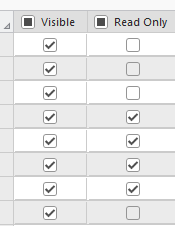
In the destination table select Data Design > Fields >
make sure Read only is not checked.
- Mark as New
- Bookmark
- Subscribe to RSS Feed
- Permalink
Thank you for your reply.
But unfortunately, despite unchecking the "read only" mode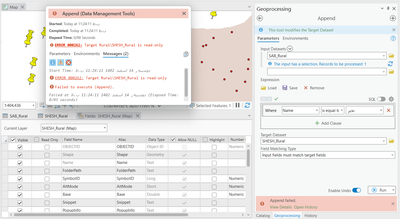
- Mark as New
- Bookmark
- Subscribe to RSS Feed
- Permalink
is your table being pulled in from a feature service?
- Mark as New
- Bookmark
- Subscribe to RSS Feed
- Permalink
Yes. A KML file has been converted into a Layer. Is this important for future operations on the "attribute tables"?

- Mark as New
- Bookmark
- Subscribe to RSS Feed
- Permalink
I had a similar problem, where I could not add any new fields into the table because it was in "read-only" mode or was "pending edits". What I was able to find out this morning is that you can go into the attribute table, click on any field, click "calculate field" and if there's a notification at the top of that menu that says "pending edits", just click "save" and it would allow me to edit the table afterwards.

- Mark as New
- Bookmark
- Subscribe to RSS Feed
- Permalink
I ran into a similar issue and my solution was to export the table under "data" in the right click menu. That created an identical table that I was able to manipulate.
