Select to view content in your preferred language

Can't get XY Table to Point tool to pull X Y fields in

151
11
Jump to solution
yesterday
AvaFarouche
Frequent Contributor

Hi, all,

I added a table to my Pro map (version 3.5.2) and I can't get the XY Table to Point tool to recognize the X and Y Fields. It just won't pull them in so I can run the tool:
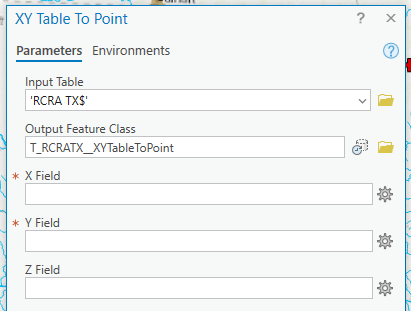
AvaFarouche_0-1765498296975.png


There are plain Lat Long fields. I made sure they're formatted to numeric w/6 decimal places. The field names are just Lat and Long. None of the field names have spaces or special characters or even numbers in them. All of the field headers/ names are formatted as text. I restarted Pro and then restarted my computer.

I do this all the time and I can't figure out why it's not working. I did download the original table as a giant csv, which I opened in Access, selected out the entries I was interested in, and copied those into Excel to create my table. Is there something residual from that that's messing me up? 

Thanks for any insights!!

0 Kudos
1 Solution

Accepted Solutions
AyanPalit
Esri Regular Contributor

@AvaFarouche Looks like you are directly using the Excel Table. Does your other processes work fine with data in Excel - there are specific instructions to Work with Microsoft Excel files in ArcGIS Pro

If the required drivers are installed, try using Excel to Table  and use the GDB table as input to XY Table to Point tool.

Ayan Palit | Principal Consultant Esri

View solution in original post

11 Replies
DanPatterson
MVP Esteemed Contributor

show a couple of rows of the table, perhaps, they ended up getting formatted as text (left_justified)


... sort of retired...
0 Kudos
AvaFarouche
Frequent Contributor

Hmm.. they are left justified. But they are also formatted as numeric. I experimented w/changing justification, just in case but it didn't change anything. Thanks for the suggestion!

AvaFarouche_0-1765499561831.png


0 Kudos
DanPatterson
MVP Esteemed Contributor

you can't just change the justification.  

Go back to excel, format those fields as numeric and save the files as a *.csv, or do as Ayan says and use the Excel to Table tool

If you can't do it in excel, then you will have to add 2 new fields to your table and use the field calculator to convert the Long and lat fields to numeric  (eg make a Long_ and Lat_ field as type double, then use the field calculator to convert from text to numeric Long_ = float(Long) etc


... sort of retired...
0 Kudos
AvaFarouche
Frequent Contributor

Well, they were formatted as numeric all along. But saving as csv solved the problem. Thanks for the tips!

0 Kudos
DanPatterson
MVP Esteemed Contributor

No problem.  Glad you found a solution.


... sort of retired...
0 Kudos
AyanPalit
Esri Regular Contributor

@AvaFarouche Looks like you are directly using the Excel Table. Does your other processes work fine with data in Excel - there are specific instructions to Work with Microsoft Excel files in ArcGIS Pro

If the required drivers are installed, try using Excel to Table  and use the GDB table as input to XY Table to Point tool.

Ayan Palit | Principal Consultant Esri
AvaFarouche
Frequent Contributor

Thanks for the tip!

I use Excel all the time! I guess I have gotten sloppy. I tried Excel to Table and that didn't fix the problem, but then I just saved my original spreadsheet to a csv and that worked! Thank you!!

0 Kudos
DanPatterson
MVP Esteemed Contributor

XY Table To Point (Data Management)—ArcGIS Pro | Documentation

good catch if it is an excel file since a delimited file is expected


... sort of retired...
0 Kudos
AvaFarouche
Frequent Contributor

Yes, that was the problem. I use Excel all the time!! I have gotten sloppy with that, but it generally works. I saved it to csv and that solved the problem. Thanks for chiming in!

0 Kudos