- Home
- :
- All Communities
- :
- Products
- :
- ArcGIS Pro
- :
- ArcGIS Pro Questions
- :
- Building Footprints: What's entered in the "Buildi...
- Subscribe to RSS Feed
- Mark Topic as New
- Mark Topic as Read
- Float this Topic for Current User
- Bookmark
- Subscribe
- Mute
- Printer Friendly Page
Building Footprints: What's entered in the "BuildingPart" field?

- Mark as New
- Bookmark
- Subscribe
- Mute
- Subscribe to RSS Feed
- Permalink
Not finding much documentation on what to enter and how to utilize the "BuildingPart" field in the Community Maps layer.
When a single building is made up of different parts, I'm guessing something entered into this field indicates the polygon within a polygon can be designated a building part, multiples of which constitute a single building. What might that entry be?
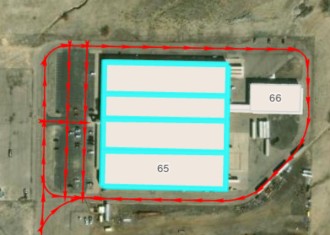
Example #1: A large building is internally divided into four similar sections. My intent is to show a single building composed of four sections.
Example #2: A large building has two sections with different building heights. While I'm able to enter the different building heights in the "Height" & "HeightUnits" fields if they're shown as different polygons, what gets entered in the "BuildingPart" field?
Solved! Go to Solution.
Accepted Solutions



- Mark as New
- Bookmark
- Subscribe
- Mute
- Subscribe to RSS Feed
- Permalink
In your example 1
• Create four polygons, one for each section
• Set BuildingPart = 1 for all four
• Do not include a separate outer footprint polygon
• (Unless you want it for cartography — then set that outer polygon to BuildingPart = 2)
Example 2
Set:
• BuildingPart = 1 for both polygons
• Fill in Height and HeightUnits for each polygon individually
Esri’s 3D basemap renderer will extrude each part to its own height.
- Mark as New
- Bookmark
- Subscribe
- Mute
- Subscribe to RSS Feed
- Permalink
In your example 1
• Create four polygons, one for each section
• Set BuildingPart = 1 for all four
• Do not include a separate outer footprint polygon
• (Unless you want it for cartography — then set that outer polygon to BuildingPart = 2)
Example 2
Set:
• BuildingPart = 1 for both polygons
• Fill in Height and HeightUnits for each polygon individually
Esri’s 3D basemap renderer will extrude each part to its own height.
- Mark as New
- Bookmark
- Subscribe
- Mute
- Subscribe to RSS Feed
- Permalink
Ahh... so with a similar building all the parts would have "2" entered within that building's parts, with subsequent building part groups noted consecutively?
Or, so I don't have to track which part number was last used, I'm guessing I could simplify use the actual building's number as the parts number (all our buildings are numbered). No need for these numbers to actually be consecutive... correct?
This is very helpful. I searched high and low trying to learn what actually gets entered into the "buildingPart" field. Thank you.
