- Home
- :
- All Communities
- :
- Products
- :
- ArcGIS Pro
- :
- ArcGIS Pro Questions
- :
- Re: Automatically add PDF metadata for accessibili...
- Subscribe to RSS Feed
- Mark Topic as New
- Mark Topic as Read
- Float this Topic for Current User
- Bookmark
- Subscribe
- Mute
- Printer Friendly Page
Automatically add PDF metadata for accessibility after export with pikePDF

- Mark as New
- Bookmark
- Subscribe
- Mute
- Subscribe to RSS Feed
- Permalink
PikePDF is a conda-forge library that would allow me to write a csv file of the file paths, file names, titles, subjects, authors, and keywords and overwrite my PDF maps. I have about 70 maps that I export regularly to different locations, and need to make WCAG 2.1 compliant. Since there is no way currently to model this in arcpy and also include the accessibility tags, I will have to export one at a time. But if I can get pikePDF to work, that at least keeps me from having to write the meta data over and over again.
Has anyone successfully cloned their arcgis python environment and installed pikePDF?
I'm currently at 3.3.4 and when I did this, my ArcGIS Pro environment crashes. I'm not sure why. Maybe it's not compatible??
As a note, I couldn't clone my library until our network team allowed conda through the firewall.
https://anaconda.org/conda-forge/pikepdf
Olmsted County GIS
GIS Analyst - GIS Solutions
Solved! Go to Solution.
Accepted Solutions
- Mark as New
- Bookmark
- Subscribe
- Mute
- Subscribe to RSS Feed
- Permalink
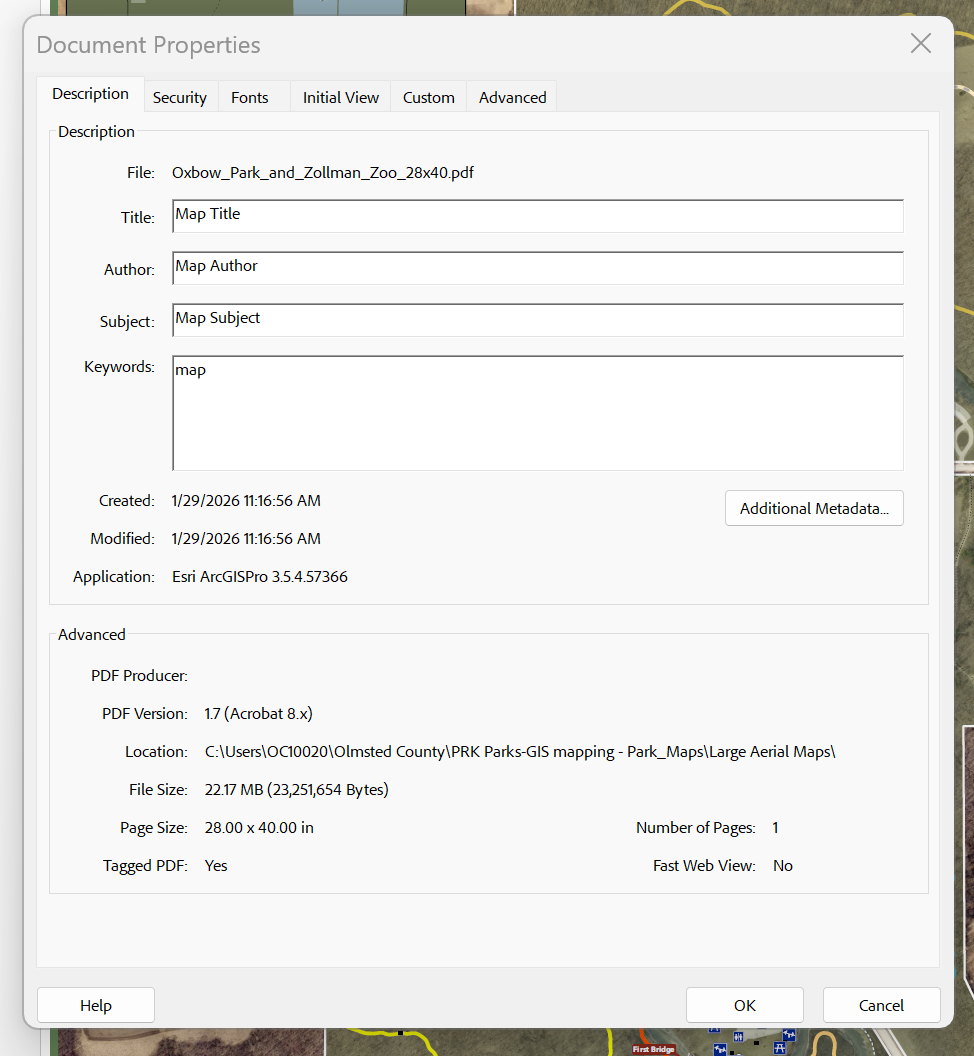
I was able to use PikePDF with the help of copilot outside of the active arcpy environment while still using the python installed with arcgis pro. I was able to get it to also hit all the metadata fields in XMP whereas pro does not offer all the fields, like copyright etc.
Attached are those files.
And here is the .bat to run the .py file in the same folder, since I can't attach it. The .py file references a specific location on my computer of the .csv and so that would have to be changed.
@echo off
REM ---------------------------------------------------------------------------
REM Olmsted County GIS – PDF Metadata Updater (Batch)
REM Overwrites PDFs in place using your CSV. No renames. Preserves QR/URLs.
REM ---------------------------------------------------------------------------

REM Path to your user-local Python venv created earlier
set "VENV_PY=%USERPROFILE%\pdfmeta-venv\Scripts\python.exe"

REM Path to the updater script (same folder as this .bat)
set "SCRIPT=%~dp0update_pdf_metadata_from_csv.py"

REM Quick checks
if not exist "%VENV_PY%" (
  echo [ERROR] Could not find venv Python at:
  echo         "%VENV_PY%"
  echo Make sure you created the venv using ArcGIS Pro's Python:
  echo   "C:\Program Files\ArcGIS\Pro\bin\Python\envs\arcgispro-py3\python.exe" -m venv "%USERPROFILE%\pdfmeta-venv"
  echo Then install packages:
  echo   "%USERPROFILE%\pdfmeta-venv\Scripts\python.exe" -m pip install pikepdf pandas openpyxl
  pause
  exit /b 1
)

if not exist "%SCRIPT%" (
  echo [ERROR] Could not find updater script:
  echo         "%SCRIPT%"
  echo Save the corrected script as: update_pdf_metadata_from_csv.py
  echo in the same folder as this batch file.
  pause
  exit /b 1
)

echo [INFO] Running updater...
"%VENV_PY%" "%SCRIPT%"
set "ERR=%ERRORLEVEL%"

echo.
if "%ERR%"=="0" (
  echo [DONE] Update completed successfully.
) else (
  echo [DONE] Update finished with errors. See the log CSV in the same folder.
)

pause
Olmsted County GIS
GIS Analyst - GIS Solutions


- Mark as New
- Bookmark
- Subscribe
- Mute
- Subscribe to RSS Feed
- Permalink
It doesn't directly answer your question, but see this thread for an example of using pypdf to write metadata to a pdf after export from Pro. You might be able to accomplish your task without having to install pikePDF.
- Mark as New
- Bookmark
- Subscribe
- Mute
- Subscribe to RSS Feed
- Permalink
I did read that earlier, but it sounds like I wouldn't be able to reference a csv with all the metadata in it and that I'd have to write it into the python script? It looks like I'm writing out the title, author, subject, keywords right into the python script yes? And this is for a map series? Whereas I'm not working with a map series in this case.
I'm super new to python so that script looked pretty intimidating haha
Olmsted County GIS
GIS Analyst - GIS Solutions
- Mark as New
- Bookmark
- Subscribe
- Mute
- Subscribe to RSS Feed
- Permalink
You would load the CSV as a dataframe, then loop through it to get the values you need to modify the PDFs. Below is a more direct example for your workflow. I haven't tested it directly but it should work, you just need to tweak your csv column names.
import pandas as pd
from pypdf import PdfWriter, PdfReader

## Make sure your csv has simple column names without spaces
## This will make it easier to access them from a named tuple later
## In this example, I am assuming csv columns named:
    # filepath
    # title
    # author
    # subject
    # keywords

#define your csv and load as dataframe
csv_file = r"path/to/file.csv"
df = pd.read_csv(csv_file)

#iterate over the rows
for row in df.itertuples():
    # you can now access values using row.columnname

    # open pdf
    reader = PdfReader(row.filepath)
    writer = PdfWriter(clone_from=reader)

    #write metadata
    writer.add_metadata({"/Title": row.title
                         "/Author": row.author,
                         "/Subject": row.subject,
                         "/Keywords": row.keywords})

    #save pdf
    with open(row.filepath, "wb") as f:
        writer.write(f)
- Mark as New
- Bookmark
- Subscribe
- Mute
- Subscribe to RSS Feed
- Permalink
I was able to use PikePDF with the help of copilot outside of the active arcpy environment while still using the python installed with arcgis pro. I was able to get it to also hit all the metadata fields in XMP whereas pro does not offer all the fields, like copyright etc.
Attached are those files.
And here is the .bat to run the .py file in the same folder, since I can't attach it. The .py file references a specific location on my computer of the .csv and so that would have to be changed.
@echo off
REM ---------------------------------------------------------------------------
REM Olmsted County GIS – PDF Metadata Updater (Batch)
REM Overwrites PDFs in place using your CSV. No renames. Preserves QR/URLs.
REM ---------------------------------------------------------------------------

REM Path to your user-local Python venv created earlier
set "VENV_PY=%USERPROFILE%\pdfmeta-venv\Scripts\python.exe"

REM Path to the updater script (same folder as this .bat)
set "SCRIPT=%~dp0update_pdf_metadata_from_csv.py"

REM Quick checks
if not exist "%VENV_PY%" (
  echo [ERROR] Could not find venv Python at:
  echo         "%VENV_PY%"
  echo Make sure you created the venv using ArcGIS Pro's Python:
  echo   "C:\Program Files\ArcGIS\Pro\bin\Python\envs\arcgispro-py3\python.exe" -m venv "%USERPROFILE%\pdfmeta-venv"
  echo Then install packages:
  echo   "%USERPROFILE%\pdfmeta-venv\Scripts\python.exe" -m pip install pikepdf pandas openpyxl
  pause
  exit /b 1
)

if not exist "%SCRIPT%" (
  echo [ERROR] Could not find updater script:
  echo         "%SCRIPT%"
  echo Save the corrected script as: update_pdf_metadata_from_csv.py
  echo in the same folder as this batch file.
  pause
  exit /b 1
)

echo [INFO] Running updater...
"%VENV_PY%" "%SCRIPT%"
set "ERR=%ERRORLEVEL%"

echo.
if "%ERR%"=="0" (
  echo [DONE] Update completed successfully.
) else (
  echo [DONE] Update finished with errors. See the log CSV in the same folder.
)

pause
Olmsted County GIS
GIS Analyst - GIS Solutions
