- Home
- :
- All Communities
- :
- Products
- :
- ArcGIS Pro
- :
- ArcGIS Pro Questions
- :
- attribute table not showing in arcgis pro 2.5
- Subscribe to RSS Feed
- Mark Topic as New
- Mark Topic as Read
- Float this Topic for Current User
- Bookmark
- Subscribe
- Mute
- Printer Friendly Page
attribute table not showing in arcgis pro 2.5

- Mark as New
- Bookmark
- Subscribe
- Mute
- Subscribe to RSS Feed
- Permalink
I loaded a point feature layer with 178 records in arcgis pro 2.5. Everything is showing in the map as expected. But my attribute table is not showing:
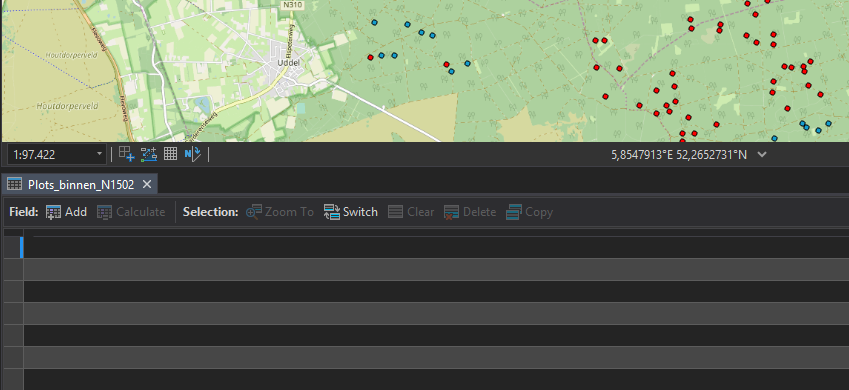
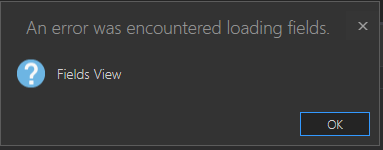
the switch button switches the selected rows but shows nothing. The Fields View button results in
Other layers in the map are showing their attribute tables ok.
the layer shows up OK in arcmap 10.6 and the attribute table is visible also in 10.6.
I downloaded the layer as gdb from agol. I have done this before and had no problems earlier.
thanks for your time,
Bert
Solved! Go to Solution.
Accepted Solutions

- Mark as New
- Bookmark
- Subscribe
- Mute
- Subscribe to RSS Feed
- Permalink
I also have had the attribute table not display in ArcPro from a downloaded file geodatabase of a feature service hosted online. Check the editor tracking date fields in the Arc Catalog field property window. I had a default date of 12-31-1899. Removed the default value and I can now see the attribute table in ArcPRO. Republished the service with overwrite web service and things seem to back on track. I do not know how I accomplished getting the default values set in the tracking fields. But I am glad to see the attribute table is back. I hope this helps you.
John.


- Mark as New
- Bookmark
- Subscribe
- Mute
- Subscribe to RSS Feed
- Permalink
Where is the data housed for the layer, i.e. file geodatabase, shp file, Enterprise Geodatabase?
- Mark as New
- Bookmark
- Subscribe
- Mute
- Subscribe to RSS Feed
- Permalink
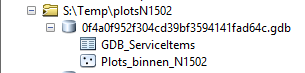
I've downloaded the feature layer as a .gdb from our own arcgis online, so it arrived as a zipfile with the gdb named something like 0f4a0f952f304cd39bf3594141fad64c.gdb
- Mark as New
- Bookmark
- Subscribe
- Mute
- Subscribe to RSS Feed
- Permalink
I do this every day to visualise progress of a project, until a few days ago everything was as expected including the attribute table. I would be able to PM you the file should you want.
- Mark as New
- Bookmark
- Subscribe
- Mute
- Subscribe to RSS Feed
- Permalink
Ok, so the data is being hosted in ArcGIS Online and the table is not showing?
I would reach out to tech support on this.

- Mark as New
- Bookmark
- Subscribe
- Mute
- Subscribe to RSS Feed
- Permalink
For me, the attribute table doesn't show for the data being pulled from ArcGIS Online OR when I download it as a FGDB and bring it into Pro.
- Mark as New
- Bookmark
- Subscribe
- Mute
- Subscribe to RSS Feed
- Permalink
No, not hosted on agol, as I wrote before: "I've downloaded the feature layer as a .gdb from our own arcgis online, so it arrived as a zipfile with the gdb named something like 0f4a0f952f304cd39bf3594141fad64c.gdb"
- Mark as New
- Bookmark
- Subscribe
- Mute
- Subscribe to RSS Feed
- Permalink
That is weird behavior. I would recommend working with technical support on this.

- Mark as New
- Bookmark
- Subscribe
- Mute
- Subscribe to RSS Feed
- Permalink
Must be some corruption in the file itself. Though it is strange the table appears in ArcMap and not Pro
Try moving the feature from ArcMap to a .gdb and view it in Catalog to make sure it is visible there.
- Mark as New
- Bookmark
- Subscribe
- Mute
- Subscribe to RSS Feed
- Permalink
The catalog window in arcmap 10.6 shows up normally: