- Home
- :
- All Communities
- :
- Products
- :
- ArcGIS Pro
- :
- ArcGIS Pro Questions
- :
- Arcgis Pro Select Layer by Attribute is not workin...
- Subscribe to RSS Feed
- Mark Topic as New
- Mark Topic as Read
- Float this Topic for Current User
- Bookmark
- Subscribe
- Mute
- Printer Friendly Page
Arcgis Pro Select Layer by Attribute is not working for tables in memory

- Mark as New
- Bookmark
- Subscribe
- Mute
- Subscribe to RSS Feed
- Permalink
I have 2 identical feature classes, - one stored in FGDB and one in 'memory'. They both have 2 text fields, storing the same value in each row. Table for one of them:
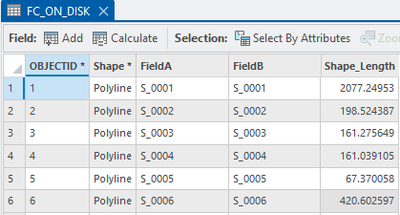
When I run this from notepad:
aList = ['FC_ON_DISK','FC_IN_MEMORY']
for infc in aList:
arcpy.management.SelectLayerByAttribute(infc,"NEW_SELECTION","FieldA = FieldB",None)
nSelected = int(arcpy.management.GetCount(infc).getOutput(0))
print (f'Selection count = {nSelected} for {infc}')
I get these messages:
Selection count = 2530 for FC_ON_DISK
Selection count = 0 for FC_IN_MEMORY
The query on table stored in memory is not working from GUI either.
Is this intended behavior?

- Mark as New
- Bookmark
- Subscribe
- Mute
- Subscribe to RSS Feed
- Permalink
I'm having the same issue @FelixPertziger. Sounds like a bug, not intended result. Any luck finding resolution?
- Mark as New
- Bookmark
- Subscribe
- Mute
- Subscribe to RSS Feed
- Permalink
It seems they quietly fixed it (sometime between v.3.3 and 3.5), so tool works as expected on tables stored in memory. I am on version 3.6.1. So, just update the software.
