- Home
- :
- All Communities
- :
- Products
- :
- ArcGIS Pro
- :
- ArcGIS Pro Ideas
- :
- Transformation Tab in ArcGIS Pro
- Subscribe to RSS Feed
- Mark as New
- Mark as Read
- Bookmark
- Printer Friendly Page

- Mark as New
- Bookmark
- Subscribe to RSS Feed
- Permalink
Transformation Tab in ArcGIS Pro
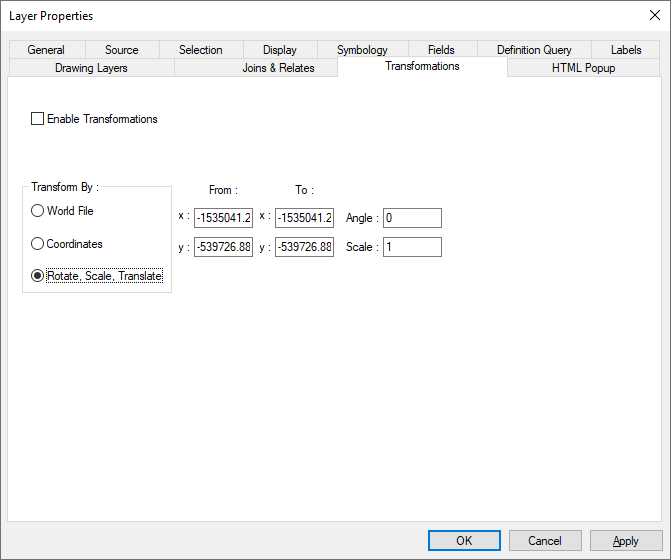
Desktop has a Transformations Tab to key in the transformation data in a cad file and bring it to the right location. I use this all the time and find it quite accurate and useful. I would like to see this feature added to ArcGIS Pro as well.
I am often given the CAD transformation settings and use this all the time. Two Point does not work in most cases because I do not have real world points to register to only the CAD file in an undeveloped area typically.
Add CAD file to Desktop. Right-Click -> Properties. Transformations Tab, enter CAD Transformation information on the tab, check "Enable Transformations" and OK
- « Previous
-
- 1
- 2
- Next »


Thanks for voicing this idea, @StevenLowman and many others. I am happy to share that this was included in the November 2025 release of ArcGIS Pro 3.6.

This is now available in 3.6.0, finally after nearly 10 years they have add the tool from Desktop (that I used a lot) to Pro! Thank you. I would only add one change. The temp plugin that was available would remember the values entered so if you had multiple files to Transform it was easier, I also believe Desktop Transformation Tab did this as well. This tool does not remember previous values, so you have to enter the same values over and over again if bringing in multiple files. But finally the tool is there by default, thank you for that!!!
You must be a registered user to add a comment. If you've already registered, sign in. Otherwise, register and sign in.