- Home
- :
- All Communities
- :
- Products
- :
- ArcGIS Pro
- :
- ArcGIS Pro Ideas
- :
- Save Project As, Creating more than just the APRX
- Subscribe to RSS Feed
- Mark as New
- Mark as Read
- Bookmark
- Follow this Idea
- Printer Friendly Page
Save Project As, Creating more than just the APRX

- Mark as New
- Bookmark
- Subscribe
- Mute
- Subscribe to RSS Feed
- Permalink
There should be a way to save the whole project as a new project, creating more than just the aprx file, but also duplicating all other supplemental files.
- « Previous
-
- 1
- 2
- Next »


It is possible to save a Project Package (ppkx), but having an option in the "Save Project As" dialog would be nice: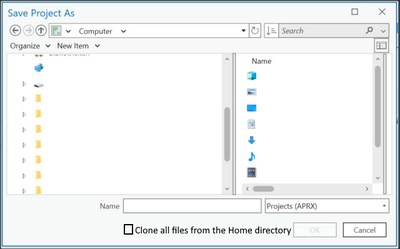
Instead of only saving the .aprx file under a new name, also clone the files from the current home directory to the new directory, where the APRX is saved to.
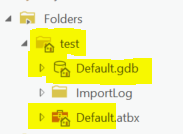
Why is it useful?: If you have different versions of an APRX file, all referencing the same GDB, accidental changes to the data can happen. If you try out different Project configurations for example.


Seems like a no-brainer. I've wanted this, too.
Though, you can just copy the whole ArcGIS Pro project folder using Windows File Explorer and that will do the same thing.
@KoryKramer, has this been suggested before?
Is Windows File Explorer the recommended method for this?
Looking back months later, I've found this workflow accomplishes what I needed:
1. Save your favorite layout as a layout file.
2. Start a new project.
3. Import the layout file into the new project.
4. Save the new project.

@ErikBreedon is that only giving you the layout-file, or the entire project?
I am trying to do this myself:
Create a copied project with no references to previous projects/file paths/databases, and then get all the features layers as unique features layers within the new database, maintaing symbology, queries etc.
Links to WMS etc. should also remain.
Share>project template does this partly, but you get a "lot of databases" within the new database instead of all layers gathered in one database. Moreover, absolutely all layers (that have been added in the map) that stems from a database within the company network is brought over in the new project template. These I would like to rather remain as links, as they are many GBs worth of data...
I.e. I only want the feature classes that are existing in the map database I was originally making the template from over in the new one, not all other "linked" databases too. I think it would be nice if we could differentiate which databases are brought over to the new project template and not, then my problem would be fixed, and for those who want to combine databases, their problem would be fixed too. 🙂
I am a fan of the ArcGIS-program (quite a newbie myself), so these are some features I hope to see in the feature (if they don't already exist). 🙂

PLEASE add this in.
All my users ask for templates so they don't have to recreate everything for each project.
The PAGX workaround works ok but was a lot harder to explain than just using Save As, which is the default workflow for just about every other program, including ArcMap.
Project Templates (APTX) have a host of problems in their current implementation, and, frankly, a project package doesn't really fill the need of just being able to duplicate a whole project. (For one thing, the whole "unpack to the Packages folder instead of a place that's actually useful" thing is a massive tripping hazard).
Please let us just Save As to duplicate the entire project folder, not just the APRX.
This keeps happening to my users. They spend a bunch of time making a Pro project to use as a template for everything else, then, to duplicate it, they use Save As.
This is awful.
All of the default stuff, e.g. the default gdb, belongs to the original project, and then everyone is confused as to why stuff is saving there.
The clear workaround is to use Layout Files (PAGX -- also because Project Templates do not work in a smart way) but also that's something else to explain and quite frankly, I have users who just don't get it no matter how many times I explain. They can understand Save As to save a copy, since that's how it works for every other program. But let's be real, an aprx without its own folder or default gdb is kind of useless (and again, confuses everyone trying to save stuff).
So.
Please add in a Duplicate Project option, where it copies everything in the project-- Maps, Layouts and places it in a new project folder, with a new gdb, wherever the user chooses. This will be a lot easier for people to actually do what they think they're doing.


Would creating a project package solve your issue?
Share a project package—ArcGIS Pro | Documentation
This creates a project package and packages up the local data and makes a copy of it.
C:\Users\<USERNAME>\Documents\ArcGIS\Packages\<PACKAGENAME>
When you extract the package - by default it gets extracted here, but you can move the content to a different location if you desire once its opened for the first time
Hi, Project Packages do not solve the issue for the same reason that Project Templates (themselves a type of Project Package) don't, either: I'm not looking to duplicate any data, just the maps and layouts.
For ArcMap users, the workflow for the past 20ish years has been to Save As to duplicate and reuse most of your work on a new map, and it's causing issues as they migrate. With the addition of the new default gdb per project as well as the home folder, this workflow no longer works. I suppose I could tell them to copy the original project's entire folder, but then they have to rename everything and change the default gdb in Options, etc. Having a "Duplicate Project" button makes this a lot simpler.
(As a side note, why on earth can't we choose where packages get extracted to? If I'm opening a Project Package, it's because I plan to use it in Documents\ArcGIS\Projects or another folder somewhere. Why on earth would I look for it in Packages after unpacking it?)

(As a side note, why on earth can't we choose where packages get extracted to? If I'm opening a Project Package, it's because I plan to use it in Documents\ArcGIS\Projects or another folder somewhere. Why on earth would I look for it in Packages after unpacking it?)
Have you looked at Set unpacking options? https://pro.arcgis.com/en/pro-app/latest/get-started/share-and-download-options.htm#ESRI_SECTION1_D6...
You must be a registered user to add a comment. If you've already registered, sign in. Otherwise, register and sign in.