- Home
- :
- All Communities
- :
- Products
- :
- ArcGIS Pro
- :
- ArcGIS Pro Ideas
- :
- Setting Pro organizational settings through Pro.se...
- Subscribe to RSS Feed
- Mark as New
- Mark as Read
- Bookmark
- Follow this Idea
- Printer Friendly Page
Setting Pro organizational settings through Pro.settingsConfig

- Mark as New
- Bookmark
- Subscribe
- Mute
- Subscribe to RSS Feed
- Permalink
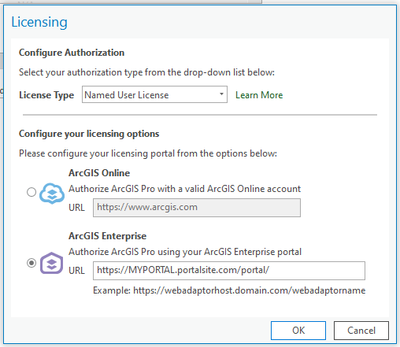
Having the ability to set your Portal, and Named User for all users is something that would be great in Pro.settingsConfig. We deploy through Citrix VDI, and you can't set these items through HKLM in the registry, and people forget how to sign in and get their licensing. If we could make it where they just get past selecting Named User, Enterprise and the URL entry we would be helping our users greatly. I was hopeful that sign in through browser would catch on but it really has not helped our organization.
Using Pro.settingsConfig would allow us to manage a single file and call on it from all virtual machines. This would allow us to switch users over to a testing environment quicker, or add additional portal URLs to their list. I know some of these items can be set through performing a silent install, but we prefer configuration that you can manage after the install. Not all settings can be specified through the install variables.
This was posted at recommendation of requesting through a support case and our ESRI TAM.


We need this more than I could ever express - the migration from concurrent to named licensing has been a nightmare for our users


This idea has been implemented in ArcGIS Pro 3.7. System administrators who manage application settings can set default portal connections for an ArcGIS Pro deployment.
Please see What's New in ArcGIS Pro 3.7 for more information and to learn about other new updates.
You must be a registered user to add a comment. If you've already registered, sign in. Otherwise, register and sign in.