ArcGIS Pro 3.4.2
I have a layer in the Contents pane (List By Drawing Order tab) that is not selectable in the List By Selection tab. I want to easily make the layer selectable, while preserving other selectable layers, by right-clicking the Contents List By Drawing Order tab layer and choosing a new "Make Layer Selectable" option from the Selection context-menu section.
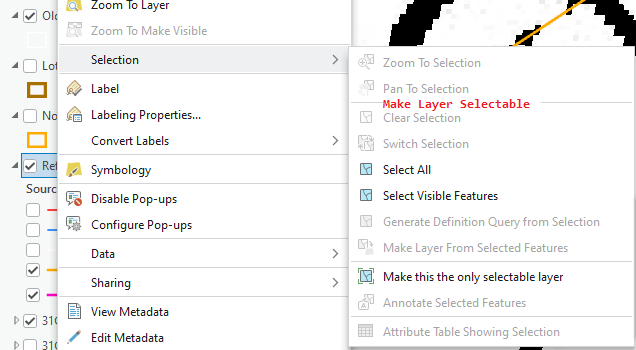
I'm aware that if the layer is highlighted(has focus) in the Contents List By Drawing Order tab, then it will be automatically highlighted(has focus) in the List By Selection tab. That's useful, but I would rather make the layer selectable using the idea I described. I think that would be most intuitive for non-experts.
