- Home
- :
- All Communities
- :
- Products
- :
- ArcGIS Pro
- :
- ArcGIS Pro Ideas
- :
- Retain File Name when Changing File Type in Expor...
- Subscribe to RSS Feed
- Mark as New
- Mark as Read
- Bookmark
- Follow this Idea
- Printer Friendly Page
Retain File Name when Changing File Type in Export Layout

- Mark as New
- Bookmark
- Subscribe
- Mute
- Subscribe to RSS Feed
- Permalink
When exporting a layout I use different file types depending on the intended use of the document. I normally define the file name and location of the layout being exported before thinking about the file type. When I then go to change the file type, the name and location I just entered in the Name field is deleted. Replaced by the original file name and location. I then have to change the file name and location a second time. Quite infuriating.
Please make it so that when file type is changed in the export layout tool the name field does not change except for the file name extension?
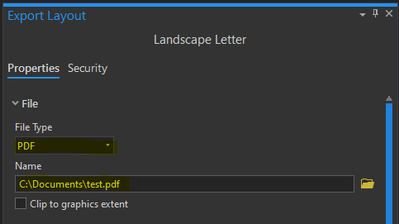

This was not a problem until the most recent release (3.4.0), but every time I go to the export layout tab, and set the filename of my layout, if I have to click off of that tab for whatever reason the filename is simply reset to "Layout" rather than whatever the filename of the map was. So let's say I have a map that is ready to be exported titled "Salisbury_Thefts_12_16.png" - but just after I export it, I notice a small symbology issue I need to change. I click off the export tab, fix the symbology, but when I click back to export, the filename has reset to "Layout1.png". Now I have to re-enter the name of the map I exported to overwrite it. And if I accidentally enter the wrong name, it won't be overwritten - I'll simply have two maps, one of which is wrong and just taking up storage space. The filename didn't used to reset like that, it used to simply stay the same.
I know this doesn't sound like a massive issue, but I am a crime analyst, and place a high value on the speed at which I can export and share maps, often around a dozen in one session, many of which are related and have similar names. When I have to re-enter full layout names every time I click off of the export tab it adds an unneeded and inconvenient step to my workflow. It also leads to me occasionally having maps without consistent naming conventions, or duplicate maps due to the difficulty of remembering exactly what I name each one in real time. I would really appreciate this feature being reverted back to it's previous behavior of simply keeping the exported file name the same when clicking to a different tab!

I'm all for anything that improves speed and efficiency. As you outline, it really matters!



@DrWalkerS when you say "I click off the export tab, fix the symbology, but when I click back to export" can you clarify? Are you clicking on a Map view to switch from working in your Layout view to working in a map?
If you're doing something like adjusting symbology, couldn't you do that directly from your Layout view? Like here

Or Activate the map and make any changes that you need to while you are still in the same Layout view?

Does that allow you to make the changes you need to on a map and retain the previously entered file name for the layout export?
Thank you


I see this thread is a little aged but that it was updated earlier this month to under consideration. I just updated from 2.something to 3.6, and am experiencing the same thing now.
@KoryKramer I don't see that you got a response, so I'll add my own clarification. I have tools docked to the side of the screen, but let's say I want to export and click the tab to pop out that export menu. I set everything up and actually run the export. I simply click anywhere else so the tab autohides. If I click the tab to open export again, the file name goes back to the default. Whereas before the name would just be there and I could hit export again, or if all I did was toggle a layer off and another one on I could modify the end of the filename instead of having to either retype it completely or browse to the location and pick the file I want to overwrite.
Which itself was already a significant time drag from ArcMap. Used to be you went File > Export and it popped open the file dialog where you could enter a name or click a file to populate the name, then when you hit save it actually saved the export. Now with Pro I can't tell you how many times I've browsed to set the file name and location and then forgot to actually hit the export button to save a file because muscle memory just says when I hit save on the browse dialog that saved a file, not just set the path/name.
Semi-related note, the double-click in a dialog box behavior isn't working to Windows standard either. Say your file name is "your image name". Windows standard you can double-click a word like 'image' and it will highlight only that word (or continuous text), and double-click again to highlight the entire file name. In Pro, it always only grabs the entire file name. I know that's a whole separate idea/suggestion, but it came to mind here because often I will export a series of maps with the same root name and just change ending words, which goes back to the original idea.
Hi Chris,
Thank you so much for your clarification and note! This did not make it in the 3.6 product release (as you noticed) but the team has updated it to in product plan. We understand this is really inconvenient and they are working to address it.
Cheers,
Aubri
You must be a registered user to add a comment. If you've already registered, sign in. Otherwise, register and sign in.