- Home
- :
- All Communities
- :
- Products
- :
- ArcGIS Pro
- :
- ArcGIS Pro Ideas
- :
- Provide tool (hover) tips for symbol classes in th...
- Subscribe to RSS Feed
- Mark as New
- Mark as Read
- Bookmark
- Follow this Idea
- Printer Friendly Page
Provide tool (hover) tips for symbol classes in the ArcGIS Pro Symbology Pane

- Mark as New
- Bookmark
- Subscribe
- Mute
- Subscribe to RSS Feed
- Permalink
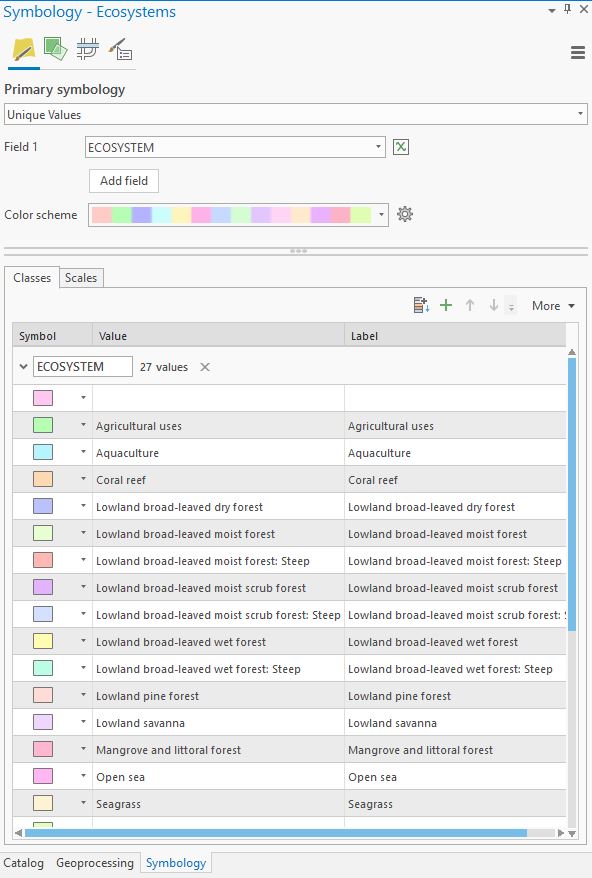
In the ArcGIS Pro Symbology Pane, the values for different symbol classes are sometimes too long to fit in the cell. Typically in this situation software will provide a tip that comes up when you hover on the value, allowing to you see the entire text string. ArcGIS Pro doesn't do this, and I wish it would.
The attached screenshot shows longer symbol class values that don't have a hover-enabled tip to expose the entire text string.

Hey Mark - if you double click on the right side of the Value and Label header, the column expands out to the width of the largest field. Then you can see the full text. But I agree a hover tip would be nice.

ArcGIS Pro 3.4.2; file geodatabase
Symbology Pane:
- Classes > Value and Label fields
- or Add Unlisted Values
When I hover over a Value or Label cell, nothing happens. I would like to hover my mouse over long text values to see the full value in a tooltip.
For example, in Add Unlisted Values:
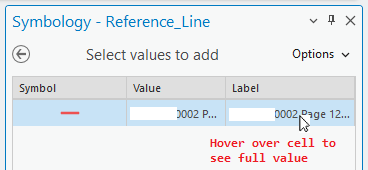

Otherwise, since the value is so long, I'd need to:
- Expand the pane to half the size of the screen,
- Resize the columns to see the full value,
- And then resize the columns again so that they're smaller and can be properly viewed when I resize the pane back to normal.
That process is awkward. I'd rather hover over a cell to see the full text value.
You must be a registered user to add a comment. If you've already registered, sign in. Otherwise, register and sign in.