- Home
- :
- All Communities
- :
- Products
- :
- ArcGIS Pro
- :
- ArcGIS Pro Ideas
- :
- Include singlepart statistic options when dissolvi...
- Subscribe to RSS Feed
- Mark as New
- Mark as Read
- Bookmark
- Printer Friendly Page
Include singlepart statistic options when dissolving in ArcGIS Pro


- Mark as New
- Bookmark
- Subscribe to RSS Feed
- Permalink
So, somehow I've managed to survive for years without coming across this issue....until now! The Statistic fields in Dissolve and Pairwise Dissolve do NOT honour "Create multipart features" option in these tools.
If you leave "Create multipart features" unchecked, and are dissolving 3 polygons where 2 are adjacent and a 3rd is not adjacent and all contain an ID value to be concatenated as a Statistic field (e.g. A and B adjacent with C not adjacent), instead of producing 2 output polygons with a statistic fields that shows (polygon 1) A/B and (polygon 2) C, you get 2 polygons but both contain A/B/C in the concatenated field (as if they were a multipart polygon)!
Visual example below (more reading here too).

IDEA: Include an option (second checkbox or other method) to control whether the statistic fields should be calculated as per the singlepart output or original multipart functionality. Bonus points if it's enabled by default!
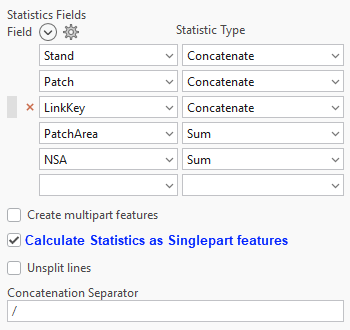
P.S. Please update the documentation and tool tips of these tools to clearly state how these things work!
From the linked post:
We are actively working on a solution for this using the PairwiseDissolve tool. Our goal is to have it available in ArcGIS Pro 3.7.
Ken


If it's only "Under Consideration", does this mean it won't be in 3.7 as previously indicated?
You must be a registered user to add a comment. If you've already registered, sign in. Otherwise, register and sign in.