- Home
- :
- All Communities
- :
- Products
- :
- ArcGIS Pro
- :
- ArcGIS Pro Ideas
- :
- Honor deselection of 'equal column widths' when us...
- Subscribe to RSS Feed
- Mark as New
- Mark as Read
- Bookmark
- Follow this Idea
- Printer Friendly Page

- Mark as New
- Bookmark
- Subscribe
- Mute
- Subscribe to RSS Feed
- Permalink
Request to reduce the blank space provided for word wrapping when equal column widths is unchecked. Right now (3.3) your only option to reduce this space is to turn off word wrapping, which is undesirable in many circumstances. As you can see in the image below, there is no difference in the legend when unchecking equal column widths. I have an awkward gap between my first and other legend items. The idea here is to keep word wrapping, but only using the 1.3" label wrap I've specified when it's needed.


- « Previous
-
- 1
- 2
- Next »

@AubriOtis Am I understanding this correctly? Are these my options?


This is about the best I can do with 3" of dead space between columns and a 7 line row that could be reduced to 3 or 4 with adjustable column widths and text wrapping.
Thanks


@JacobBurdick1 actually this is supported for table frames, the request is specific to legends. For table frames you can set different word wrapping per column. It looks like you have both columns selected, make sure only one is and you should be able to get a result you like.


When in Manual Column mode please disconnect the Word Wrap length for Labels and the column spacing setting used in a legend. (Currently on Pro 3.5.1 but counts for earlier versions)
For some reason when you set a wrap length for labels in a legend, Pro will then assume you want this as a column width/spacing and widen your columns so they no longer fit in a carefully crafted layout.
It will disregard any column settings you may have such as a defined column width, unticked Equal column widths, etc.
Rough example below.
Unticked:
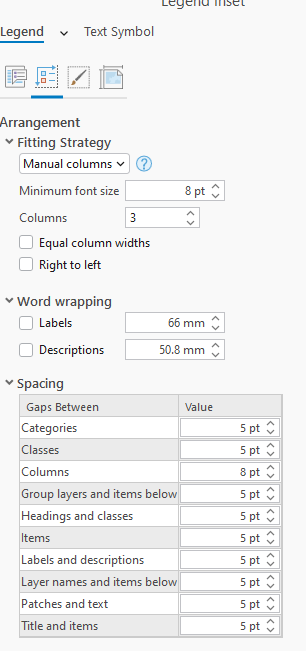
gives
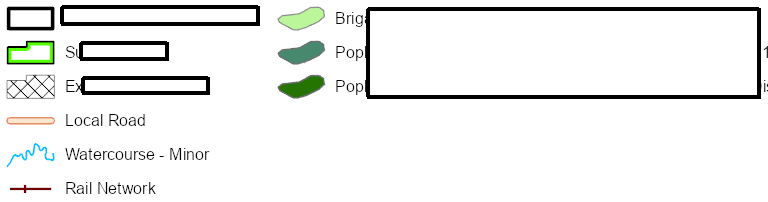
Wrap ticked:

gives

It doesn't just wrap the labels, it tootles them off into the never never over the title block!!
Brownie points for a full manual mode where WE can set every option in a legend with no assumptions or automations in Pro.

I think this might be the same thing as Honor deselection of 'equal column widths' when using word wrapping in legend and Make Word Wrap compatible with Unequal Column Widths?
Either way, I'm giving you all kudos because this is driving me nuts! I love having the option of manual columns, but I'm having to dig out my list of ArcMap coping strategies and manually insert line breaks in item descriptions so that I can turn word wrapping off and get my column widths back to normal.
You must be a registered user to add a comment. If you've already registered, sign in. Otherwise, register and sign in.