- Home
- :
- All Communities
- :
- Products
- :
- ArcGIS Pro
- :
- ArcGIS Pro Ideas
- :
- Honor deselection of 'equal column widths' when us...
- Subscribe to RSS Feed
- Mark as New
- Mark as Read
- Bookmark
- Printer Friendly Page

- Mark as New
- Bookmark
- Subscribe to RSS Feed
- Permalink
Request to reduce the blank space provided for word wrapping when equal column widths is unchecked. Right now (3.3) your only option to reduce this space is to turn off word wrapping, which is undesirable in many circumstances. As you can see in the image below, there is no difference in the legend when unchecking equal column widths. I have an awkward gap between my first and other legend items. The idea here is to keep word wrapping, but only using the 1.3" label wrap I've specified when it's needed.


- « Previous
-
- 1
- 2
- Next »


Hi @AubriOtis, unfortunately that does not work. The Fitting Strategy I had applied is attached to the post as a screenshot.
Thanks

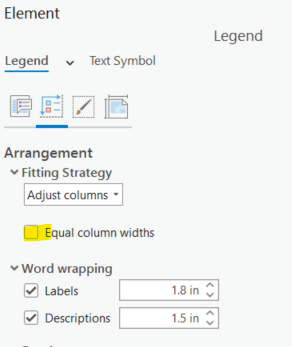
Not trying to ESRI bash, but the legend adjustments, particularly this issue wherein we are unable to deactivate "equal column widths" in order to standardize font sizes within legend items across figure sets is really poor form by them. This post is two years old, and it's just classic frustrating ESRI-stuff. IN general, it seems they're either lacking resources to address these issues or prioritizing others. Also classic in that it's a bunch of broken knobs strewn like land mines throughout their sprawling suite of half-baked functionality ambitions. Seems like an easy programming / software fix, especially considering these knobs are similar to Desktop and they work there. In screenshot below, notice that the column widths remain equal despite being deactivated.
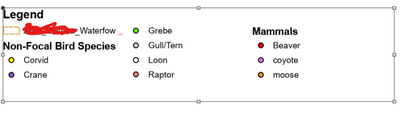
I'll link this exact same idea from 2020. Not sure I'd call it an idea, more pointing out broken functionality. Formatting Legends in Pro is a nightmare. Specifically adjusting column widths in relation to text size, element size, etc. The knobs simply don't work. "Equal Column Widths" check box does not function. Fitting Strategy options to anchor Font Size, Column Width, etc. don't fully work either. We need the ability to create legends that don't look like the below screenshot (notice all the white space between column 2 and 3).
Trying to be productive by reiterating a previously proposed idea / identified bug. It's high time ESRI fixed this. We are version 3 of Pro, yet core functionality present in Desktop is still missing. It reinforces my observation that ESRI seems to prioritize resources towards software suite sprawl and functionality half-bakedness at the expense of core functionality. I'm pretty sure I love you guys (ESRI) but PLEASE (!) look in to this finally. It's a big issue for a lot of users.
https://community.esri.com/t5/arcgis-pro-ideas/adaptive-legend-label-wrapping/idc-p/1239213#M22466
Zach


Hi,
I'm not sure what the idea is here. I understand legends can be frustrating and we are always looking to improve, but I don't know what you are asking for. Are there bugs in the software? Are there properties not available? We need more specific details to understand what is being asked so we can evaluate it.
As for the legend you posted a picture of, you have word wrapping turned on for both labels and descriptions, but it doesn't look like you have any descriptions in your legend. So a lot of blank space is being added to accommodate your word wrapping without any values to wrap. I think unchecking word wrapping for descriptions will fix your legend spacing. I hope that helps.
Cheers,
Aubri Kinghorn
Hi @AubriOtis and thanks for your response. I believe the below screenshots and explanation will offer some clarity. But the issue is two parts: 1) The Fitting Strategy functionality in Pro is confusing and far less intuitive or functional than my recollection of Desktop. 2) It would be excellent if we could Word Wrap AND have Unequal Column Widths simultaneously. The low hanging fruit for this idea is essentially the latter idea (2), and recognizing that Word Wrapping is 50/50 Word Wrapping and Equal Column Widths. It's arguably more setting the Column Width than Word Wrapping.
- The only way to activate variable column widths is withOUT Word Wrapping.

Word Wrapping in reality is just Equal Column Widths + Word Wrapping

- Reduce Word Wrapping val and notice that column sizes take that value

- Note that once Word Wrapping value is less than width of labels (0.7), words wrap. But we are stuck with Equal Column Widths

Which is kind of the same as Equal Column Widths without automatic fitting (Bullet Point 3)

@AubriOtis Sometimes it is hard and time-consuming to explain a complaint/idea/question properly, but believe me - Desktop was WAY more functional. Admittedly, part of it is understanding how the Fitting Strategy Options have changed. But to keep it simple - my idea is "Word Wrapping + Unequal Column Widths".
Much Appreciated,
Zach
Hi @ZacharyUhlmann1 ,
Thanks for clarifying! Word wrapping + Unequal Column Widths is information we can use as we evaluate future work for legends. Thanks again! It might be helpful to update the name of your idea so that other people can find and vote on it more easily. We do our best to read and implement ideas, but kudos help us prioritize the order of things and keep the issues at the forefront.
Cheers,
Aubri


Same issue, I need to wrap labels at 2.7, but my first column needs to stay narrower at 1.4. If I choose word wrap at 2.7 it adds blank space to first column, making the legend not fit in the allotted space on the page.
When the word wrap value is greater than actual contents of a column, the smaller content value should be applied to the column. Otherwise, you need to allow the user to specify column widths individually.
BROKEN
You must be a registered user to add a comment. If you've already registered, sign in. Otherwise, register and sign in.