- Home
- :
- All Communities
- :
- Products
- :
- ArcGIS Pro
- :
- ArcGIS Pro Ideas
- :
- Geometry Info (area, length, etc.) for Graphic Ele...
- Subscribe to RSS Feed
- Mark as New
- Mark as Read
- Bookmark
- Follow this Idea
- Printer Friendly Page
Geometry Info (area, length, etc.) for Graphic Elements

- Mark as New
- Bookmark
- Subscribe
- Mute
- Subscribe to RSS Feed
- Permalink
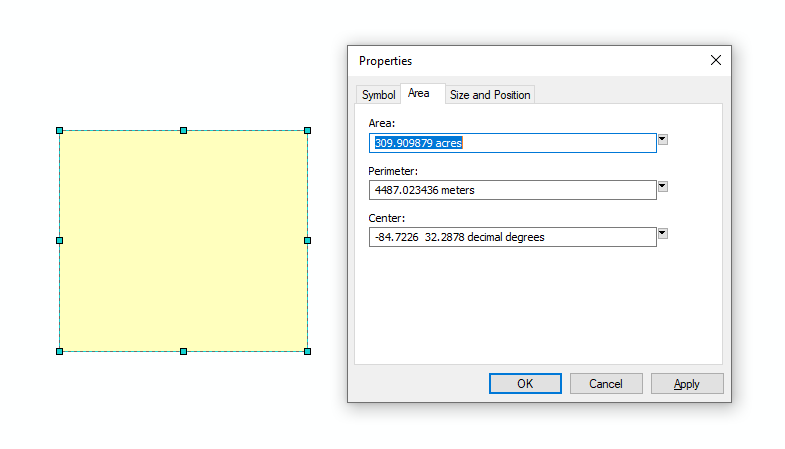
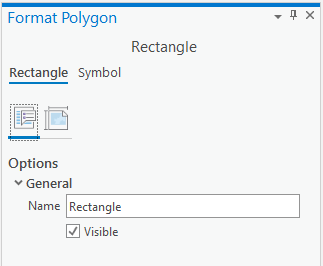
Please add geometry info (area, length, etc.) to the properties (format) pane viewed when right clicking a graphic element and selecting properties. ArcMap 10.x has an area or length tab in the graphic element properties box where you could determine the area or length of the selected graphic element. Thanks.
- « Previous
-
- 1
- 2
- Next »


I'm also requesting the geometry info (area, length, etc) be added to the properties pane when right clicking on a graphic element in ArcPro.
I can offer, you can use the Graphics to Feature tool and then quickly get the measurement you want from Measure Features on the Maps tab. This is the quickest work-around I can find.

Is this something Esri plans to include in its next release? I am using ArcGIS Pro 3.4.3 and do not see it.

I've used the draw tool to draw a polygon graphic and calculate its acreage for years. It was very nice to quickly get the acreage and keep the polygon on the map for future reference, without having to turn it into a feature layer, as I am daily figuring out what acreage I have traversed and subtracting it from the acreage left to traverse and quickly adjusting the vertices or just drawing another polygon when needed. If I use the measure tool, then my successional measurements of that area will be different. It was disturbing to find that this isn't the same in Pro.
Hopefully it's not too difficult to add geometry info into the properties pane because I'd love to keep the ease of this ability. Thank you for the platform to voice our suggestions:)
You must be a registered user to add a comment. If you've already registered, sign in. Otherwise, register and sign in.