- Home
- :
- All Communities
- :
- Products
- :
- ArcGIS Pro
- :
- ArcGIS Pro Ideas
- :
- Duplicate Definition Query
- Subscribe to RSS Feed
- Mark as New
- Mark as Read
- Bookmark
- Printer Friendly Page

- Mark as New
- Bookmark
- Subscribe to RSS Feed
- Permalink
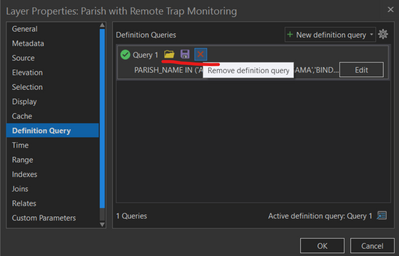
The ability to have multiple definition queries associated with a layer is great. However, to streamline the ability to copy a currently definition query so it can be changed would be great. Adding a duplicate definition query button along side the load, save and remove definition query buttons (unlined in red in attached image) would be helpful.
Currently you have to edit the current definition query, copy the SQL, create a new definition query, paste the SQL and update the definition query. Adding a duplicate definition query button would allow the use to quickly and easily duplicate the definition query and update the duplicated version straight away.

Totally! Absolutely. Glad you wrote this suggestion up Drew! I have been thinking the same for months.


absolutely!

Here's a scenario where this would have saved me many, many clicks:
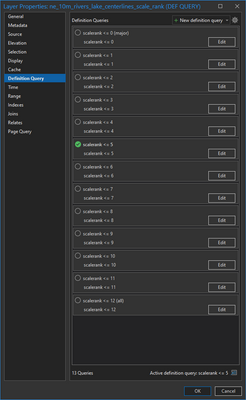
These queries will make for easy mapping with this layer at various scales in the future.
I'm also imagining if I had made a mistake here, just how frustrating that would be. It would be even better, for scenarios like this one, if it were "smart" like Excel and provided a way to increment your queries and query names or make batch edits once created. A batch/related query editor, maybe?
I also noticed that you can't rearrange queries in the list, and the fact that they name themselves nominally ("Query 1") doubles the work, but I have a related idea open for that, too: More intuitive default definition query naming - Esri Community

Really, is this not implemented in Pro 3.6.?????
When will this come????? I cant wait!
your timing couldn't get any better 🙂 It is being rolled out with ArcGIS Pro 3.7 which just released today. Pls give this a try and let us know. Pls see my comment for screenshots etc.
The enhancement was made in ArcGIS Pro 3.7 release. You can access this command from the cog menu

or from the hover-over menu bar

Thank you all for your suggestions and feedback.
You must be a registered user to add a comment. If you've already registered, sign in. Otherwise, register and sign in.