- Home
- :
- All Communities
- :
- Products
- :
- ArcGIS Pro
- :
- ArcGIS Pro Ideas
- :
- Deselect feature from layout view without activati...
- Subscribe to RSS Feed
- Mark as New
- Mark as Read
- Bookmark
- Follow this Idea
- Printer Friendly Page

- Mark as New
- Bookmark
- Subscribe
- Mute
- Subscribe to RSS Feed
- Permalink
Simply put: I would like to be able to clear any feature selections made on all maps in a layout without having to activate or open them. At the moment, the clear selection button on my quick access toolbar grays out. I work in the layout view quite a bit, and anything to reduce the back and forth would be welcome.
Also -- it is possible to deselect things from the layout view without activating a map in a place like the attribute table or pane, so the lockout on the QAT button really doesn't make a whole lot of sense.
You can select features when a map is hidden from the attribute table or select by attributes/location. Why is it so hard, then, to deselect them? I see no need for the deselect button to be 1) inaccessible unless added to QAT and further 2) disabled even when it is. It just adds unnecessary clicks that add up. Why not keep the map tab in the ribbon, too? There are plenty of functions on it I'd like to use from layout, but I'm forced to switch back and forth - activate, deactivate. It would be like having to shift your car into neutral anytime you wanted to use the brake pedal -- makes no sense.
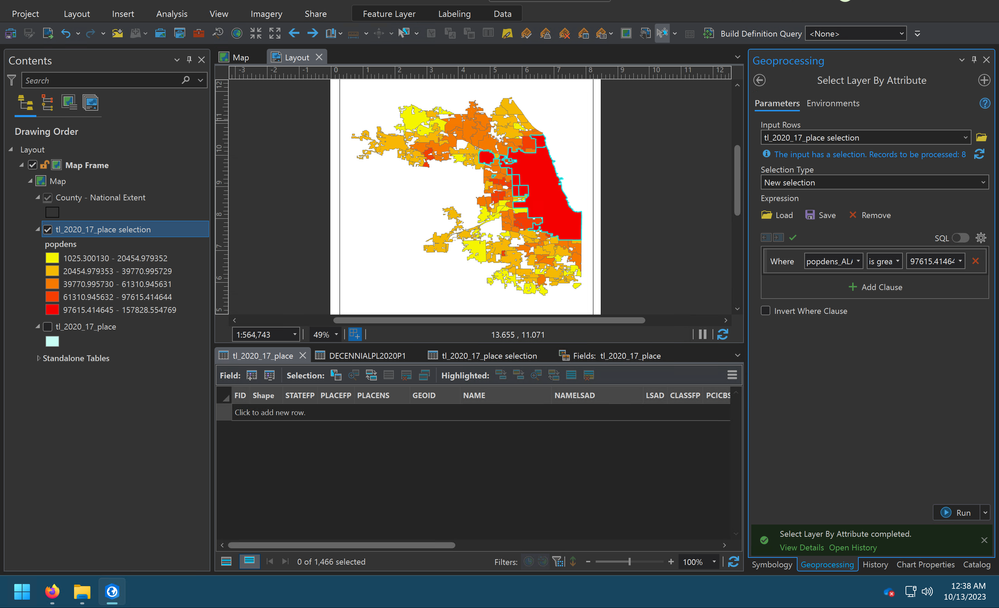


We often run batch exports and rapidly scrolling through 20 - 30 PDFs to see that single feature still highlighted is really annoying. An global deselect prior to export would be a game changer! Or even better just don't show selections on exports unless specifically told to do so

Sometimes you have a complex layout with a bunch of maps in it.
You do your thing and there are edits, selections, geo-processing, and sometimes ramen involved.
You think you are done and as you want to export the layout or do your final save, you see one of the map frames has something selected. It doesn't really matter but old habits die hard and you want to clear all selections.
Find the map frame in Contents, expand, expand the map, search for the layer and clear the selection, or make the map frame active and clear all selections, or any other number of ways to clear a selection.
How much easier would it be if there was a "Clear All Selections" in the Layout toolbar so that you can just make sure nothing is selected anymore before you do your exports, final saves, etc?

This could maybe be combined with Deselect Feature from Layout View?
It helps that there's an option to turn off selection symbology when you export a map, but I REALLY wish the handy clear selection button I added to my quick access toolbar worked when I was in layout view too, without having to activate/deactivate maps frames.
You must be a registered user to add a comment. If you've already registered, sign in. Otherwise, register and sign in.