- Home
- :
- All Communities
- :
- Products
- :
- ArcGIS Pro
- :
- ArcGIS Pro Ideas
- :
- Choose what fields to enable/disable when creating...
- Subscribe to RSS Feed
- Mark as New
- Mark as Read
- Bookmark
- Printer Friendly Page

- Mark as New
- Bookmark
- Subscribe to RSS Feed
- Permalink
ArcGIS Pro 2.6.8
When creating a join in the attribute table using the Add Join geoprocessing tool:
The first thing I always do after creating the join is go into the FC properties and turn off a bunch of the join fields.
It would be more efficient to skip the FC Properties step and just enable/disable the join fields right in the Add Join window.
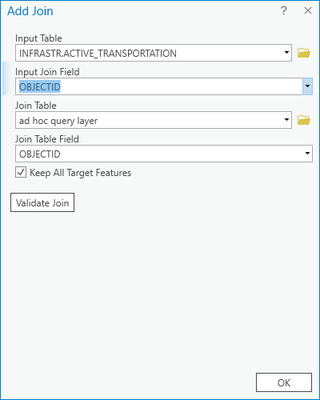
Could that functionality be added?
Notes:
I'm aware that I can hide fields in the attribute table by right-clicking a field header —> Hide Field. That works, but is tedious when hiding tens of fields.
And I'm aware that I can omit fields in a query layer's SQL definition. That works, but doesn't let me use those fields for other things like a definition query. And doesn't help when joining to a FC or table.


Hi Bud, you could use the Join Field tool, which has the option you are looking for using the Transfer Method and Transfer Fields parameters to select specific fields from the Join Table that will be added to the Input table. You can also alter field names, and other properties by setting the Transfer Method parameter to "Use Field Mapping". Keep in mind that joins made using the Join Field tool are permanent, whereas joins made using the Add Join tool are temporary.. Which I am not sure will work for your workflow.
https://pro.arcgis.com/en/pro-app/latest/tool-reference/data-management/join-field.htm
You must be a registered user to add a comment. If you've already registered, sign in. Otherwise, register and sign in.