- Home
- :
- All Communities
- :
- Products
- :
- ArcGIS Pro
- :
- ArcGIS Pro Ideas
- :
- Choose output location when creating network analy...
- Subscribe to RSS Feed
- Mark as New
- Mark as Read
- Bookmark
- Printer Friendly Page
Choose output location when creating network analysis solvers

- Mark as New
- Bookmark
- Subscribe to RSS Feed
- Permalink
When adding a new network analysis layer to the map, enable the user to select an output location and name. Currently network analyst uses the default project geodatabase as defined in environments along with a randomized alphanumeric name with no option to change, which is not always desirable...
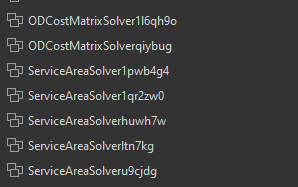
...nor is this consistent with other tools in the application, which do preview/allow edits to output location and name on creation. You can manually rename it, but as far as I know, you can't move it -- cutting and pasting just makes a copy, and you can't change the source of the analysis layers.
Most tutorials I've seen push the user through the Analysis tab > Network Analysis > New Network Analysis Type, but I've found that even the GP tools such as Make Service Area Analysis Layer do not have any control for output location.
- « Previous
-
- 1
- 2
- Next »


We are planning to add this functionality in the Pro 3.7 release.
This functionality is available in Pro 3.7.
The geoprocessing tools used to create network analysis layers (Make Route Analysis Layer, etc.) have two new parameters:
- Analysis Geodatabase – The existing file geodatabase workspace where the new network analysis layer's sublayer data will be stored.
- Analysis Feature Dataset Name – The name to use for the new feature dataset that the tool will create in the analysis geodatabase to store the network analysis layer's sublayer data.

You must be a registered user to add a comment. If you've already registered, sign in. Otherwise, register and sign in.