- Home
- :
- All Communities
- :
- Products
- :
- ArcGIS Pro
- :
- ArcGIS Pro Ideas
- :
- Attributes Pane advanced configuration
- Subscribe to RSS Feed
- Mark as New
- Mark as Read
- Bookmark
- Follow this Idea
- Printer Friendly Page

- Mark as New
- Bookmark
- Subscribe
- Mute
- Subscribe to RSS Feed
- Permalink
It would be nice if the Attributes pane could be configured to group attributes so that editors can focus on important data without having to scroll through dozens of fields. Some examples where we would want to move fields are:
- In a Utility Network there are numerous fields maintained by the network. These are necessary to understand the state of the network but clutter the UI for editors.
- We have a subset of fields that are required but only for 24" and greater waterlines. Being able to break this out so the editor only has to go to them when necessary is helpful.
- Some fields are set by an attribute rule but can be changed by the user having these grouped would help the users.
We have attempted to use ordering and the alias to help with these situations. I have also tried a custom solution but ran into a bug. If would be better if I didn't have to do custom code.
This image shows the full list of attributes the user has to scroll through. Important attributes have to be scrolled to.
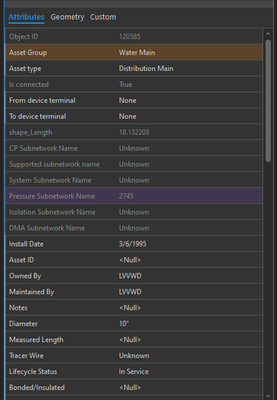
The next images are from the prototype AddIn I created that show a new tab with subtabs for different groupings (works on a file geodatabase but not feature service) :
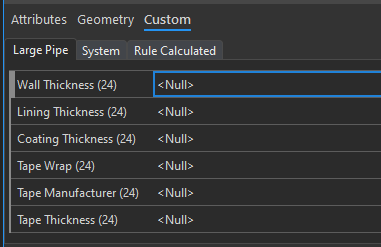
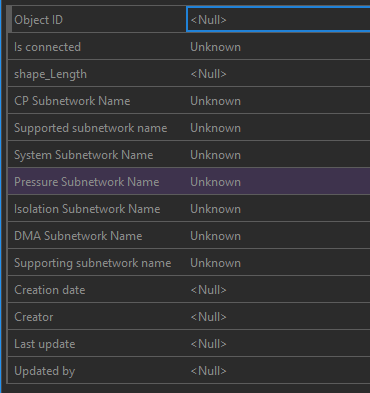
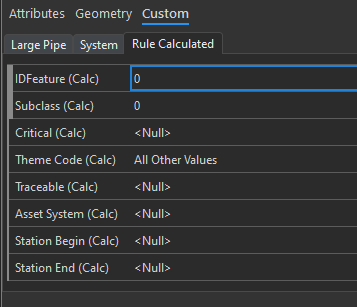
This was the customization option available to me but these groupings could be configured as a treeview (with a toggle for is expanded or not when initialized):


I really like the idea of expanding groups of fields. Kudos!

I have similar idea "Field groups for thematic division of large database" in relation to the attribution table. The principle is the same: being able to group fields for better overview and easier work.

Likewise, grouping fields is possible in an AGOL web map > form configuration, for use in the editor widget in Experience Builder. I imagine the same thing can be done in Field Maps too.

Editor Widget — Make read-only fields look different from editable fields
Like you say, it would be nice to do this in ArcGIS Pro too.
- Would field highlighting help at all? If you were to highlight like-fields in the attribute table, would those fields get highlighted in the attribute pane too?
- Does the attribute pane in ArcGIS Pro honor AGOL/Enterprise web map > form configuration groupings? I imagine the answer is no.
Edit: ArcGIS Pro Roadmap - November 2025Support for Attribute Editing Forms - The first phase of this project will provide support in ArcGIS Pro to use attribute editing forms created in other ArcGIS applications (Map Viewer and Field Maps Designer). The second phase will provide support for building and configuring forms from ArcGIS Pro.
- Related Ideas:
ArcGIS Enterprise Question:
Future Attribute Editing Form functionality in Pro (via feature service/web map) — What setup would be needed in Portal?
https://community.esri.com/t5/arcgis-enterprise-questions/future-attribute-editing-form-functionalit...
An uneducated idea, as a last resort:
Could you click a hyperlink (for a given feature) in the Pro map that pops up a Portal web map form (with field grouping/formatting) in the browser -- for editing the attributes of that specific feature? I imagine that'd be clunky and not worth doing. But I thought it was worth asking.
You must be a registered user to add a comment. If you've already registered, sign in. Otherwise, register and sign in.