- Home
- :
- All Communities
- :
- Products
- :
- ArcGIS Pro
- :
- ArcGIS Pro Ideas
- :
- ArcGIS Pro - Creating Project Templates without De...
- Subscribe to RSS Feed
- Mark as New
- Mark as Read
- Bookmark
- Follow this Idea
- Printer Friendly Page
ArcGIS Pro - Creating Project Templates without Default File Geodatabase

- Mark as New
- Bookmark
- Subscribe
- Mute
- Subscribe to RSS Feed
- Permalink
With Pro, it doesn't want to remember SDE connections or folder connections, I have template MXDs that I always start with ArcMap projects, so I'd like to the same thing with Pro. Or even start a blank Pro Project, however have all those folder/SDE connections and maybe a layout set with page sizes. The solution it to create Project Templates.
I've created Templates. Now want to update that templates with some new changes. I've even tried creating a brand new templates. However when creating a new Project, you have to select the default folder location, which sets the default file geodatabase, and toolbox. So I get everything set in my Pro Project, then Share > Export Project Template. It creates the template and I can share it how I please. However those default file geodatabase come with the template. Therefore another user at my organization that would use this template would have the same default FGDB as me. Which is something I don't want.
I know there is an option to pick the same FGDB for every Project, for example a network location, however I don't really want my users to be using the same one for all projects.
I'd like to be able to create a template without the default file geodatabase that was used in that original template Project (aspx file). Because the user creates the default FGDB when they open the template and create a new Project.
- « Previous
-
- 1
- 2
- 3
- Next »
Hey All - great to see this is now 'Under Consideration'. I created this idea five years ago and there have been a lot of improvements with Pro. One of them being the ability to have "Favorites" where you can save all of your folders, databases, etc. Even with that, I still think the ability to only include certain geodatabases of your choosing (i.e. not the default one) when creating a template is needed. When a user uses a template they'll create their own folder and geodatabase when they are opening the template.


Can we make the default geodatabase and toolbox in Pro optional? It makes it difficult when we want to share a project across an organization (for a specific project or a template) and we don't want people accidentally writing to the wrong places.

@LaurenCardona thank you for submitting this idea. Can you please review https://community.esri.com/t5/arcgis-pro-ideas/arcgis-pro-creating-project-templates-without/idi-p/9... ? Based on your description and comparing to the existing idea, it sounds like the use case is the same. Could you review and let us know, and if needed we'll merge your idea.
Thank you
@ekort Hi Kory, it sounds like the original post is referring to disabling default geodatabases in project templates, I was referring to disabling them in a project. Both would be helpful though and I think these can probably be merged.


Currently, when setting up an APTX file, a reference to the default GDB of the original project used to create the template is preserved.
For example, my original project was "Template_Work". When I created a project from the APTX, it made its own default GDB but preserved the connection to the Template_Work.gdb
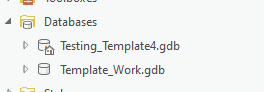
This doesn't really make sense.
First of all, why would I want a reference to another project's default GDB? It makes sense to preserve connections to other GDBs (except actually, not really, given the current behaviour of copying any data not in an enterprise GDB-- if you're going to copy any data used in the project anyway, we really don't need a reference to the file GDB it came from), but in general, they'd be like, my reference GDBs like elevation or wildlife, not the default/scratch GDB of another random project.
Second of all, if I launch this template on another computer or if I deleted the original project GDB, I'm now stuck with a broken link that I have to manually remove each time.
Third of all, the system templates don't have references to random GDBs in them. They just make a new default GDB and call it a day.
I would like the reference to the default GDB to be forgotten during APTX creation.
Any data that we're going to need is going to be copied into another GDB anyway during the packaging process, and we're also getting a new default GDB during project creation.


Kudos to the dev team for the many improvements in Pro, however, this one is a no-brainer. I just got into making project templates and am immediately running into this obvious flaw in implementation, where using a project template creates multiple geodatabases (the one from Options and the one that carries through from the template.)
If a project template is used, the home geodatabase should be as defined in the template. Same for toolboxes. Ignore the global creation settings from Options for those items. This is why templates exist.
To bring this up to standard, implement the above, and also allow users to remove or disable gdb's and atbx's from project template files, in which case the global creation settings from Options would kick in.
I posted a similar, if not identical, idea here: Project Templates (APTX): Remove reference to orig... - Esri Community and am okay with it being merged into this one.
Hello @AlfredBaldenweck ,
Thank you for your feedback, and for suggesting that we merging your idea with https://community.esri.com/t5/arcgis-pro-ideas/arcgis-pro-creating-project-templates-without/idi-p/9.... We will merge it, together with the kudos to your idea here. Could you also add your kudo to https://community.esri.com/t5/arcgis-pro-ideas/arcgis-pro-creating-project-templates-without/idi-p/9... ?
Thank you again.
You must be a registered user to add a comment. If you've already registered, sign in. Otherwise, register and sign in.