- Home
- :
- All Communities
- :
- Products
- :
- ArcGIS Pro
- :
- ArcGIS Pro Ideas
- :
- ArcGIS Pro coded value display sorted
- Subscribe to RSS Feed
- Mark as New
- Mark as Read
- Bookmark
- Follow this Idea
- Printer Friendly Page
ArcGIS Pro coded value display sorted


Hum, for me text sort is fine so, make a choice. Sort by values or by name.


@AJR Sort was added in Pro 2.8. See https://pro.arcgis.com/en/pro-app/latest/help/data/geodatabases/overview/an-overview-of-attribute-do...

Does that work for your use case?
Great! I'll mark this one implemented. Thank you for the confirmation!
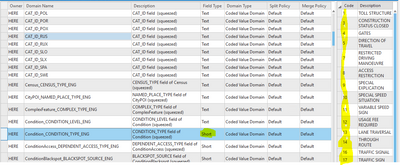
Unfortunately, it seems like the sorting uses string sorting rather than numeric sorting. As soon as the codes are sorted they get all jumbled up again (string sort) and there doesn't seem to be any way to get back to the initial display of the properly numerically sorted values 😞 For me, the update addresses the original issue of having the values numerically sorted rather than string sorted, but the implementation only seems to be about halfway there. Anyone who wanted to see the list sorted in descending order (or sorted by description and then wanted to get back to the original ascending numeric sort) is out-of-luck. The only way to get back to the properly ascending sorted numeric values seems to be to click on another domain and then click back to the domain of interest.
Good catch @AJR I'm glad that the default sort for numeric codes addresses the original issue raised. I've shared the point about the sort on integers behaving like a string sort with the dev team.
Thank you!


It looks like it is back to sorting by text value again in 3.6. I know in the past when I displayed the Description (in the attribute table) and then sorted, it would sort by the Coded value (which is a double integer). This always made the best sense as most folks preferred to read it as a text (1/2 in, 5/8 in, 3/4 in, 1 in, 1 1/2 in, 4 in,6 in..) but then sort it as the true coded-double integer value. Not too many people will call out a '5/8 in' meter as 0.625, or a '1 1/2 in as 1.5', so on and so forth...
Also ESRI should make sure that their "Gold Partners" understand domains and coded values. Our Asset Management Software reps told us they can only pull from the Description rather than the coded value. Now inside our AMS when people want to sort for 8 inch and larger they are forced to do a random crazy **bleep** filter like this
(([Diameter_GIS] is equal to "8 in") OR ([Diameter_GIS] is equal to "10 in") OR ([Diameter_GIS] is equal to "12 in") OR ([Diameter_GIS] is equal to "16 in")OR ([Diameter_GIS] is equal to "18 in")OR ([Diameter_GIS] is equal to "20 in")OR ([Diameter_GIS] is equal to "24 in")OR ([Diameter_GIS] is equal to "30 in"))
I've worked with "Bronze Partners" that had a better grasp on this and rather than telling me I have to add and maintain another separate numeric field, they went in and modified their scripts to grab the coded integer value...
You must be a registered user to add a comment. If you've already registered, sign in. Otherwise, register and sign in.