- Home
- :
- All Communities
- :
- Products
- :
- ArcGIS Pro
- :
- ArcGIS Pro Ideas
- :
- ArcGIS Pro: Clone Map Tab
- Subscribe to RSS Feed
- Mark as New
- Mark as Read
- Bookmark
- Printer Friendly Page

- Mark as New
- Bookmark
- Subscribe to RSS Feed
- Permalink
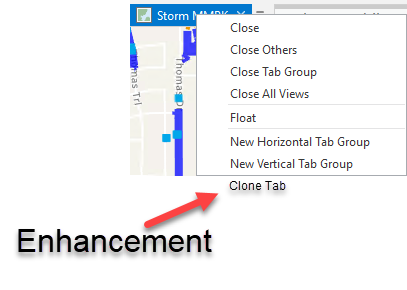
The ability to clone map tabs so you can keep configuration. This is helpful when publishing several MMPKs with offline basemaps that are identical. Makes it way more efficient to configure and publish many maps (MMPKs) without needing to reset map settings. arcgispro
- « Previous
-
- 1
- 2
- 3
- Next »

I’m not sure if by Map you mean Layout. I will duplicate both the Layout and the Map, the new Layout I will then set to point to the new Map (you do this in Map Frame properties of the new Layout). Then I can make changes to that Layout (and the underlying Map) without messing up or changing previous Layouts I’ve created. I have tried using the functionality of basing multiple Layouts on a single Map, but have found the utility is really limited. Most things I want to change in a duplicate Layout also end up changing the Map, and thus any other Layouts.

hi @ErinGilbert1 , I am not looking at Layouts. I am only look at the Maps in a Project.
What I would like to do is copy a Map (say, copy a QA map to create a new Production map), then keep the layer order, symbology, definition queries, but point the underlying data to a new source in the new Map. this is a common workflow in my office, and is/was easy using stand alone mxds. and using catalog to change the data source.
I don't see a way to do this; if I copy or clone a map, and then i change the data source in a new map, both the original and copy's data source are changed. the only way I see to create a new Map with the same layers symbology and such is to create from scratch (I can save each layer as a layer file and then import to the new Map, but this is a bit tedious for maps with many layers).
@JasonFitzsimmons , thanks for the explanation. I understand your issue now, and have not tried doing that or experienced that issue. Not ideal probably, but have you tried duplicating the entire project using Save As, then changing the data source? Apologies if this was already mentioned earlier in the thread.
@ErinGilbert1 that is probably possible, but I would like to utilize the advantages of the project template, and have dev QA and prod all in one project.

@JasonFitzsimmons - If I understand your desired workflow correctly, I think I know how you can do one small addition to the workflow to change just the data sources for the new map, not the original one also.
After you have the "Data Sources" tab opened for the project, open the "Maps" folder under the Catalog View, to the left of where all the data sources are listed for the project.
Select the new map you duplicated. Only the data sources for that particular map will be listed to the right. You can change those sources, and it will not affect the original map's data sources.
Give it a try, it works for me in Pro 3.4.4.

You must be a registered user to add a comment. If you've already registered, sign in. Otherwise, register and sign in.