- Home
- :
- All Communities
- :
- Products
- :
- ArcGIS Pro
- :
- ArcGIS Pro Ideas
- :
- Allow clicking a field/row in ID tool pop-up to re...
- Subscribe to RSS Feed
- Mark as New
- Mark as Read
- Bookmark
- Follow this Idea
- Printer Friendly Page
Allow clicking a field/row in ID tool pop-up to return to

- Mark as New
- Bookmark
- Subscribe
- Mute
- Subscribe to RSS Feed
- Permalink
Please add the ability to select a field/row in the ID tool pop-up to return to on each consecutive click. Arcmap pop-up allows this behavior and is a quick way to see a particular value in a field. Steps in Arcmap: 1. select ID tool, click a feature, pop-up opens, scroll down select field to return to, ID another feature, pop-up refreshes to show same field highlighted.
- « Previous
-
- 1
- 2
- Next »

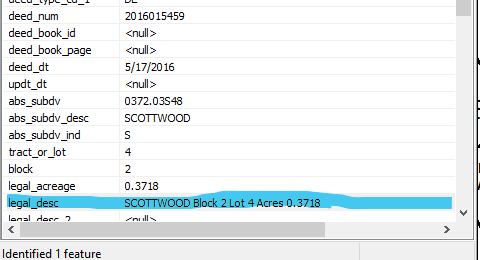
@KoryKramer It appears this functionality was lost/removed in 3.5.2. It worked in 3.4.x (filed not highlighted but stays at the scrolled to position). Can you please bring it back? Bringing back the Arcmap version of this would be even better where the actual selected field is highlighted like @Bud shows in the link. Thank you.
You must be a registered user to add a comment. If you've already registered, sign in. Otherwise, register and sign in.