- Home
- :
- All Communities
- :
- Products
- :
- ArcGIS Pro
- :
- ArcGIS Pro Ideas
- :
- Add a delete metadata button to ArcGIS Pro
- Subscribe to RSS Feed
- Mark as New
- Mark as Read
- Bookmark
- Follow this Idea
- Printer Friendly Page
Add a delete metadata button to ArcGIS Pro


- Mark as New
- Bookmark
- Subscribe
- Mute
- Subscribe to RSS Feed
- Permalink
When editing metadata in ArcGIS Pro the Manage Mapping tab shows a variety of tools for working with the metadata. There appears to be no way of simply removing all metadata or resetting it to blank values appropriate for the source format for a selected item in the catalog.
It would be very useful to have a button in the Metadata group on the ribbon that is clear all metadata.
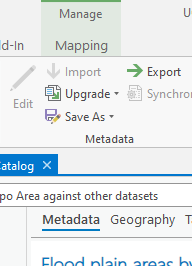
I'm aware of some basic metadata data manipulation using arcpy but if your dataset has inherited geoprocessing logs these are difficult to remove when you have hundreds of entries.
I've seen old threads pertaining to ArcMap and using the Import Metadata tool with a blank path as a way of overwriting the metadata with nothing (an acceptable solution) but the importMetadata() functions simply throws an error for ArcGIS Pro.

If I want to delete existing metadata, the only way is importing an empty XML document...
I would like a Delete Metadata button on the Metadata toolbar in ArcCatalog.

How To: Delete metadata created with ArcCatalog
http://support.esri.com/en/knowledgebase/techarticles/detail/18129
Has anyone tested (ArcGIS 10.1) the code sample that Hornbydd posted in his comment back in 2011?
That piece of ESRI code dates back to 2001 as a ArcObject Sample for 8.3.
Delete All Content
http://edndoc.esri.com/arcobjects/8.3/samples/metadata/deleteallcontent.htm
Just curious.



Any update? This would be nice either within Pro, right click on FGDB, or a GP tool. Would be wonderful to strip metadata and anything "hidden" like GP steps/info. If I'm exporting data to a customer I don't want to include all of that detail. I know I can turn off options to track GP steps but who knows what is hidden.
Upvote!

Not only a Delete function, but some sort of refresh, because there have been many times that the provided list of Attribute Fields is not reflective of its current state, perhaps it looked like that at some point in the past, but not as it is today, and the only option is to manually delete the erroneous fields and manually create them. VERY time consuming.

Removing absolutely all metadata, including processing history, can be achieved by creating a blank metadata object, getting the xml string of the blank metadata object and overwriting the xml string of the dataset you want to reset with the xml string of the blank metadata object. There is no way of undoing, but you could write the old xml string to a file first as a backup.
import arcpy

# Get metadata for dataset, change full path to your dataset
md = arcpy.metadata.Metadata(r"C:\Scratch\fGDB_Scratch.gdb\tblX")

# Create a blank object
new_md = arcpy.metadata.Metadata()

# Get the xml string of the blank object
new_xml = new_md.xml

# Overwrite existing xml and save back to the dataset
md.xml = new_xml
md.save()
@paulbehnke making the attribute fields in the metadata reflect the actual attributes can be done with "synchronize" in the Metadata group of the ribbon , see https://pro.arcgis.com/en/pro-app/3.5/help/metadata/update-item-properties-in-metadata.htm). It looks like this has been available since Pro 2.6 at least. This can also be done with python: https://pro.arcgis.com/en/pro-app/3.5/arcpy/metadata/metadata-class.htm . I don't think there's a way to keep it automatically in sync, but at least it doesn't have to be done manually!
You must be a registered user to add a comment. If you've already registered, sign in. Otherwise, register and sign in.