Select to view content in your preferred language

Using ArcGIS Pro and Arcade expressions to create Shortlist popups that POP in ArcGIS Runtime Apps

13529
13
06-18-2019 06:08 PM
MarkBockenhauer
Esri Regular Contributor
5 13 13.5K

Support for the use of Arcade expressions in popup configurations is starting (June 2019) to roll out in apps like Collector for ArcGIS, Explorer for ArcGIS Windows Beta, Navigator for ArcGIS Beta and any app based on the ArcGIS Runtime 100.5 or later.  This article will show how Shortlist and Tour Story Map popups can be adapted to an HTML style popup.  The relatively standard data structure of story maps make for a great popup experience.

For this example we will be using the San Diego Shortlist webmap

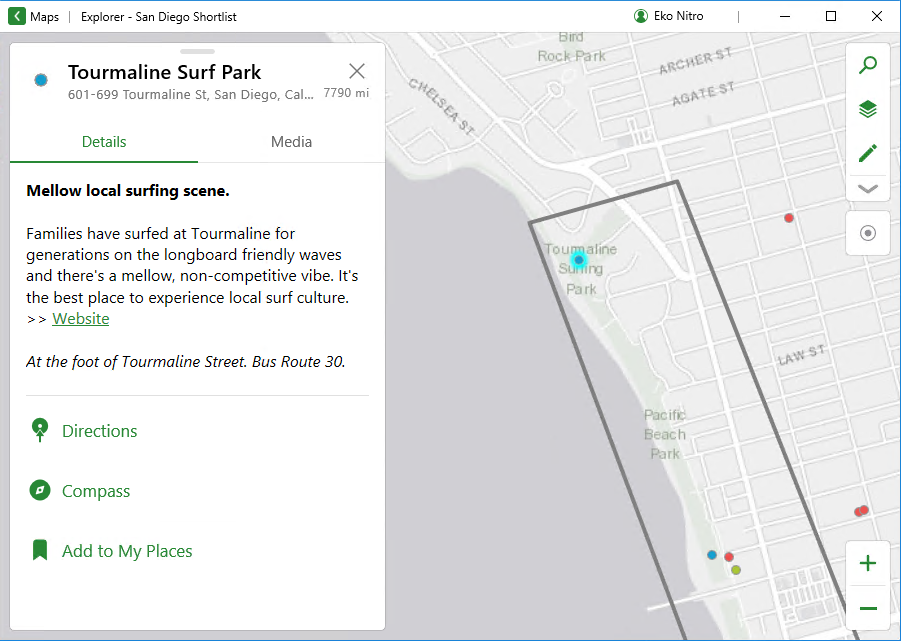
Opening this Map in Explorer for ArcGIS  we see a popup that looks like this:
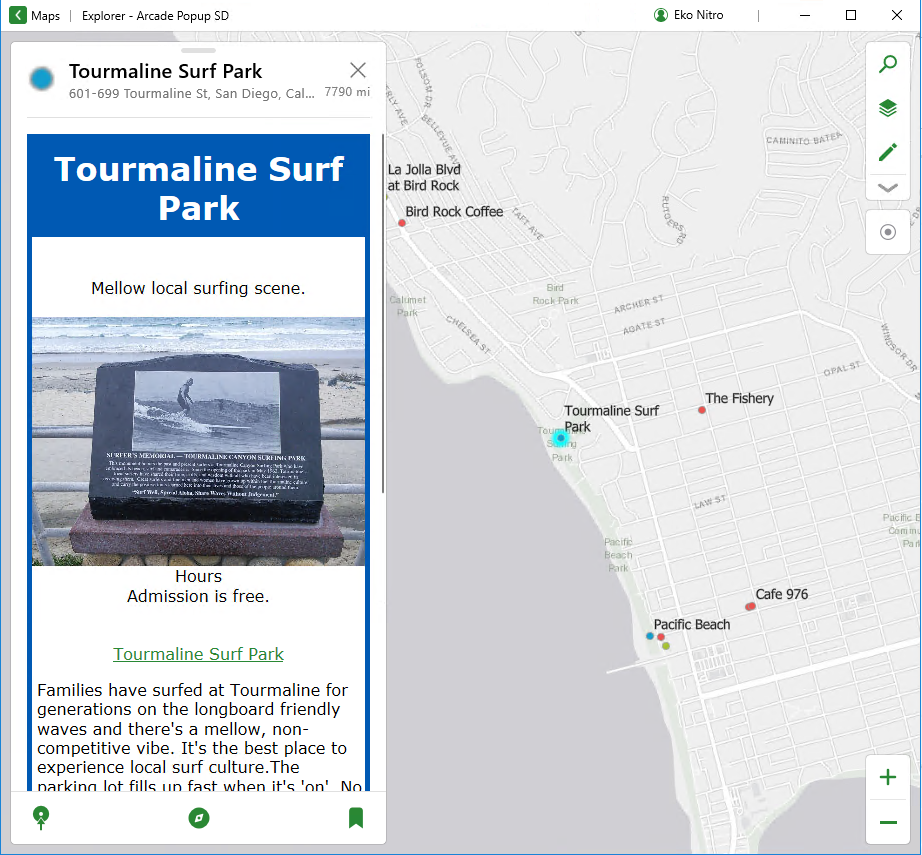
Using an arcade expression we can create a popup in ArcGIS Pro that looks like this in Explorer.
 

If you would like to follow along, open the San Diego Shortlist webmap in ArcGIS Pro.


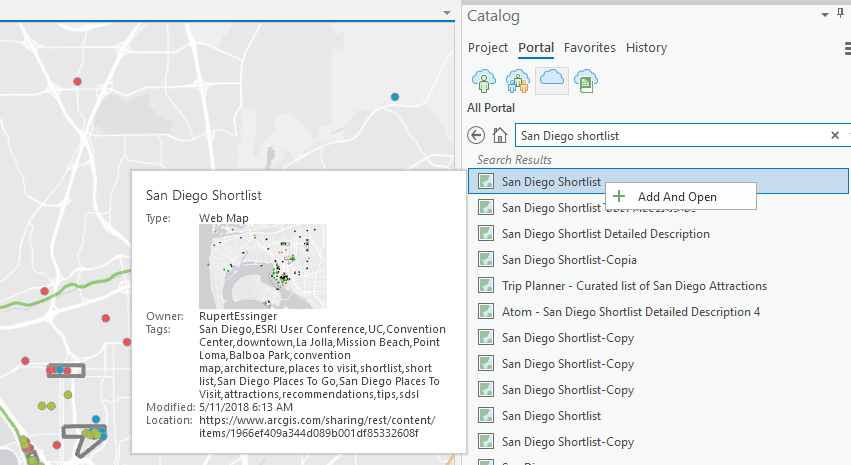
From the Catalog Pane search for ‘San Diego shortlist’ and 'Open' it.
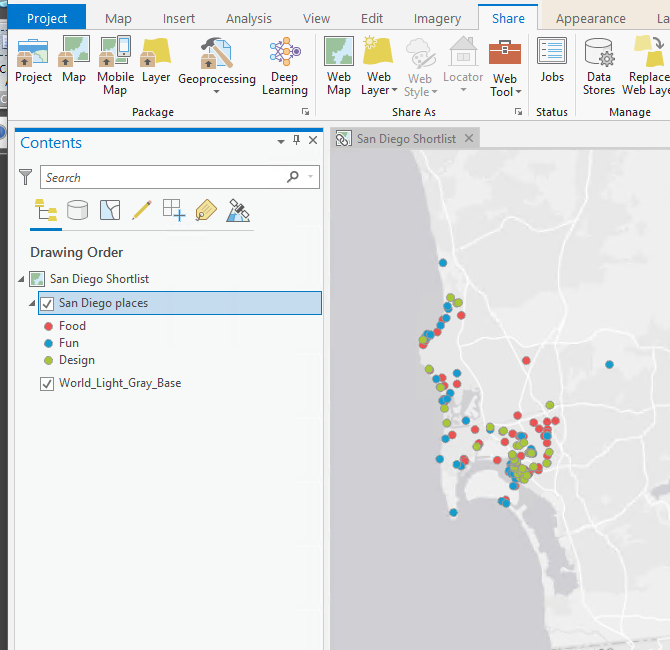
In this exercise we are only going to work with the San Diego places layer, so the other layers can be removed from the map.
Right Click on the San Diego places layer and ‘Configure Pop-ups’.
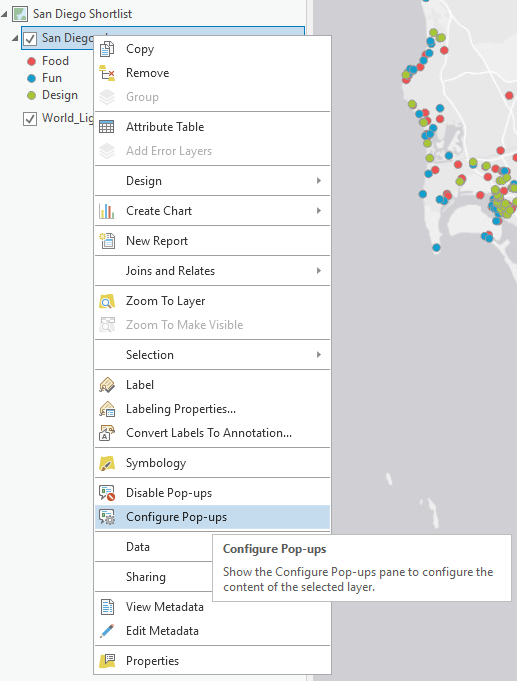
Remove the current popup elements.

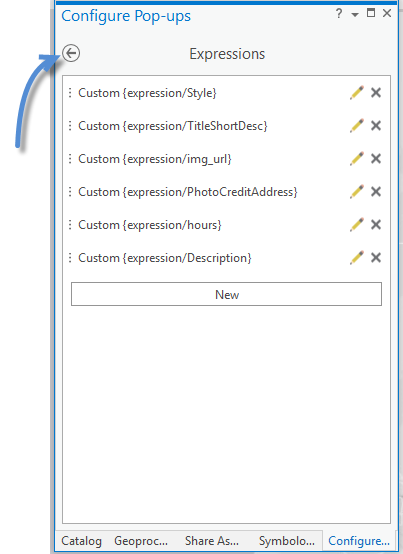
Click Expressions button to add an Arcade Expression

Click New to open the Expression Builder.

We will use multiple expressions to construct an HTML Popup.  We could probably write it up in one expression, but it will be easier to learn if we break it into multiple expressions for each part of the popup.

This picture shows the finished popup configured with the expressions.

In the expression builder name the expression and copy and paste the expression below into the ‘Expression’ text box.

{expression/style} – mainly for font, background color, border color and heading.

var style = '<style>body {background-color: white; text-align: center; font-family: verdana; margin: 0px; border: 5px solid #0059b3; outline-style: solid; outline-color: white;} h1 {color: white; text-align: center; padding: 10px; background-color: #0059b3;}p {  font-family: verdana; text-align: left; margin-left: 0px; padding-left: 5px; background-color: white;} </style>';


return style

note: The popup we are building is simple, so the style is as well, however, for more advanced popups you will definitely want make use of a style. Make sure there are no hard returns in the variables you set in the expressions, it will cause the expression to fail. All of the HTML needs to be quoted in a string.

Create new expressions for each of the expression that follow.  The part of the popup that the expression applies to is also pictured for reference.

(expression/TitleShortDesc)
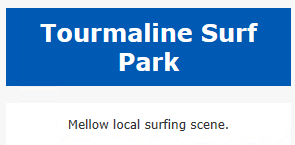
var title = '<h1 align="center"><font color="white"><b>'+ $feature.TITLE +'</b></font></h1>'

var bodytext = '<center style="background-color: white";><br>' + $feature.Short_Desc + '<br><br></center>'


return title + bodytext

note: In this expression we are utilizing a heading defined in the style and using an attribute from the TITLE field.  We are also adding a short description field.

{expression/img_url}
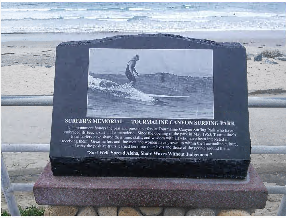
var ImgUrl = TextFormatting.NewLine +'<img src="'+ $feature.Pic_URL  + '" width="100%" />';


return ImgUrl;

note: we have set the width for the image to 100% so that it will size to the width of the popup window.

{expression/PhotoCreditAddress}

return '<center style="background-color: white";><i>'+$feature.PIC_CREDIT +'</i><br><br>'+$feature.Address + '<br><br></center>'

{expression/hours}

var hours = ""

if (!isEmpty($feature.TextForHours)){

hours = '<center style="background-color: white";>Hours<br>' + text($feature.TextForHours) + '</center><br><br>'

return hours;

}

else {

}

note: in this expression we are checking to see if the TextForHours attribute is null, this is something that we could have done for all expressions, it is good practice to check for null attributes.

{expression\Description}

var weblink = '<center style="background-color: white";> <a href="'+$feature.website+'">' + $feature.TITLE + '</a><br></center>'

var description = '<p>' + $feature.Desc1 + $feature.Desc2 + $feature.Desc3 + $feature.Desc4 + $feature.Desc5 + '</p>'


return weblink + description

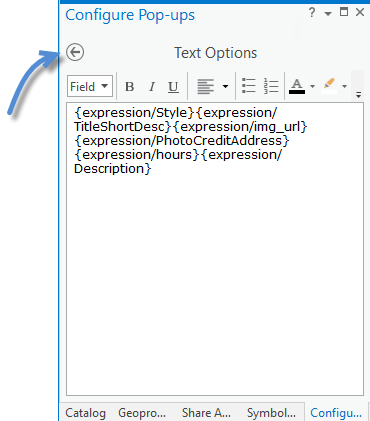
When you have finished entering all the expressions, click the back arrow and configure the popup.
Add a ‘Text’ configuration.

Click the pencil icon to edit it.

Add all the expressions.

Since the formatting for the HTML was part of the expressions, you do not need to and probably should not format them in the Text Options.

Tap the back arrow.
Click on a feature to see if the popup appears as desired.

note: ArcGIS Pro shows a light gray background where background color is undefined.  Also, you can see there is padding at the top and sides of the heading, this will display correctly in runtime apps.


Using ArcGIS Pro share the map as webmap or mobile map package (change the basemap if creating a mobile map package) and your map with HTML Popup will be ready for use in ArcGIS Runtime 100.5 and later apps.  (Apps written on prior runtime version do not support the use of arcade in a popup and will not display arcade content.)

Just barely touching the surface for possibilities with arcade popups, but that's it for now.

13 Comments
XanderBakker
Esri Esteemed Contributor

Hi Mark Bockenhauer , thanks for sharing, great blog post!

One question; when you share the web map, will the HTML pop-up be provided in Web Apps too? As far as I know HTML wasn't interpreted as such when returned by an Arcade expression. Will this change in the June 25 update?

MarkBockenhauer
Esri Regular Contributor

Xander,

this approach is only valid fro ArcGIS Pro and ArcGIS Runtime applications, the HTML will not display in a web browser.

However, you could use the expression to calculate a field attribute to be HTML.

add a field

and use the field calculator with the same arcade expressions

var style = '<style>body {background-color: white; text-align: center; font-family: verdana; margin: 0px; border: 5px solid #0059b3; outline-style: solid; outline-color: white;} h1 {color: white; text-align: center; padding: 10px; background-color: #0059b3;}p {  font-family: verdana; text-align: left; margin-left: 0px; padding-left: 5px; background-color: white;} </style>';


var title = '<h1 align="center"><font color="white"><b>'+ $feature.TITLE +'</b></font></h1>'

var bodytext = '<center style="background-color: white";><br>' + $feature.Short_Desc + '<br><br></center>'

var ImgUrl = TextFormatting.NewLine +'<img src="'+ $feature.Pic_URL  + '" width="100%" />';

var hours = ""

if (!isEmpty($feature.TextForHours)){

hours = '<center style="background-color: white";>Hours<br>' + text($feature.TextForHours) + '</center><br><br>'

var style = '<style>body {background-color: white; text-align: center; font-family: verdana; margin: 0px; border: 5px solid #0059b3; outline-style: solid; outline-color: white;} h1 {color: white; text-align: center; padding: 10px; background-color: #0059b3;}p {  font-family: verdana; text-align: left; margin-left: 0px; padding-left: 5px; background-color: white;} </style>';


var title = '<h1 align="center"><font color="white"><b>'+ $feature.TITLE +'</b></font></h1>'

var bodytext = '<center style="background-color: white";><br>' + $feature.Short_Desc + '<br><br></center>'

var ImgUrl = TextFormatting.NewLine +'<img src="'+ $feature.Pic_URL  + '" width="100%" />';

var hours = ""

if (!isEmpty($feature.TextForHours)){

hours = '<center style="background-color: white";>Hours<br>' + text($feature.TextForHours) + '</center><br><br>'

return hours;

}

else {

}


var weblink = '<center style="background-color: white";> <a href="'+$feature.website+'">' + $feature.TITLE + '</a><br></center>'

var description = '<p>' + $feature.Desc1 + $feature.Desc2 + $feature.Desc3 + $feature.Desc4 + $feature.Desc5 + '</p>'


return style+title+bodytext+ImgUrl+'<center style="background-color: white";><i>'+$feature.PIC_CREDIT +'</i><br><br>'+$feature.Address + '<br><br></center>'+hours+weblink + description

return hours;

}

else {

}


var weblink = '<center style="background-color: white";> <a href="'+$feature.website+'">' + $feature.TITLE + '</a><br></center>'

var description = '<p>' + $feature.Desc1 + $feature.Desc2 + $feature.Desc3 + $feature.Desc4 + $feature.Desc5 + '</p>'


return style+title+bodytext+ImgUrl+'<center style="background-color: white";><i>'+$feature.PIC_CREDIT +'</i><br><br>'+$feature.Address + '<br><br></center>'+hours+weblink + description

Probably best to inline all the styling elements though...as it may interfere with other web styles that are in use, depending on how the web app was authored.

XanderBakker
Esri Esteemed Contributor

Hi Mark, interesting approach... I guess this would also work in the field calculator of ArcGIS Online. However, if the data is dynamic (being updated) this will not reflect the changes in the data, since the result of the calculation is static. It would be nice if there would be a least basic support for HTML returned by Arcade expressions. Hopefully we will see this soon in the web map. 

DonSjoboen
Occasional Contributor

Mark Bockenhauer

Xander Bakker

Is it possible to use Arcade (in AGOL web map or Pro) to create a hyperlink where the parameters (i.e. EquipmentID & Notification) in the hyperlink can be looped through a related table with a 1:M relationship?  For example, we have a related table that has an "equipmentID" with multiple "Notifications".  We can create an Arcade expression that will show the 1:M relationship in the popup, but we also need (in the popup) a way to add a hyperlink to a webpage where we can display and edit those notifications (via the custom webpage).  This webpage is a way for our staff to edit tabular data that is tied to our Asset Management System (SAP).

Where Dispatch Notification 1 and Dispatch Notification 2 are hyperlinks to the related notification number (1:M) and are defined in the second expression (i.e. expression/expr1)

Here is the expression that we have so far... (we know it doesn't work like we want it to)

//var tbl = FeatureSetByName($datastore,"request Notification Table");
//request Notification Table in DEV
var tbl = FeatureSetByPortalItem(Portal('https://tacoma.maps.arcgis.com/'), '5d324b052b1e4bd588f8260dcf6131d3', 46);
Console(Count(tbl));
//var id = $feature["Equipment"];
var id = $feature["FACILITYID"];
Console(id);
var sql = "Equipment = '" + id + "'";
Console(sql);
var request = Filter(tbl, sql);

var cnt = Count(request);
Console(cnt);
var result = "";
if (cnt > 0) {
for (var req in request) {
result += TextFormatting.NewLine + "Notification No: " + req.Notification +
TextFormatting.NewLine + "Title: " +
TextFormatting.NewLine + "SAP ID: " + req.Equipment +
TextFormatting.NewLine + "Type: " +
TextFormatting.NewLine + "Work Center: " + req.WorkCenter +
TextFormatting.NewLine + "Dispatch Notification 1" +
TextFormatting.NewLine + "Dispatch Notification 2" +
TextFormatting.NewLine;
}

}
Console(result);
return result;

/*
Second Arcade expression (i.e. expression/expr1) for just the hyperlink
Insert second expression as a hyperlink in the HTML popup config (i.e. Dispatch Notification 1 as the text, expression/expr1 as the link)
*/


var tbl = FeatureSetByPortalItem(Portal('https://tacoma.maps.arcgis.com/'), '5d324b052b1e4bd588f8260dcf6131d3', 46);
Console(Count(tbl));
var id = $feature["FACILITYID"];
Console(id);
var sql = "Equipment = '" + id + "'";
Console(sql);
var url = "http://deves04/emma?a=EditNotification"
var request = Filter(tbl, sql);

var cnt = Count(request);
Console(cnt);
var result = "";
if (cnt > 0) {
for (var req1 in request) {
result += TextFormatting.NewLine + "Dispatch Notification 1: " + url + "&e=" + id + "&n=" + req1.Notification +
TextFormatting.NewLine + "Dispatch Notification 2: " + url + "&e=" + id + "&n=" + req1.Notification;
}

}
console(result);
return result;

XanderBakker
Esri Esteemed Contributor

Hi Don Sjoboen ,

As Mark Bockenhauer  showed above, you can use Arcade in Pro to return HTML. In ArcGIS Online this is not possible (yet). What you are describing could be accomplished following the example provided by Mark. 

DonSjoboen
Occasional Contributor

Xander Bakker‌ I don't see where (in Mark Bockenhauer example above) he used a "For Loop" to loop thru a related table to fill in parameters in a hyperlink (url)?  We need this to be dynamic and not static. As you stated in a comment above, that Mark's solution would be static?

XanderBakker
Esri Esteemed Contributor

Hi Don Sjoboen , 

Sorry for the confusion. What I meant was that you cannot do this in ArcGIS Online, but you can do this in ArcGIS Pro. What you should do is combine the loop that you already have and change the logic where the resulting string is created to include some of the html that Mark explained, which will allow you to create the content you want. 

So in a nutshell I am referring to this:

var tbl = FeatureSetByPortalItem(Portal('https://tacoma.maps.arcgis.com/'), '5d324b052b1e4bd588f8260dcf6131d3', 46);
var id = $feature["FACILITYID"];
var sql = "Equipment = '" + id + "'";
var request = Filter(tbl, sql);

var url = "http://deves04/emma?a=EditNotification"
var cnt = Count(request);
var result = ""; // put all your styling and initial html stuff here

if (cnt > 0) {
    for (var req1 in request) {
        result += '<a href="' +  url + "&e=" + id + "&n=" + req1.Notification + '">Dispatch Notification 1</a><br>';
    }
}

// include any html after the list of links and return the result
return result;

RichardSmith2
Emerging Contributor

This is a great article and exactly what I was looking for.  The custom popup looks so much cleaner than the standard ones built with Pro for use in runtime apps.  There is one limitation for our use model however.

I have points of interest which are similar to the ones in the example and am borrowing your code with minor changes.  The images I want to display are saved as attachments to the features.  The first thing that I got help with from ESRI support was how to get URLs for images into a field.  The analyst showed me a tool that populates a new field in the feature layer with those URLs.  I used your Arcade expression for images with those URLs and it pulls in the attached images in the popup.

When published to a mobile map package, that works fine in Explorer when the device running it is connected.  When not connected, the image is not displayed.  Clearly, the URL being used when set up this way is accessing the images on the ESRI server and not from the image in the attachments that gets included in the mobile map package.   Our users will regularly be outside of service when looking at the points of interest so the ability to see the images when disconnected is important.

Is there a way to access the images saved in attachments in a mobile map package using Arcade that would then display in the popup as your example does?

MarkBockenhauer
Esri Regular Contributor
Is there a way to access the images saved in attachments in a mobile map package using Arcade that would then display in the popup as your example does?

Richard,

When I set out to write this article, that is exactly what I wanted to accomplish.  While you can get the the number of attachments, name, type...  I was not able to figure out a way to get the actual attachment using Arcade. 

I will find out if I missed something, if possible maybe Arcade could be enhanced.

Mark

RichardSmith2
Emerging Contributor

Thanks Mark.  I did find an article about how to get to the contents of the attachments through the developer API at one point in searching around.  I'm having trouble locating that this morning and not sure it would help.   I also have this question open in a case with tech support.  If they come back with something I'll make sure it makes its way back to this thread.

Rich

RichardSmith2
Emerging Contributor

Hi again Mark.  Any luck figuring out if an attached photo can be used in the popup? 

Rich

MarkBockenhauer
Esri Regular Contributor

Rich,

No luck.  The attachments are not accessible for custom popups (mobile map package, offline use).  I did enter an issue for the Arcade team to consider.

Mark

RichardSmith2
Emerging Contributor

Thanks for investigating Mark.

Rich

About the Author
esri Software Products Engineer | he-him-his